
1999: Everything the iMac has is big: The hard drive is big. The monitor is big. The speakers are . . . small.

 I guess almost everything the iMac has is big. Some things the iMac has aren’t as good as they could be. But don’t worry; you can make the iMac much better with a few simple items.
Bigger Sound
The iMac doesn’t exactly have the best sound in the world. But what the iMac does have is a little audio out port on the side. With this little port, you can make the sound huge – using a little wire from a store like Radio Shack and your stereo system.
All you need to do this little trick is a Y-cable. It’s got a 1/8″ headphone plug on one end and red and white RCA connectors on the other. When you lift the little side panel on your iMac, you will see a tiny hole labeled with a speaker. Plug the headphone end of the wire into this hole.
Next, plug the other end of the wire into the auxiliary (usually marked AUX) ports on your stereo or shelf system. Now, switch on the AUX switch on your stereo, and voilà! You have instant huge sound. This might not sound very simple, but it is.
Another option that won’t provide as much sound as your stereo system is buying a pair of self-powered speakers. Using either batteries or a wall plug, these can provide a lot more sound than the iMac’s little speakers. Powered speakers cost more than the Y-cable, but if your stereo isn’t conveniently close to your iMac, they can be a good alternative.
Better Sound Input
Another problem with the iMac is its microphone, but you can fix this problem easily. One of the reasons that the microphone on the iMac is less than great is its location. Right under the speaker inside the case is the iMac’s internal fan. The iMac’s microphone picks up the fan noise too easily.
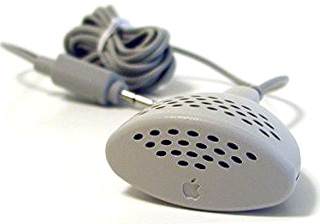 But you can fix it, and like the previous fix, you can do it very cheaply. All you need to do is call your local Used Mac place. (Personally, I like Shreve Systems.) Purchase an Apple PlainTalk microphone. There are two types, and if you tell them you have an iMac, they’ll know which type to sell you. They’re usually under $15.
So if you really want to annoy your neighbors by playing some sound intensive game, you can do it loud. And if you want to make your computer actually hear you, you can do that too.
Your iMac will finally have big sound.
Further Reading
- Connecting Your Mac to Your Stereo, Charlie Ruggiero, 2001.06.25
keywords: #plaintalk
