
1999 – You have an iMac, you have a PowerBook, and you have a few ways to connect them (see Part 1) – but none of them seem fast enough or cheap enough, so you want more options. Never fear, there are plenty more ways to connect Macs.

PhoneNet
The first way you can connect Macs used to cost $7-15 per computer, but with the iMac, the price got jacked up. This solution is called PhoneNet. As you can guess from its name, it uses phone line to connect the two or more Macs.
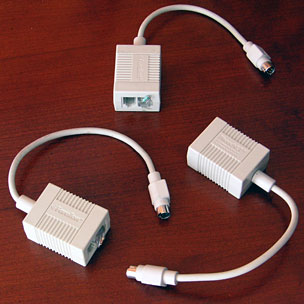 First, you will need PhoneNet adapters for each serial Mac, like your PowerBook. Their product number is: PN308P. They go for about US$10. As always, eBay has a nice variety of these pieces pretty cheap.
For an iMac or Blue and White G3, you need a special converter called the EtherMac iPrint and made by Farallon. Then to connect them, wire them with a cheap phone line, which you can buy from any Radio Shack or dollar store.
IrDA
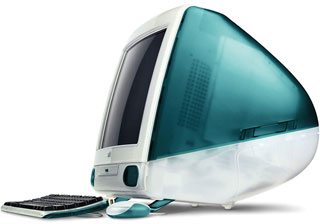 Your other option is a free one, but it only works with the original Bondi iMacs and Rev. B. If you look to your left when you are at your keyboard, you will see a little redish-black half circle. This weird color half-circle is called the infrared or IrDA port.
If you have a G3 PowerBook, you can beam files, because the G3 PowerBook has IrDA, too. If you sit at the keyboard, the IrDA port on the PowerBook is on the back, left-hand side. Just point the two IrDA ports at each other, fire up the infrared control panel, and beam like you’re Scotty. You can also use this method to connect between two Bondi iMacs or two G3 PowerBooks.
Now that we’ve discovered networking, you really have no need to have a floppy drive now!
Keywords: #irda #phonenet #ethermac #farallon #networking
Short link: http://goo.gl/5Nriqt
searchword: #networking
