
1999 – Every computer has its flaws. The iMac is a computer, but, unlike other computers, you can very easily fix the iMac’s minor flaws. Oh, the iMac is also different than other computers, because it’s really cool looking. Today I’ll give you some easy tips to fix the problems you might have with your iMac.

1
One of the biggest (and one of the most easily fixed) problems that the iMac has is its lack of a floppy drive. For a mere US$150 (or less), you can get an Imation SuperDisk drive. This drive is not only Bondi blue and ice colored to match your iMac; it is three drives in one. This drive will let you use 120 MB SuperDisk floppies (one comes with the drive) and 1.4 MB floppy disks in both Mac and that other format. What was that format called? Trash? Junk? Oh no, it was DOS.
Also, if you think that $150 is too much to spend, Newer Tech will be releasing a 1.4 MB floppy drive with serial ports on the back for about $70 US. (Currently estimated for March release.)
2
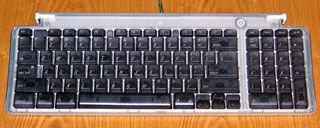 Another problem with the iMac is its keyboard and mouse. When you first look at them, you can see that both of these input devices are rather small. But we can fix that.
First, we’ll start with the keyboard. The iMac’s keyboard is about the size of a laptop’s keyboard. So if you’re used to the keyboard on a PowerBook, Duo, eMate 300, or older Mac, you’ll feel right at home. If you’ve been using a extended keyboard (the one with the power key on the right side), you won’t feel as comfortable with the new keyboard. But you’ll get used to it after about a week. If not, you can buy a full size USB keyboard from Microsoft.
3
 The mouse, on the other hand, is not as easy to get used to. After about a week of using it, you might want to buy a different mouse. Microsoft sells its mice in USB format. Also, MacSense sells an add-on for the iMac mouse, the $10 iCatch. It is a piece of plastic that is the size of a regular mouse bottom. It attaches under your round mouse and changes it into a full-sized one.
4
Another problem is that the iMac has only USB ports. If you don’t own any peripherals that use serial or SCSI, you’re lucky. If you have thousands of dollars of serial and/or SCSI equipment, the solution isn’t as cheap. Keyspan sells a product that you attach to one of your USB ports, and it gives you two Apple serial ports. There is no SCSI (Small Computers System Interface) adapter yet, but there should be soon.
Every computer comes with flaws (for example, all PCs come with a bad virus called Windows), but, unlike other computers, you can easily fix the iMac’s problems.
Short link: http://goo.gl/fg9Kx9
