
Macintosh IIfx
A Low End Mac Best Buy
code names: F-16, F-19, Stealth, Blackbird, Zone 5, Four Square, IIxi, Weed Whacker
- Got a IIfx or other vintage Mac? Join the Vintage Macs email list.
- System 6 List is for those using Macintosh System 6.
Overview: Wicked Fast
Low End Mac Reader Specials
Memory To Go Special: MacPro 8 Core Memory 4GB kit $154 / 2GB kit $94, New 2008 iMac 2GB $46. MacBook Pro / MacMini / iMac Intel Core2 DUO 2GB $44 / 1GB $23--Free shipping available.
Download Typestyler, still the Ultimate Styling Tool for Internet, Print and Video Graphics. Works great in Classic with a Native OS X Version on the way. Free Tryout: www.typestyler.com
LA Computer Company: Specials on AppleCare, iMac's, Apple Batteries and Apple A/C Adapters. Also Great prices on Used Apple Computers. Call 1-800-941-7654 Click Here.
OWC: Burn DVDs, DVD-DL, CDs, DVD-Ram - FAST! Superdrive upgrades from OWC starting from $31.99 with options for nearly every Mac. Models with Lightscribe, Blu-Ray too!
Mac users can finally play Party Poker for Mac. Not only that, they can also learn how to play PokerStars for Mac.
Laptop Hardware Provided by TechRestore - Overnight Mac & iPod Repairs.
Compare products like desktop computers, laptops, and LCD TVs side by side! All the information and reviews to make the best purchasing decision for a new cell phone GPS products or MP3 players. The Ciao network makes searching products easy for you.
New MacPro Memory 800Mhz With Apple Spec Heat Sink 2GB $88 / 4GB $138 / 8GB $274 - Click to Maximize your Macs...
Six months after moving from 16 MHz to 25 MHz with the IIci, Apple introduced the "wicked fast" 40 MHz IIfx. This was the Mac of choice for graphic designers, offering nearly three times the performance of the IIx - thanks to a lightning fast CPU, a new type of RAM, and special SCSI DMA and I/O chips which relieved the CPU of much of its burden. A built-in 32 KB static RAM cache also helps boost performance.
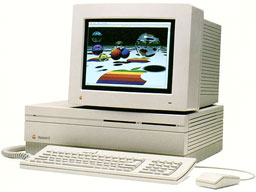
The IIfx was built on a 40 MHz motherboard and had the fastest clocked CPU that Apple used until the Quadra 840av of 1993. NuBus cards still ran on a 10 MHz bus, which is one reason Apple announced its first accelerated video card, the 8•24GC, along with the IIfx. Regular video cards were simply overshadowed by the rest of the system.
With a nod to it's Apple II ancestors, the IIfx had two 6502 CPUs to manage the floppy drive(s), ADB port, and serial ports (see Technote HW 09 for more details). Unlike the 1 MHz Apple II computers, these CPUs ran at 10 MHz.
The IIfx introduced latched read/write RAM to the Apple lexicon. Using a 64-pin SIMM different from that in any other Macintosh, the IIfx could overlap read and write operations. (Byte, 4/90, p. 112)
The IIfx requires a special "black" SCSI terminator to accommodate its unusual architecture (see Technote DV 15 for more details).
There is a ROM SIMM slot on the Mac IIfx which must be filled with a IIfx ROM. Without this ROM, the computer will not function.
Although appearing identical to the Mac II and IIx, the IIfx power supply has a variable speed fan to better control noise and cooling.
Upgrade Advice
Accelerators are almost unknown for the IIfx, especially six years after it was discontinued.
- IIfx RAM is relatively costly, but you should have at least 8 MB. When upgrading, consider putting as much in one bank as possible, leaving the other bank for future expansion.
- An accelerated video card can make a world of difference, particularly if you use 16-bit or 24-bit modes or a monitor larger than 640 x 480 pixels. See our NuBus Video Card Guide for lots of information.
- A newer hard drive will be larger and faster than the one Apple shipped with the computer, but you won't be able to take full advantage of that speed on the IIfx without a SCSI accelerator.
- More RAM plus Speed Doubler equals improved hard drive performance through intelligent caching.
Because it uses oddball memory and has some unusual circuitry, we label the IIfx a Limited Mac.
Details
- introduced 1990.03.19 at $9,900; discontinued 1992.04.15
- requires System 6.0.5 to 7.6.1
- CPU: 40 MHz 68030
- FPU: 40 MHz 68882 FPU
- bus: 40 MHz - fastest until Quadra 840av
- performance: 6.8, relative to SE; 4.60, MacBench 2.0 CPU; 11.45,
Speedometer 3.06; 0.71, Speedometer 4; 10.0 MIPS
see Benchmarks: IIfx for more details - ROM: 512 KB
- RAM: 4 MB, expandable to 128 MB using both 4-SIMM banks of 80ns 64-pin memory; can use 1 MB, 4 MB, 8 MB, and 16 MB SIMMs (the IIfx was the only Mac to use 64-pin SIMMs)
- L2 cache: 32 KB
- video: requires video card - see our NuBus Video Card Guide for more information.
- ADB: 2 ports for keyboard and mouse
- serial: 2 DIN-8 RS-422 ports on back of computer
- SCSI: DB-25 connector on back of computer
- hard drive: 40, 80, or 160 MB
- sound: 8-bit stereo
- expansion slots: 6 NuBus slots
- one PDS slot (inline with a NuBus slot)
- size (HxWxD): 5.5" x 18.7" x 14.5"
- weight: 24 lb.
- PRAM battery: 3.6V half-AA
- power supply: 230W
- Gestalt ID: 13
- model no.: M5525
- addressing: 24-bit or 32-bit
- upgrade path: none
Upgrades
- Chipping the Mac II Series
- Output Enablers 46.5-50 MHz clock accelerator
- MicroMac Speedy variable speed oscillator (to 50 MHz)
Discontinued accelerators (all are 68040) include the Applied Engineering TransWarp (25, 33 MHz 68040), Fusion Data TokaMac FX (33 MHz 68040), and Radius Rocket (25 MHz 68LC040 to 40 MHz 68040).
Online Resources
- Low End Mac's best classic Mac OS deals. Best online prices for System 6, 7.1, 7.5.x, Mac OS 7.6, 8.0, 8.1, 8.5, 9.0, 9.2.2, and other versions.
- Creating Classic Mac boot floppies in OS X, Paul Brierley, The 'Book Beat, 2008.08.07. Yes, it is possible to create a boot floppy for the Classic Mac OS using an OS X Mac that doesn't have Classic. Here's how.
- The compressed air keyboard repair, Charles Moore, Miscellaneous Ramblings, 2008.07.24. If your keyboard isn't working as well as it once did, blasting under the keys with compressed air may be the cure.
- 10 cult Macs adored by collectors, Tamara Keel, Digital Fossils, 2008.05.13. Macs are not only noted for their longevity, but also by the passion which collectors have for some of the most interesting models ever made.
- A vintage Mac network can be as useful as a modern one, Carl Nygren, My Turn, 2008.04.08. Old Macs can exchange data and share an Internet connection very nicely using Apple's old LocalTalk networking.
- Too few USB ports in too many Macs, developer Leopard ran on Yikes, Mac IIfx RAM heaven, and more, Dan Knight, Low End Mac Mailbag, 2008.01.16. Also Macworld Expo disappoints, Pismo a great field computer, using flash memory in vintage Macs, and Word vs. Pages for academic writing.
- 512 MB in tray-loading iMacs, partitioning iBook (FireWire) hard drive, value of Kanga, and more, Dan Knight, Low End Mac Mailbag, 2008.01.03. Also a source for Mac IIfx SCSI terminators, ongoing problems with a Rev. B iMac, and need to match screen size to printed output.
- Vintage Mac networking and file exchange, Adam Rosen, Adam's Apple, 2007.12.19. How to network vintage Macs with modern Macs and tips on exchanging files using floppies, Zip disks, and other media.
- Vintage Mac video and monitor mania, Adam Rosen, Adam's Apple, 2007.12.17. Vintage Macs and monitors didn't use VGA connectors. Tips on making modern monitors work with old Macs.
- Getting inside vintage Macs and swapping out bad parts, Adam Rosen, Adam's Apple, 2007.12.14. When an old Mac dies, the best source of parts is usually another dead Mac with different failed parts.
- Solving Mac startup problems, Adam Rosen, Adam's Apple, 2007.12.12. When your old Mac won't boot, the most likely culprits are a dead PRAM battery or a failed (or failing) hard drive.
- Better and safer surfing with Internet Explorer and the Classic Mac OS, Max Wallgren, Mac Daniel, 2007.11.06. Tips on which browsers work best with different Mac OS versions plus extra software to clean cookies and caches, detect viruses, handle downloads, etc.
- Simple Macs for simple tasks, Tommy Thomas, Welcome to Macintosh, 2007.10.19. Long live 680x0 Macs and the classic Mac OS. For simple tasks such as writing, they can provide a great, low distraction environment.
- Interchangeabilty and compatibility of Apple 1.4 MB SuperDrive floppy drives, Sonic Purity, Mac Daniel, 2007.09.26. Apple used two kinds of high-density floppy drives on Macs, auto-inject and manual inject. Can they be swapped?
- Macintosh IIx: Apple's flagship gains a better CPU, FPU, and floppy drive, Dan Knight, Mac Musings, 2007.09.19. 20 years ago Apple improved the Mac II by using a Motorola 68030 CPU with the new 68882 FPU. And to top it off, the IIx was the first Mac that could read DOS disks with its internal drive.
- Vintage Macs provide a less distracting writing environment, Brian Richards, Advantage Mac, 2007.09.18. A Mac OS X user finds an old Macintosh IIsi and discovers the joy of writing undisturbed by music, messaging, and streaming content.
- Mac System 7.5.5 can do anything Mac OS 7.6.1 can, Tyler Sable, Classic Restorations, 2007.06.04. Yes, it is possible to run Internet Explorer 5.1.7 and SoundJam with System 7.5.5. You just need to have all the updates - and make one modification for SoundJam.
- Appearance Manager allows Internet Explorer 5.1.7 to work with Mac OS 7.6.1, Max Wallgren, Mac Daniel, 2007.05.23. Want a fairly modern browser with an old, fast operating system? Mac OS 7.6.1 plus the Appearance Manager and Internet Explorer may be just what you want.
- Format any drive for older Macs with patched Apple tools, Tyler Sable, Classic Restorations, 2007.04.25. Apple HD SC Setup and Drive Setup only work with Apple branded hard drives - until you apply the patches linked to this article.
- Making floppies and CDs for older Macs using modern Macs, Windows, and Linux PCs, Tyler Sable, Classic Restorations, 2007.03.15. Older Macs use HFS floppies and CDs. Here are the free resources you'll need to write floppies or CDs for vintage Macs using your modern computer.
- System 7 Today, advocates of Apple's 'orphan' Mac OS 7.6.1, Tommy Thomas, Welcome to Macintosh, 2006.10.26. Why Mac OS 7.6.1 is far better for 68040 and PowerPC Macs than System 7.5.x.
- 30 days of old school computing: No real hardships, Ted Hodges, Vintage Mac Living, 2006.10.11. These old black-and-white Macs are just fine for messaging, word processing, spreadsheets, scheduling, contact management, and browsing the Web.
- Jag's House, where older Macs still rock, Tommy Thomas, Welcome to Macintosh, 2006.09.25. Over a decade old, Jag's House is the oldest Mac website supporting classic Macs and remains a great resource for vintage Mac users.
- Mac OS 8 and 8.1: Maximum size, maximum convenience, Tyler Sable, Classic Restorations, 2006.09.11. Mac OS 8 and 8.1 add some useful new features and tools, and it can even be practical on 68030-based Macs.
- Vintage Macs with System 6 run circles around 3 GHz Windows 2000 PC, Tyler Sable, Classic Restorations, 2006.07.06. Which grows faster, hardware speed or software bloat? These benchmarks show vintage Macs let you be productive much more quickly than modern Windows PCs.
- Floppy drive observations: A compleat guide to Mac floppy drives and disk formats, Scott Baret, Online Tech Journal, 2006.06.29. A history of the Mac floppy from the 400K drive in the Mac 128K through the manual-inject 1.4M SuperDrives used in the late 1990s.
- Moving files from your new Mac to your vintage Mac, Paul Brierley, The 'Book Beat, 2006.06.13. Old Macs use floppies; new ones don't. Old Macs use AppleTalk; Tiger doesn't support it. New Macs can burn CDs, but old CD drives can't always read CD-R. So how do you move the files?
- System 7.6.1 is perfect for many older Macs, John Martorana, That Old Mac Magic, 2006.03.24. Want the best speed from your old Mac? System 7.6.1 can give you that with a fairly small memory footprint - also helpful on older Macs.
- MpegDec: Play MP3s and streaming audio on 680x0 and old PowerPC Macs, Nathan Thompson, Embracing Obsolescence, 2006.03.14. 680x0 Macs can play anything short of 128kbps stereo MP3s, and even the oldest PowerPC Macs have no trouble at all with those recordings.
- System 7.5 and Mac OS 7.6: The beginning and end of an era, Tyler Sable, Classic Restorations, 2006.02.15. System 7.5 and Mac OS 7.6 introduced many new features and greater modernity while staying within reach of most early Macintosh models.
- System 7: Bigger, better, more expandable, and a bit slower than System 6, Tyler Sable, Classic Restorations, 2006.01.04. The early versions of System 7 provide broader capability for modern tasks than System 6 while still being practical for even the lowliest Macs.
- Web browser tips for the classic Mac OS, Nathan Thompson, Embracing Obsolescence, 2006.01.03. Tips on getting the most out of WaMCom, Mozilla, Internet Explorer, iCab, Opera, and WannaBe using the classic Mac OS.
- The Joy of Six: Apple's fast, svelte, reliable, and still usable System 6, Tyler Sable, Classic Restorations, 2005.12.06. System 6 was small enough to run quickly from an 800K floppy yet powerful enough to support 2 GB partitions, 24-bit video, and the Internet.
- Which system software is best for my vintage Mac?, Tyler Sable, Classic Restorations, 2005.11.22. Which system software works best depends to a great extent on just which Mac you have and how much RAM is installed.
- Macintosh II Family Technical Overview, darknerd, Angelfire. Some excellent, rarely discussed technical details on the whole Mac II lineup.
- Macintosh IIfx, Dev68k. All sorts of technical details on the "wicked fast" Mac IIfx.
- Benchmark: Mac OS 8.1 on the "wicked fast" Mac IIfx, 2000.08.31. Not only does it work, but performance is excellent.
- Run Mac OS 8.1 on your '030 Mac, Charles Moore, Applelinks, 2000.08.08. "Born Again enables certain 68030 Macs to support Mac OS 8.1."
- Holy grail: The Mac IIfx, Chris Lawson, 2000.06.06
- Games for '030s, Brian Rumsey, Low End Mac Gaming, 2000.05.26. A look at games that run nicely on the old 68030-based Macs.
- Troubleshooting My Mac IIfx, Steve Wood, View From the Classroom, 2000.04.10. The trials and joys of bringing a Mac IIfx back to life.
- Apple Macintosh IIfx, Justin Mayrand
- Mac IIfx, Steve Wood, Busman's Holiday, 1999.05.11
- Macintosh IIfx: The Inside Story, Apple Developer Technotes, 1990.04
- Why System 6 for Mac IIs?, Manuel Mejia, Mac Daniel, 1999.12.13. If they can use System 7, why use System 6?
- System 6 for the Macintosh, Ruud Dingemans. If you have an older, slower, memory-limited Mac, System 6 is fast, stable, and still very usable.
- Easter Eggs, MacKiDo
- Information on 32-bit addressing
- Email lists: Classic Macs Digest, Vintage Macs
- System6, the email list for those who choose to use System 6.0.x.
- Memory upgrade guide
- Links to System 6.0.8 and 7.0.1
- Macintosh IIfx Technical Specifications, Apple Knowledge Base Archive
Cautions
- Serial port normally restricted to 57.6 kbps; throughput with a 56k modem may be limited. See 56k modem page. For more information on Mac serial ports, read Macintosh Serial Throughput on the Online Tech Journal.
- Apple discontinued support and parts orders for the IIfx on 1998.08.31. You may be able to find dealers with parts inventory either locally or on our parts and service list.
About LEM | Support | Usage | Privacy | Contacts



