
2001: Monday morning, I received a Podium CoolPad from Road Tools. It’s a compact device measuring 11″ wide and 8.7″ deep. The base has a swivel, so you can easily turn a laptop from side to side. It also comes with adjustable risers, which let you raise the back of your notebook computer from 0.5″ to 1.5″
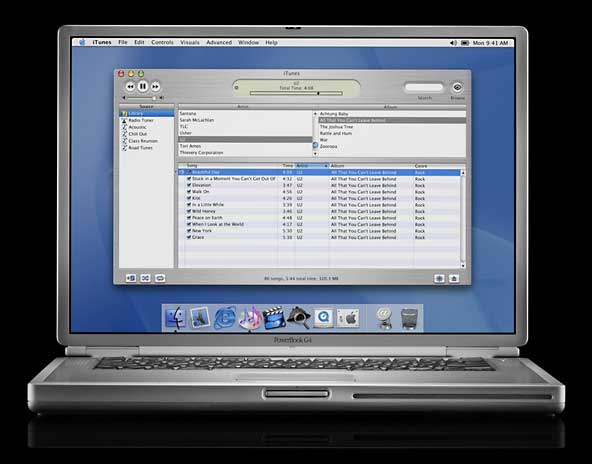 I decided to start at the lowest setting, then set Quicksilver, my titanium PowerBook G4, on the CoolPad, where the rubber feet kept it snugly in place. The first thing I discovered is that typing is much easier with the back of the PowerBook propped up like this – one upon a time, all PowerBooks had feet to lift up the back for improved typing and better air circulation.
I still have no way of measuring the TiBook’s temperature; every utility I’ve tried (five at this point) simply doesn’t know where to find the temperature data. Jeremy Kezer is hoping to get his hands on a PowerBook G4 in coming weeks and tackle the problem, which will answer one of the questions that readers have asked the most about the TiBook.
Newer Tech’s Gauge Pro v1.1 does recognize the CPU as a G4 (7410), but reports temperatures far below room temperature.
Until there’s a utility to measure the TiBook’s temperature, all I can say is that Quicksilver feels somewhat cooler sitting on the CoolPad.
I don’t recall the fan kicking in even once since putting the TiBook on the CoolPad. Sitting on my desk, the fan would usually kick in every few hours for 5 minutes or so. The sound wasn’t objectionably loud. From a few feet away, the sounds from the other Macs in the office would probably drown it out.
One reader berated me for not being more specific about how hot the outside of the case gets. Sorry, but I don’t have a lab or know of a convenient way to measure that – I do know that an oral thermometer isn’t the proper tool for measuring surface temperatures. (Any suggestions for an inexpensive surface thermometer?)
As I noted earlier, the TiBook runs too hot for use in your lap without something like the LapBottom to protect your legs. It won’t cause blisters, but it is uncomfortably warm.
Testing a Portable CD Burner
Another package showed up Monday morning: VST’s new Portable FireWire CD-R/RW Drive. This tiny gem – thinner than the TiBook and with a footprint only a bit larger than a Discman – is powered via FireWire, so there’s no power cord or power brick to deal with.
My experience with CD-R has been limited to ordering drives for others to use, so I had to run out on Monday afternoon and buy some blank CDs. I picked up five Memorex CD-RWs (rewritable CDs) for $5.99 and 50 Kodak CD-Rs (write once) for $24.99 at the local CompUSA. I probably could have scored a better deal by checking DealMac, but I wanted to start today.
The VST drive ships with Toast for burning CDs, as well as an MP3 player app – another area of technology I really haven’t done anything with yet.
Remembering Steve Jobs’ impressive demo at Macworld, I dropped a CD-RW into the drive and tried to mount it. After several minutes, I had to force a restart. The next time, I launched Toast and copied my Web sites to a CD-RW. The process went smoothly, but when I tried to mount the burned disk in the VST drive, all it showed was a lot of music tracks. Putting it in the internal drive solved that problem. (This isn’t a VST problem; it’s not a Toast problem; it’s the OS.)
The next project was to duplicate a software CD. Toast makes that pretty easy: choose Copy Disk, select your master, drop in a blank, and find something else to do while Toast burns your copy.
That brings up one big drawback of this drive: It only burns at 4x. Eighteen minutes to duplicate a 710 MB CD-ROM, the time during which you can’t use to do anything else on your computer (give me OS X!). I suspect this was the only way to run a CD burner from the FireWire port at present, but I think I’d rather have an 8, 12, or 16x burner and a power adapter to vastly reduce burn time.
I really wish this drive supported the drag-and-drop burning Jobs demonstrated at Macworld. Toast isn’t much more difficult than that, but you do have to launch a program – you can’t just drop the files to the CD-R or CD-RW itself. Maybe that will come with a future driver update, along with a driver for iTunes.
DVD Hints
I haven’t yet watched a full DVD on the TiBook. Apple does have several suggestions on avoiding DVD stutter, such as:
- quit all programs
- disable virtual memory
- set color to thousands, not millions
- disable Speakable Items
- turn off AirPort networking
Screen Update
One of our readers, Brian J. Best, read about the problems I was having with washed out colors and being unable to use the iBook or Pismo profiles mentioned in yesterday’s article. He detailed his steps for making it work:
- Download ColorSync 2.5.1 and 3.0.1 from Apple’s site.
- Install ColorSync 2.5.1 and restart the computer. (You’ll have to explicitly allow it to overwrite the newer ColorSync files on your TiBook.)
- Put the Pismo profile into the ColorSync Profiles folder and restart.
- Open the Monitors control panel, choose Color, and select the Pismo profile.
- Close the control panel.
- Run the ColorSync 3.0.1 installer and restart the computer.
It’s a lot of steps, but it does the job. I am now using the Pismo profile and find the colors improved over Apple’s color profile. It will be nice to see a profile optimized for the TiBook – and Brock Brandenberg tells me they’ll have one out as soon as they have PowerBook G4s to test them on – but this is definitely an improvement over the stock profile.
Mouse Bounce
I mentioned in a previous article that my Kensington Mouse-in-a-Box Optical sometimes registers an extra click, something I see when using both the left button (set to single click) and the right button (set to double-click). I thought maybe this was a TiBook problem, but I have heard from two PowerBook owners (one Pismo, not sure about the other) who have seen the same problem since upgrading to Mac OS 9.1.
I usually avoid beta software, but I’m trying the MouseWorks 5.6 beta drivers.
My TiBook Index
- My TiBook, Part 1: First Impressions
- My TiBook, Part 2: Migrating Everything
- My TiBook, Part 3: It’s Hot!
- My TiBook, Part 4: Solid Battery Life
- My TiBook, Part 5: A Portable CD Burner
- My TiBook, Part 6: Nearly Perfect
- My TiBook, Part 7: Static Shock and a Road Trip
keywords: #tibook #titaniumpowerbook #powerbookg4
short link: https://goo.gl/TYeX23
