
2001: For the past couple days, we’ve been hearing rumors that TiBooks (the Titanium PowerBook G4) are shipping. My dealer told me yesterday that mine had shipped from Taiwan via FedEx. They promised to let me know as soon as they had an ETA.
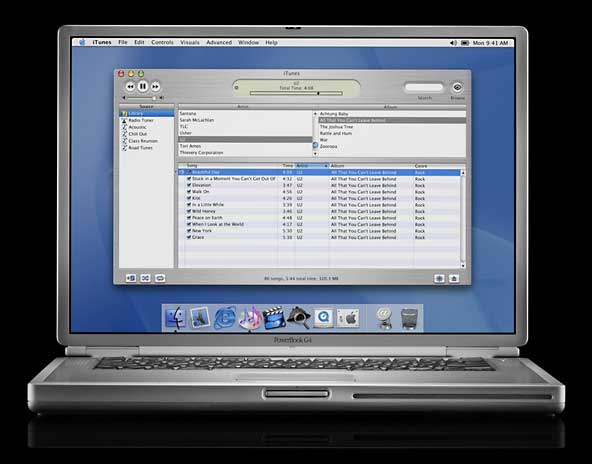 Dave Etterman called from AMS (my local dealer) at lunchtime. My TiBook was in! I picked it up after lunch.
(I was planning on ordering from Outpost.com, but Dave cut me a deal that made it worth buying from him. I also spent the money for AppleCare; I consider it a good investment since laptop repairs can be horrendously expensive.)
Since bringing it home, I’ve been fighting the kids for access to it. They had to try a DVD (The Matrix, of course). I just wanted to partition the drive and reinstall the software.
Hardware Setup
I ordered a stock 400 MHz PowerBook – that’s plenty of speed and drive space for me. The base 128 MB of memory will get me by for a few days, but I already know where I can get two 256 MB modules for about $200 shipped. That should keep me happy for years. And I can probably sell the 128 megger for $40-50.
My first step when I get a new computer is partitioning the hard drive. Ever since 350 MB drives, I have made it a point to have a partition with a full Mac OS install both as a backup (it’s so easy to replace a damaged System or Finder!) and as a faster way to run diagnostics than booting from a CD-ROM.
Since the advent of the Web, I’ve also had the habit of creating a small cache partition, where the Netscape, IE, and iCab caches are stored. This keeps all those small files from cluttering up the hard drive.
I decided on four partitions on the stock 20 GB hard drive: 7.2 GB main partition, 2.5 GB for my backup OS (plenty of room for OS X later on), 36 MB cache, and 256 MB for a backup copy of my Web sites. (I usually keep a backup on Zip, but my SCSI Zip won’t plug into my TiBook. Mostly I use the Zip as a quick source for restoring a page I just messed up. It’s much faster than restoring files from a backup tape.)
Update: It’s 2018 as I migrate this article to WordPress, and I still partition my hard drives – and also my SSDs. One partition for OS X 10.6 Snow Leopard, one for OS X 10.11 El Capitan on Macs that support it, one for my work files, iTunes collection, and downloads.
Hands On
At this point, I haven’t spent much time with the computer, and most of that time was just setting it up. I have made several observations:
- The outer edge seems lighter than I remember from the show, nearly white. I wish this color was closer to titanium.
- The screen is gorgeous, but only at full resolution and the 1024 x 768 setting with black stripes along the sides. The other settings are fuzzy, but that’s always the case with LCDs.
- This thing gets hot, probably too hot for comfortable laptop use.
- Full-screen DVDs are somewhat jerky. The 500 MHz PowerBook may be better in that respect. Watching DVDs at lower resolutions than full screen works just fine.
- Even the keyboard itself is remarkably thin and flexible.
- Unlike recent ‘Books, the AirPort card isn’t installed under the keyboard. Instead, you have to remove the TiBook’s bottom cover.
- Both memory sockets are very accessible, located under the keyboard.
- For desktop use, I don’t find the trackpad button as nice as the one on the iBook, where it’s on the curved leading edge of the computer. For laptop use, the button is fine.
That’s about it for now, just an hour or so after I got home with it. Projects for tonight include updating my SuperMac S900 to Mac OS 9.1 (there are some changes in directory structure when going from 9.0.x to 9.1), and then copying all my files to the TiBook.
Then there’s the matter of a name. I’ve had Calvin and Hobbes partitions going back to my Mac Plus days a decade ago; I think this machine deserves something different.
With this article, I became the first person to post a hands-on online review of the PowerBook G4 that wasn’t based on playing with one at the 2001 Macworld Expo.
My TiBook Index
- My TiBook, Part 1: First Impressions
- My TiBook, Part 2: Migrating Everything
- My TiBook, Part 3: It’s Hot!
- My TiBook, Part 4: Solid Battery Life
- My TiBook, Part 5: A Portable CD Burner
- My TiBook, Part 6: Nearly Perfect
- My TiBook, Part 7: Static Shock and a Road Trip
keywords: #tibook #titaniumpowerbook #powerbookg4
short link: https://goo.gl/wD3KWd
