

Simple Strategies to Minimize and Filter Spam
- 2005.10.28
Spam is annoying. It can easily fill up your Inbox and take up too much server space. You may have the impression that there's nothing to do about it, but you shouldn't see things that way.
Here are a few tips to minimize the amount of spam you get. Some of the things are standard tips for Internet users, while others are strictly Mac software tips you can take advantage of.
General Internet Tips
The first thing you have to know is that it will be hard to eliminate spam completely from your Inbox. Most Internet service providers (ISPs) have spam filters, and some of them are really effective, but spammers are always working on ways to write messages that will go through them.
The key is making sure that spammers don't have a chance to find your email address with their indexing robots when they look for new email addresses on the Internet.
It starts with your choice of an email address. Large ISPs are the first targets of attacks. AOL, Earthlink, and a few others in the US; Sympatico, Telus, and others in Canada; as well as large providers in other countries are prime candidates for spam. Spammers will usually find ways to send messages to all their customers at the same time. This also applies to free email addresses provided by Hotmail, Gmail, and other large carriers.
If you can, get an email account from a smaller source, because a spammer will be less tempted to make the effort to index the addresses of a smaller ISP. They usually go for the big fish.
While at it, you should know that providers usually have different policies for email usernames. Sometimes a username (i.e.: johndoe@earthlink.net) may already have been used in the past, locked for a certain time, and later released to a new user. The problem? The address may have been indexed in a spam database.
Picking an original username is important, especially if you have a common name such as John Smith. Usernames such as jsmith and johnsmith are not original enough because they are too standard and formal.
After picking an address, the next important step is to avoid putting your address in the wrong place on the Internet. How can you do that?
If you post messages to newsgroups, do not put your real address in the From field of your account in your newsgroup software. If you do, you have made sure that anybody in the world can scan newsgroups and find your address. If you want to give people the option to send feedback, write things such as "john doe at hotmail dot com" in the last line of your messages. People who read your message and want to send you an email will figure it out.
The same applies to Web forums. However, in these forums you can usually modify your user profile to select an option such as "do not display my email address in postings".
Generally, mailing lists make their archives available on the Web, so if you subscribe to any of them, you may become a target because you cannot hide your real email addresses from them (this applies to Low End Mac's email lists). That may be a case of asking the list owner if he/she can ask for a simple password in order to restrict access to the archives.
Are you a website creator? If so, you should know that putting your email address in a mailto: link makes it easy to find. Of course you want to make it possible for surfers to send feedback, so I recommend using forms for feedback instead of mailto: links. It doesn't completely clear your email address from the HTML code, but it makes it tougher to find.
If you are a webmaster, using your own domain name has some big advantages. The first one is that any address you pick is brand new; it has never been used by anyone.
The second is that a program called SpamAssassin may have been installed on your server. If not, try to convince your host to install it. It's easy to configure - especially to allow safe senders to reach you - and it's quite effective at detecting spam. When it finds spam, it will add ****SPAM**** to the subject line, making it easy to filter and eliminate junk mail.
|
Here's another way to hide your email address on your website. Take the following code and paste it into a blank page. Save it as plain text with a .htm extension.
<html>
<head>
<title>encrypt.htm</title>
</head>
<body bgcolor="#FFFFFF">
<p><script language="JavaScript" type="text/javascript">
//<![CDATA[
y = "<a href=mailto:myname@domain.com>My Name<\/a>";
  for(i=0;i<y.length;i++) {
    document.write(String.fromCharCode(7^y.charCodeAt(i)));
  }
//]]>
</script></p>
</body>
</html>
Replace "myname@domain.com" with your own email address, "My Name" with your name as you want it to appear on the page, and then open the file in your browser. You'll see something like this, which is an encrypted version of your mailto: link that a spammer's spiders shouldn't recognize: ;f'ouba:jfnksh=j~ifjbGchjfni)dhj9J~'Ifjb;(f9 The final step is to past this into the following code between the quote marks in the third line:
<script language="JavaScript" type="text/javascript">
//<![CDATA[
y = ";f'ouba:jfnksh=j~ifjbGchjfni)dhj9J~'Ifjb;(f9";
  for(i=0;i<y.length;i++) {
    document.write(String.fromCharCode(7^y.charCodeAt(i)));
  }
//]]>
</script>
This JavaScript decodes the encrypted mailto: link so visitors to your site can use their regular email program to contact you instead of a form. Now paste this into your website anywhere you might have had <a href="mailto:myname@domain.com">My Name</a> We've been using this on Low End Mac since April, and it definitely helps. It helps even more if you do this with a brand new email address that the spammer's haven't already discovered. Dan Knight, publisher, Low End Mac |
Mac Specific Tips
You can also use your own Mac to fight spam. You need to train and use your spam filter effectively. Most email applications ship with something decent, and most of those filters are adaptive. They scan incoming mail for spam and put suspect messages in a folder called Junk or Spam.
In single messages, you usually have buttons that allow you to tell your filter whether the message is junk mail or not, and I believe that you should use this feature actively. This allows your filter to better know the difference between a legitimate message and junk mail. When you open the filter's preferences window, you can usually
Here are the paths to popular email clients' spam filters:
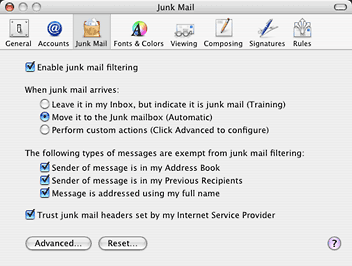
- Apple Mail: Pull down the Mail menu and select Preferences.
Click on Junk Mail
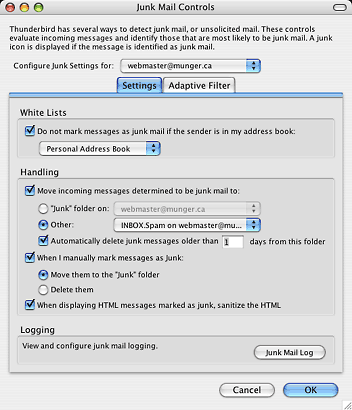
- Mozilla Thunderbird: Pull down the Tools menu and select Junk
Mail Controls
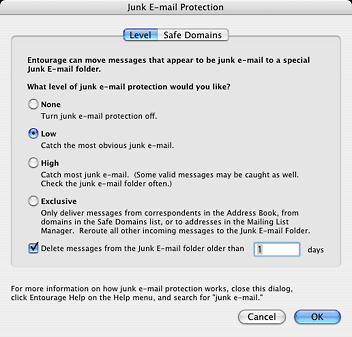
- Microsoft Entourage: Pull down the Tools menu and select Junk
E-mail Protection
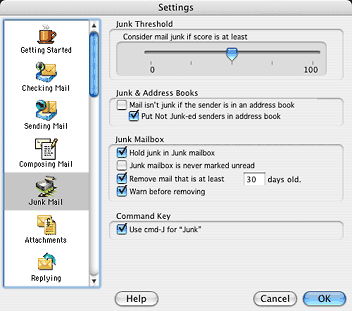
- Eudora: Pull down the Eudora menu, select Preferences and click
on Junk Mail
- Bare Bones Mailsmith: Launch the SpamSieve application
To make sure that known senders do not get filtered out, add them to your address book. This includes the From address of a newsletter, because most newsletters are easy to distinguish as spam even though they are not.
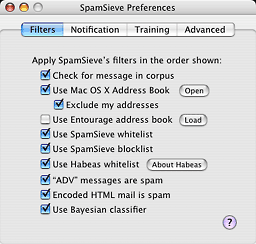 You may also
think about buying SpamSieve (US$25), a product that works hand in
hand with most Mac email software. It intervenes to filter out the
spam. I have used it for a short while so far and I am impressed by
its filtering capabilities, without having done any effort to
configure it.
You may also
think about buying SpamSieve (US$25), a product that works hand in
hand with most Mac email software. It intervenes to filter out the
spam. I have used it for a short while so far and I am impressed by
its filtering capabilities, without having done any effort to
configure it.
If you use all those tips, I believe you will be quite capable
to keep spam away from your Inbox. You will always get some, but it
is nice when you can minimize the amount.... 
- Link: SpamSieve
- Link: SpamAssassin
Join us on Facebook, follow us on Twitter or Google+, or subscribe to our RSS news feed
Michel Munger is a journalist who lives in Montréal. He discovered the Mac in 1994, and his work on a PC reminds him every day why he embraced Apple's platform. Munger has also authored some MacDaniel columns.
You can learn more about him on his personal website.
Today's Links
- Mac of the Day: Motorola StarMax 3000, introduced 1999.09.07. This inexpensive clone used lots of off-the-shelf parts.
- April 25 in LEM history: 00: Netscape 6 - 01: Always back to the Mac - IE 5's advanced features - 02: Why we love Macs - 03: Worth it to upgrade your old Power Mac? - 05: Always a market for excellence - How green is my Apple? - 06: 17" MacBook Pro value equation - 07: They're all Macs now - Thunderbird 2.0 - Format any drive for older Macs - 08: Apple #4 PC vendor
- Support Low End Mac
About LEM Support Usage Privacy Contact
Follow Low End Mac on Twitter
Join Low End Mac on Facebook
Favorite Sites
MacSurfer
Cult of Mac
Shrine of Apple
MacInTouch
MyAppleMenu
InfoMac
The Mac Observer
Accelerate Your Mac
RetroMacCast
The Vintage Mac Museum
Deal Brothers
DealMac
Mac2Sell
Mac Driver Museum
JAG's House
System 6 Heaven
System 7 Today
the pickle's Low-End Mac FAQ
Affiliates
Amazon.com
The iTunes Store
PC Connection Express
Macgo Blu-ray Player
Parallels Desktop for Mac
eBay

