

Mac Maintenance, Part 3: Testing Your Hardware
- 2005.07.14
After reading my two previous columns about Macintosh maintenance, you should be a knowledgeable expert. You know how to maintain a hard drive and optimize your system software. You just need one more thing - knowing your hardware well enough to detect any "physical" problems with your Mac.
Third-party software was useful but optional with our earlier articles. Hardware tests require one mandatory product: TechTool Pro 4 (TTP4). This piece of software, which Micromat sells for US$97.97, is simply brilliant. I would not recommend it over DiskWarrior for disk directory work, but it is a gem for hardware testing and verification. (TechTool Deluxe, which Apple includes with AppleCare, does most of the same tests as TechTool Pro.)
What you gain from using TTP4 is the ability to find out if your hardware has a clean bill of health or if it needs repairs and/or replacement. You Can run the tests whenever you want to, and you should whenever you feel that some of your hardware, even a simple port, may be acting up.
There are two categories of tests. To use the first one, launch TTP4, click on the Tests pane, and select the Hardware tab.
Hardware Tests
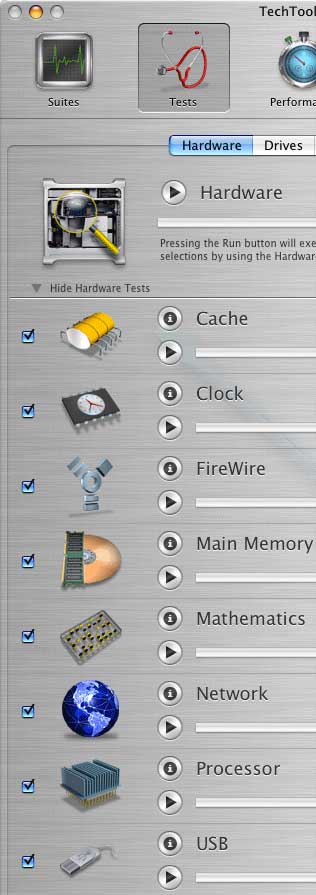 Cache: The L1, L2, and
sometimes L3 caches are types of memory that respond much faster
than your computer's RAM. These caches are central to computer
performance because your processor stores frequently-used
instructions in them, to the point where any malfunction would
cause serious problems. This test verifies that the caches are
present and makes sure that the memory is working well.
Cache: The L1, L2, and
sometimes L3 caches are types of memory that respond much faster
than your computer's RAM. These caches are central to computer
performance because your processor stores frequently-used
instructions in them, to the point where any malfunction would
cause serious problems. This test verifies that the caches are
present and makes sure that the memory is working well.
Clock: The clock speed of the processor (and bus) is a well-known bit of information. It is one of the keys to processing, and its improvement makes computers faster as long as the processor architecture keeps evolving. This test verifies that the circuits are working well.
FireWire: You are probably familiar with this interface that allows you to plug in external devices such as hard drives and CD/DVD drives. This test verifies that the internal FireWire circuits are working well, but it does not test the ports themselves.
Main Memory: Your RAM is another crucial part of your computer. The faster the RAM, the better system performance you can enjoy, and the more you have, the better it is. If memory gets corrupt, however, your computer may behave as if a nuclear bomb had been dropped in your backyard. This test verifies every RAM chip in your Mac. Any damaged RAM chip has to be thrown out as soon as it is detected.
Mathematics: This test verifies your Mac's ability to make calculations correctly. This is another thing that makes your Mac behave badly when damaged.
Network: This test makes sure that your Ethernet interface is available and gives you its status.
Processor: The processor is on top of the list in terms of hardware importance because it is like the brain in the human body. The tests make sure that your processor is handling all instructions the right way.
USB: This is the same thing than the FireWire test, but it applies to the USB circuits.
Video Memory: Video memory is necessary for your monitor to display everything correctly. If it is damaged, there will be dead pixels, noise, freezes, or even crashes.
Drive Tests
The second category of tests is related to hard drives. To access it, just click on the Drives tab.
Disk Controller: This is a key hard disk drive test. It verifies interface that connects to internal and external drives, and some tests will work with CD and DVD drives. If this test fails, you may be dealing with a dead disk.
Read Write: You guessed it - this test performs some reading and writing tasks to make sure that your disk can read and write data reliably at all times.
Surface Scan: This can be a long, time consuming operation, but it is absolutely necessary for the safety of your data. When bad blocks are detected on a disk, your Mac will avoid using them - this is called "mapping out" - to prevent data loss. Good blocks can go bad without any warning. Run this every three months.
|
|
|
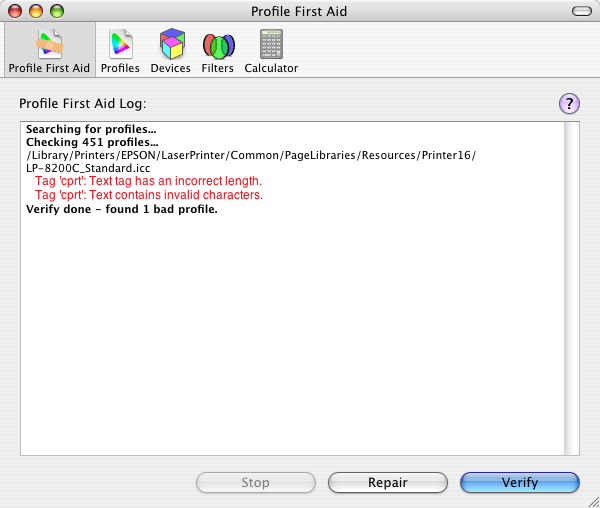
The ColorSync Utility is not well-known, but it can be really useful. (Click on the image for a larger view.) |
There are also other things you can do to make sure that your hardware is working properly.
Did you just print a color document, only to see that the colors on the screen don't match the print itself? If you did everything you could to set the software preferences, you may need to calibrate your monitor and make sure that it has the right ColorSync profile. Read the display manufacturer's instructions and try the following trick:
Go to the Applications folder and open the Utilities subfolder. Launch the ColorSync Utility and click on Profile First Aid. Click on the Verify button. After the verification process, any damage will be reported in red, and you should click on the Repair button. These steps are necessary when you have a damaged color profile, and it can mess up the colors when you print documents.
|
|
|
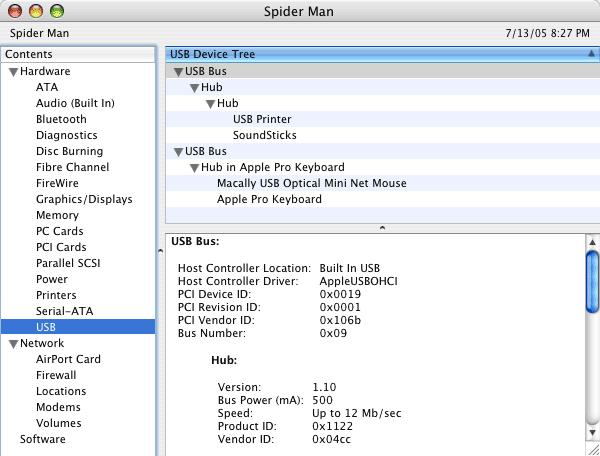
The System Profiler never won a software design award, but it has its purposes. (Click on the image for a larger view.) |
That's it for maintenance. You know quite a few ways to maintain
your Mac without the help of a technician. Nurture your Mac, and it
will reward you with extra years of use. Enjoy. 
Join us on Facebook, follow us on Twitter or Google+, or subscribe to our RSS news feed
Michel Munger is a journalist who lives in Montréal. He discovered the Mac in 1994, and his work on a PC reminds him every day why he embraced Apple's platform. Munger has also authored some MacDaniel columns.
You can learn more about him on his personal website.
Today's Links
- Mac of the Day: PowerBook 500 Series, introduced 1994.05.16. 'Blackbird' includes a 25 to 33 MHz 68040 along with smart batteries and grayscale or color displays.
- June 9 in LEM history: 99: WebMate - Cal State going Windows - 00: The suitability of G3 upgrades for gaming - Internet radio - Dr. Mouse Ergonomic Mouse - Using the Espy font - 03: Free POP3 email services - 04: Power Macintosh G5/2.5 GHz - June 2004 Power Mac G5 value equation - 06: Apple's great Asteroid hoax - PB 1400 'Volvo of laptops' - Time to switch from OS 9 - Pimp my SE/30
- Support Low End Mac
About LEM Support Usage Privacy Contact
Follow Low End Mac on Twitter
Join Low End Mac on Facebook
Favorite Sites
MacSurfer
Cult of Mac
Shrine of Apple
MacInTouch
MyAppleMenu
InfoMac
The Mac Observer
Accelerate Your Mac
RetroMacCast
The Vintage Mac Museum
Deal Brothers
DealMac
Mac2Sell
Mac Driver Museum
JAG's House
System 6 Heaven
System 7 Today
the pickle's Low-End Mac FAQ
Affiliates
Amazon.com
The iTunes Store
PC Connection Express
Macgo Blu-ray Player
Parallels Desktop for Mac
eBay

