
2001 – Isn’t it great to have a cool looking desktop picture in the background when you do your work or surf the Net? Most people like to have a decent picture and have a hard time finding the one they like.
- Description: Scanning and converting a photo into a desktop picture
Difficulty level: Advanced
System version: Not applicable
Required: Scanner, photos, Photoshop if possible
Well, if you find other people’s pictures a bit boring, make your own! If you have a scanner, photo editing software – I strongly recommend Photoshop, even if it is an old version – and a good old fashioned film camera. Creativity doesn’t hurt when it is time to shoot pictures and find desktop-worthy landscapes.
The first step is to find places to shoot pictures. Find parks or urban hot spots where a sunrise, sunset, mist, or everyday circumstances will provide great colors to the photos. Finding the perfect sites can take time, and getting that perfect sunset can take a while. It is worth the wait, and sightseeing will make up for the wait.
I did take a few pictures during my summer 2000 vacation, back where I was born. I took this one of a small hill at the Saguenay River, near my hometown of Jonquiere, in the Canadian province of Quebec. I will scan and convert into a desktop picture, as a demonstration.
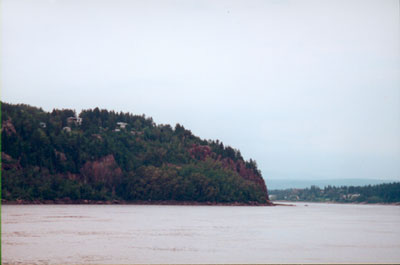
You like it? That’s nothing! The whole area is breathtaking.
[Publisher’s note: Remember, this was written in 2001. Nobody had an iPhone yet. Few people even had digital cameras. We have it so much easier these days.]
Firstly, you must scan the photo. Put it in your scanner, making sure that you follow the manufacturer’s instructions when placing it and using the scanning software. I scanned the photo at the 600 DPI (dots per inch) resolution, which is way too big for most pictures. You can easily scan a photo at 300 DPI and get a great desktop picture out of it.
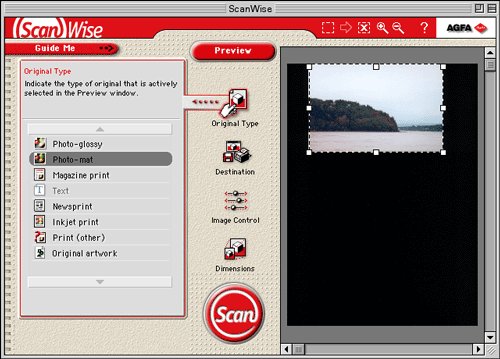
When you scan, use the appropriate settings for the type of photo print.
Save the picture as a Photoshop (.psd) file or an uncompressed JPEG. I highly recommend a Photoshop file to avoid quality losses.
Once done, open the file with Photoshop or your favorite image editor. Again, Photoshop is your best bet. Get an old version that somebody wants to get rid of if money is an issue.
Here is a little trick. Select the picture by going to the Edit menu and choosing Select All. Then use the Edit menu again to choose Copy. The whole picture is in your clipboard. Go to the File menu and hit New. Type 72 in the resolution field, even though your original is in 300 DPI. This trick will allow you to have a very large picture at screen resolution, giving you more elbow room for photo editing without taking too much disk and RAM space.
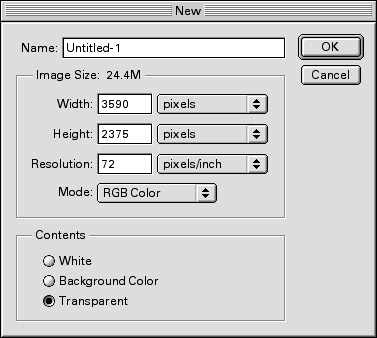
Once the picture is ready for editing and trimming, you proceed to judge which part of the picture is desktop-worthy. Your artistic skills are required, and there is nothing I can do about it. 🙂 Remember to leave out the edges of the photo, especially if your scanner does not handle edges correctly.
The selection step is rather easy. In Photoshop (or your favorite editor), use the selection tool. The button, in your toolbar, displays a square shape with stripped lines. Click on it. In Photoshop 4 through 5.5, you have a tab (the navigation tab) where you can use a Constrained Aspect Ratio to make a selection. In Photoshop 6, the toolbar on top of the screen shows it automatically when the selection tool is active.

Type 832 in the width field, and 624 in the height field. No matter if your final picture will be smaller or bigger, 832 x 624 will respect the ratio of the desktop’s size.
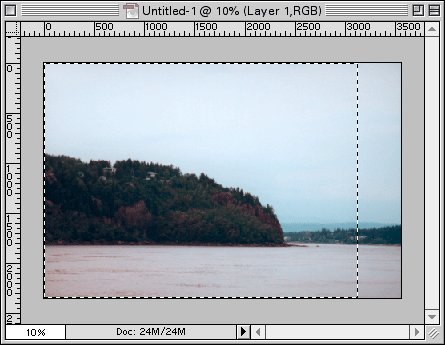
I selected the portion that will be used and resized.
Once done, go to Photoshop’s Image menu and select Crop. Then go back to the Image menu and select Image Size. Resize the picture by typing the appropriate width or height. Typing one should adjust the other. Just type the numbers corresponding to the resolution selected for your screen. If you don’t know what your display’s resolution is, just head to the Monitors (or Monitors & Sound) control panel and see which one is selected. The resolution is always displayed as width x height.
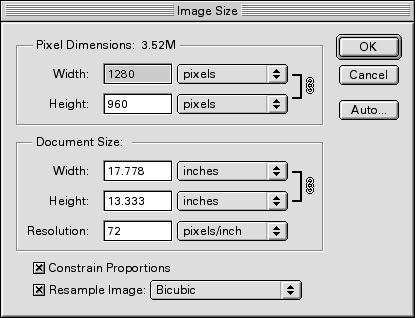
My resolution is 1280 x 960, therefore I type 1280 in the width field.
After resizing the picture, only one more step is required! You now need to save the picture. Save it in PICT or JPEG format with maximum quality. Name the picture – and you’re done!
The final step is opening the Appearance control panel and applying the picture to your desktop.
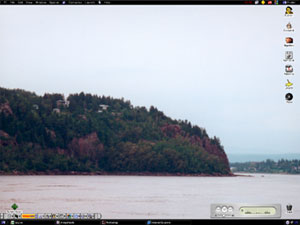
My new desktop!
Enjoy!
Publisher’s note: For some downloadable desktop photos of Tahquamenon Falls in Michigan’s upper peninsula, click here. Available in 1-bit for those old black-and-white Macs and resolutions up to 1280 x 960!
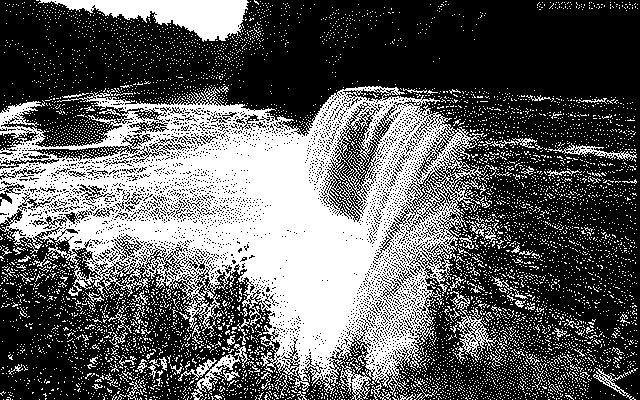
640 x 400 version for 1-bit PowerBook and Mac Portable displays
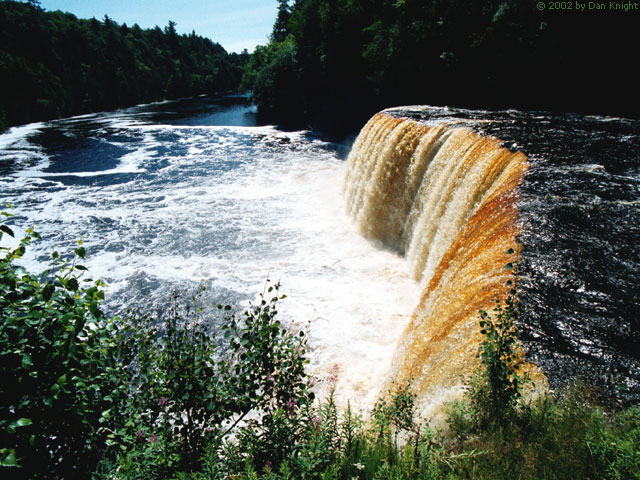
640 x 480 version in full color. Yes, the tannin from decomposing leaves make it look like root beer!
Keywords: #wallpaper #desktoppicture
Short link: http://goo.gl/XcHaqU
