
Low End Mac
Search LEM 
Donate · Amazon.com · MacResQ · Advertise
Other Cobweb sites: Low End Living · Reformed.net
Quicklinks: · Power Macs · 'Books · Early Macs · Week's Best Deals · Best Buys · OS Downloads

iBasics

Squeezing the Most out of StuffIt Deluxe, Part 2

Low End Mac Reader Specials

Memory To Go Special: New 2008 iMac 2GB $42 / iMac Intel Core2 DUO & MacBook Pro 2GB $36 - 1GB $20. MacPro 8 Core Memory 8GB kit $286 / 4GB kit $143 / 2GB kit $93 -- Free shipping available. LIfetime warranty.

Download Typestyler, still the Ultimate Styling Tool for Internet, Print and Video Graphics. Works great in Classic with a Native OS X Version on the way. Free Tryout: www.typestyler.com

LA Computer Company: Specials on AppleCare, iMac's, Apple Batteries and Apple A/C Adapters. Also Great prices on Used Apple Computers. Call 1-800-941-7654 Click Here.

OWC: Upgrade to a Larger Hard Drive, Add Additional Drives SATA for Mac Pro and G5s, up to 1.0TB in each Bay. 500GB from $90!

Mac users can finally play Party Poker for Mac. Not only that, they can also learn how to play PokerStars for Mac.

Laptop Hardware Provided by TechRestore - Overnight Mac & iPod Repairs.

Compare products like desktop computers, laptops, and LCD TVs side by side! All the information and reviews to make the best purchasing decision for a new cell phone GPS products or MP3 players. The Ciao network makes searching products easy for you.

- 2001.10.11

Description: Using compression software on the Net
Difficulty level: Intermediate
System version: Depends on what StuffIt version you have
Required: StuffIt Deluxe 6.5

In the first part of this tutorial, we covered general use of StuffIt Deluxe. This time we are going to discuss file exchange on the Internet. StuffIt Deluxe encodes and compresses files for the Net and has features designed to make transfers easier.

Before we start, here is a quick explanation of what the Translate menu options mean. StuffIt Deluxe can produce and open different file types that are usually used for different computer environments.

  • AppleSingle: This format preserves the information unique to Macintosh files, even when used on different file systems.
  • Binary to ASCII: If btoa and atob mean nothing to you, this may not be an important encoding operation in your case. :-)
  • BinHex: This is the most used encoding on the Mac on the Internet. The files that end with a .hqx extension are encoded in BinHex, especially after being compressed by products such as StuffIt.
  • BZip and GZip: Used mainly by Unix systems - remember, Mac OS X is Unix - these two will not be used on Mac OS 9 and earlier. GZip handles single files only.
  • LHa: Mostly a Japanese thing.
  • MacBinary: Used by lots of Mac users, this is an excellent file encoding, especially after compression. It is smarter than BinHex because it takes less space, and is friendlier with Mac OS 8.5 to Mac OS 9.2 files.
  • Tar: It stands for Unix tape archiver. It combines files into one.
  • Unix compress: I'll let you guess.
  • UUEncode: It can be used to transfer files to a Unix station or a PC.
  • ZIP: The default compression format for Windows computers.

Contextual Menu
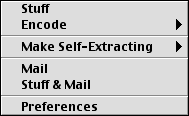
The easiest way to send files over the Internet - think of email attachments - with compression is to contextual menucontrol-click on a file and select Stuff and Mail from the contextual menu. This little option takes a file (or several files), compresses it into an archive, and goes to your email application to open a new message with the archive as an attachment. If your email app is not active, StuffIt Deluxe will launch it for you. You can select your preferred email application in the Magic Menu's preferences.

StuffIt Express Personal Edition

On to the good stuff! When I started using StuffIt Deluxe 6.5, which was recently released, I found its newest addition to be welcomed. What is StuffIt Express Personal Edition? In short, it automates things. You create drop boxes that will, when you drop files on them, execute the steps they were programmed to execute. The best part is that unlike AppleScript, this is easy to do. If you know how to read and click on a mouse, you should know how to handle this.

I find this application to be at its best when sending attachments to the same people regularly. In example, I am a freelance writer for a newspaper, and I have to send several Word files a week to the same person over there. Creating a drop box that compresses, addresses and sends everything makes this easier, and much faster. It saves time and the hassle of doing all the steps manually.
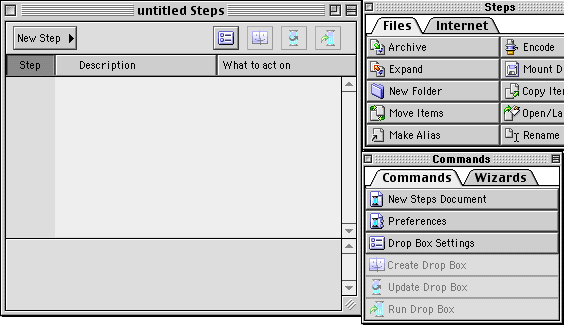
creating a drop box
Here is the standard interface when creating a drop box.

The first thing to do is to create a new drop box. When you open StuffIt Express PE, it starts one by default. To create new steps, just click on a step in one of the available tabs, namely Files and Internet. When needed, the application will ask you how to handle the task by customizing the step. In example, when I want a file compressed, the app asks me what name I want to give it to the file. I give the compressed file a basic name with the .sit extension to the file. For example, when I send my articles to Low End Mac, the archive automatically created gets this name: lemsubmission.sit.

In this spirit, create steps that allow you to compress, encode, move, copy, or perform whatever operation you need before sending it somewhere. With all the available options, you can create drop boxes that what whatever you want.

When you send files via email, the drop box will activate or launch your favorite email application and do all the work for you. If you specify a subject and a message in your drop box settings, it will handle it for you. Here is an example of a drop box to handle files and send them over email:
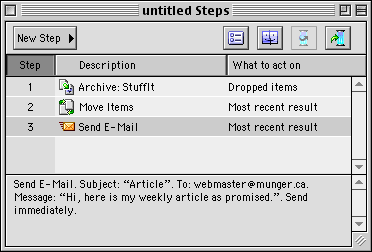
steps

With a specified subject and message, it sends the files - after compressing them - to a specific address. To create the drop box, drop boxall I need to do, from this point, is to click on Create Drop Box in the Commands window from StuffIt Express PE. Save it wherever you want and get ready to use it by dropping files on it.

You can use that software for whatever need you have, including FTP uploads. And you can update drop boxes by modifying the steps and clicking on the button to update the drop box. I personally recommend experimenting with it.

Recent Content on Low End Mac

  • The October 2008 MacBook Value Equation, Dan Knight, Mac Musings, 10.15. Apple changed the entire MacBook lineup on Tuesday. How do close-out prices compare to the new ones?
  • G3 and Low End G4 Mac Performance Comparison, Simon Royal, Mac Spectrum, 10.15. Factors that impact performance are the version of CPU, the size and speed of the Level 2 cache, and how much RAM is installed.
  • The Good, the Bad, and the Ugly of Apple Design, Charles W. Moore, Miscellaneous Ramblings, 10.15. Apple has produced some beautiful computers and iPods over the years, but also a few of the ugliest and most ungainly computers ever seen.
  • 3 Reasons to Use a Mac, and Pismo Troubleshooting, Charles W. Moore, Miscellaneous Ramblings, 10.15. Why one Windows user is also a Mac user, a Pismo that can't see its AirPort card, and sources of kernel panics.
  • MacBook (Unibody), 10.14. The MacBook gets the same aluminum treatment as the MacBook Pro - and dedicated GeForce 9400M graphics.
  • 15" MacBook Pro (Unibody), 10.14. The new MacBook Pro's case is carved from a block of aluminum for increased strength.
  • MacBook Air (GeForce), 10.14. More storage, a video port, and GeForce 9400M graphics improve the MacBook Air.
  • MacBook White, 10.14. Entry-level white MacBook gets a SuperDrive, retail price reduced to US$999.
  • Death of the iPod 'Way Off in the Future', Tim Nash, Taking Back the Market, 10.14. Someday Apple will decide that the iPod is no longer profitable and discontinue it, "but that day looks to be way off in the future."

Latest Deals on Low End Mac

  • Best MacBook Deals, 10.15. Used 1.83 GHz, $649; 2.0 SD, $750; refurb 2.1 GHz, $849; 2.4, $1,049; black, $1,099; new 2.1, $869 after rebate; 2.4, $1,175 a/r; black, $1,194 a/r.
  • Best 15" MacBook Pro Deals, 10.15. Used 2.0 GHz Core Duo, $1,000; 2.16, $1,100; refurb, 2.4, $1,349; new, $1,444 after rebate; refurb 2.5, $1,499; new, $1,644 a/r; refurb 2.6, $1,799; new, $2,594 a/r.
  • Best MacBook Air Deals, 10.15. Used 1.6 80 HD, $1,200; refurb, $1,349; new, $1,549; 1.8 120, $1,999; 1.6 128 SSD, $2,299; used 1.8 64 SSD, $1,800; new, $2,100.
  • Best Intel iMac Deals, 10.14. Used 20" 1.83 GHz, $599; 2.0, $730; 2.16, $800; 24", $950; refurb 17" 1.83, $699; 20" 2.0, $949; 2.4, $999; 2.66, $1,299; 24" 2.4, $1,299; 2.8, $1,549; 3.06, $1,899; rebates on new.
  • Best iBook G3 Deals, 10.14. Used 300 MHz clamshell, $150; 366, $199; 500 CD, $149; 800, $190; 600 DVD, $200; CD-RW, $240; 700 Combo, $250; 900, $369; 14" 600, $230; 900, $449.
  • Best Classic iPod Deals, 10.14. Used 60 GB color, $150; used 30 video, $140; 80, $170; refurb 80 classic, $169; new 120 GB, $240; refurb 160 GB, $249; new, $280. New & refurb include shipping.
  • More links in our archive.

Go to the iBasics index.

  • Mac of the Day: Macintosh LC, Oct. 1990 - only 3" tall, the LC was the least expensive color Mac in 1990.
  • List of the Day: The iPhone List Low End Mac's forum for discussing and supporting Apple's iPhone.
  • Channels
     Power Macs
     iMac Channel
     iBook/PowerBook
     MacInSchool
    Computer Profiles
     iMac
     Power Mac
     PowerBook/iBook
     Performas
     Mac Clones
     Older Macs
     LisaNeXT
    Editorial Archive
    Mac Daniel's Advice
    Email Lists
    LEMchat (uses AIM)
    Online Tech Journal
    Consumer
     advice, reviews
     guides, deals
    Software
    Apple History
    Best of the Web
     Best of the Mac Web surveys
    Miscellaneous Links
     Best Used Mac Buys
     Used Mac Dealers
     Video Cards
     Mac OS X
     Mac Linux
     Macspeak
     RAM Upgrades
    About Low End Mac
    Site Contacts

    Open Link

    Support LEM

    Affiliates

    The Apple Store
    .mac
    iTunes Store
    Club Mac
    MacMall
    MacResQ
    ExperCom
    eBay
    Amazon.com
    PayPal
    PCMall
    PC Zone
    Crucial Memory

    Our advertising is handled by BackBeat Media. For detailed price quotes and advertising information, please contactat BackBeat Media (646-546-5194). This number is for advertising only.

    All iBasics articles ©2001-2005 by Michel Munger. Entire Low End Mac website copyright ©1997-2008 by Cobweb Publishing, Inc., unless otherwise noted. All rights reserved. Advice presented in good faith, but what works for one may not work for all. Please report errors to .
      LINKS: We allow and encourage links to any public page as long as the linked page does not appear within a frame that prevents bookmarking it.
      Access our RSS news feed at http://lowendmac.com/feed.xml.
      Email may be published at our discretion; email addresses will not be published without permission, and we will encrypt them in hopes of avoiding spammers. If you prefer your message not be published, mark it "not for publication." Letters may be edited for length, context, and to match house style.
      PRIVACY: We don't collect personal information unless you explicitly provide it. For more details, see our Terms of Use.
      Low End Mac is an independent publication and has not been authorized, sponsored, or otherwise approved by Apple Inc. Apple, the Apple logo, Macintosh, iBook, iMac, eMac, iPod, iPhone, PowerBook, MacBook, MagSafe, Mac Pro, Apple TV, and AirPort are registered trademarks of Apple Inc. Additional company and product names may be trademarks or registered trademarks and are hereby acknowledged.