
Vintage Mac Living
30 Days of Old School Computing
Computing at Work with a PowerBook 170
- 2006.09.12
Hello everyone,
Last time I talked about how I was having problems with my servers, and how one of my managers at McDonald's wanted to join me in 30 days of "old school" computing.
Well, I managed to get my servers running again, and so far I haven't had any more problems with them.
As for my manager, I don't know what the deal is. I set up the Classic II for him to use, but he has yet to come and pick it up. I'm guessing that he doesn't really want to proceed with the project.
Oh well, that's his loss, not mine. I'm sure there are plenty of other people out there that would love to join me.
Today I'm writing this at work while I'm on break. I bet you're wondering how I managed to pull this off.
 I
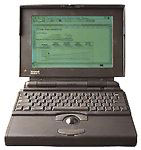
brought in my PowerBook 170, which
still has a working battery. The wonderful thing about the
PowerBook 170 is that I can turn down the processor speed, turn off
the backlight on the screen (you can do that with color LCDs, but
you can't see them too well), open ClarisWorks (or MS Word, or Word
Perfect, or whatever you want to use), spin down the hard drive,
and be able to type for a good long while.
I
brought in my PowerBook 170, which
still has a working battery. The wonderful thing about the
PowerBook 170 is that I can turn down the processor speed, turn off
the backlight on the screen (you can do that with color LCDs, but
you can't see them too well), open ClarisWorks (or MS Word, or Word
Perfect, or whatever you want to use), spin down the hard drive,
and be able to type for a good long while.
I'm not sure just how long I will be able to pull it off, but I'm only on a 30 minute break. The battery should be able to hold out that long.
I must say that the PowerBook is doing really well. AIM, WannaBe, MacLynx, Eudora Lite 1.3.1, even iCab 2.9.9 work great.
iCab is by no means fast, but it works when I need to visit sites that WannaBe and MacLynx simply can't handle, like online forums, and sites where I need to see pictures.
WannaBe is my browser of choice: it's super fast and works great. The only problem I have with it is I cannot use Google or any other search engine, because you can't input data. When that happens, I just use MacLynx. It works without any problems, it's just slower a and doesn't look as good (it's the best browser for compact Macs).
AIM works really well on this PowerBook. Sure, it isn't as fast as running it on a Power Mac G3 (or even a 7500), but I wouldn't expect it to be.
And yes, email works just fine using Eudora Lite 1.3.1, with one exception: It likes to encode all attachments in BinHex, so no one can open any attachment I send. Oh well, that's only a minor setback.
So far everything seems to be working great, without any major problems at all.
Wish me luck, and stay tuned more Old School Computing articles
are to come. 
Join us on Facebook, follow us on Twitter or Google+, or subscribe to our RSS news feed
Today's Links
- Mac of the Day: Motorola StarMax 3000, introduced 1999.09.07. This inexpensive clone used lots of off-the-shelf parts.
- Support Low End Mac
Recent Content
About LEM Support Usage Privacy Contact
Follow Low End Mac on Twitter
Join Low End Mac on Facebook
Favorite Sites
MacSurfer
Cult of Mac
Shrine of Apple
MacInTouch
MyAppleMenu
InfoMac
The Mac Observer
Accelerate Your Mac
RetroMacCast
The Vintage Mac Museum
Deal Brothers
DealMac
Mac2Sell
Mac Driver Museum
JAG's House
System 6 Heaven
System 7 Today
the pickle's Low-End Mac FAQ
Affiliates
Amazon.com
The iTunes Store
PC Connection Express
Macgo Blu-ray Player
Parallels Desktop for Mac
eBay

