
Vintage Mac Living
30 Days of Old School Computing
Setting Up a Mac Classic II
- 2006.09.07
Hello everyone, thanks for tuning in.
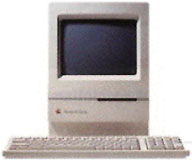
For the last week or so, I've been setting up a number of my machines for use in my "30 Days of Old School Computing" project. This article focuses on one of those machines, a Classic II.
A week ago, I decided to set up my old Classic II, because I have always had fond memories of using Classic IIs back in elementary school.
Limited Space
I knew it was going to be a tight squeeze, because it only had a 40 MB hard drive. I had WannaBe, MacLynx, Eudora Lite 1.3.1, Word, Excel, Kid Pix, and a bunch of games like Brickles and PacMan installed, and then I ran out of room. I really wanted to install AIM (AOL's Instant Messenger program), but I didn't have enough room on the hard drive.
I have a box of old SCSI and IDE hard drives, so I dug out the smallest SCSI drive I could find (a 230 MB drive) and an external case for it. I hooked up the external drive, and booted the Classic II.
No good, the drive wouldn't mount.
A Bad Disk Tools Floppy
Okay, time to dig up the old System 7.1 disks I have somewhere. I found my old Disk Tools disk, but when I put it in the drive, I got the dreaded message: "This disk is unreadable: Do you want to initialize it?"
 "Great", I thought "Now I have a bad Disk Tools
disk."
"Great", I thought "Now I have a bad Disk Tools
disk."
I decided to Initialize it and then go on Apple's archived software site and download System 7.1. Uh oh, you can't get System 7.1 from Apple's site, but you can get System 7.0 and 7.0.1.
"Fine", I said to myself. I downloaded it and put the System 7.0.1 Disk Tools on my old Disk Tools floppy.
Still No External Drive
I opened the Apple HD SC setup utility, and it didn't see external the drive. Maybe the external drive box is messing up?
So I opened the Classic II, took out the old drive - and guess what I found? Both drives were set to the same SCSI ID. (For those who don't remember SCSI, each device has to have a unique ID or you get problems like this.)
Stupid me, I should have thought of that. Both drives had been internal ones.
Since I already had to old drive out, I decided to change the SCSI ID on the new drive and install it in the Classic II.
Well, I got it back together again, turned it on, and realized I'd made a big mistake. I had set the drive to disable auto spin up - now I had to take the whole machine apart again and terminate a different jumper.
It Finally Works!
I'd wasted enough time. I put it back together again, put in the Installer floppy for System 7.1, and waited for it to boot.
As soon as it started to open the installer, I got the following message: "The Installer needs more memory to perform an installation. Try quitting other applications and running the Installer again. You could also try removing some system extensions and restarting to make more memory available."
I was getting a little ticked off. How could there not be enough memory? The system was booting off the installer disk, and the machine had 10 MB of RAM!
I put the old internal hard drive in the external case and hooked it up the the Classic II. I decided to boot off of the Disk Tools floppy and just copy all of the stuff on the old hard drive to the new one.
AIM on the Classic II Is Very Slow
That worked, and the computer booted off the new internal drive. With the new hard drive installed, I was able to transfer the AIM installer onto the Classic II and install AIM.
I knew I was going to have to import all of my buddies onto AIM manually, because versions before 4.3.1 don't pull your buddies off of the AIM server.
It would have taken well over half an hour to do that on the Classic II, because every time you hit the return key (after you type in a new buddy) on the Classic II, there was a 40 second delay. I don't know why there was such a long delay, but that didn't matter. I didn't want to wait.
So I installed AIM 3 on my old Power Mac G3, typed in each of my buddies, and copied the AOL Instant Messenger preferences file over the network into my Classic II's Preferences folder. It worked great, now I was able to Instant Message all of my friends.
I'm looking forward to hearing your thoughts on this project, so
please feel free to email me. 
Next time: A talk with a manger at McDonald's leads to a partnership in old school computing.
Join us on Facebook, follow us on Twitter or Google+, or subscribe to our RSS news feed
Today's Links
- Mac of the Day: Power Mac 7500, introduced 1995.08.08. This workhorse introduced a new desktop case and CPU daughter cards for easy upgrade.
- Support Low End Mac
Recent Content
About LEM Support Usage Privacy Contact
Follow Low End Mac on Twitter
Join Low End Mac on Facebook
Favorite Sites
MacSurfer
Cult of Mac
Shrine of Apple
MacInTouch
MyAppleMenu
InfoMac
The Mac Observer
Accelerate Your Mac
RetroMacCast
The Vintage Mac Museum
Deal Brothers
DealMac
Mac2Sell
Mac Driver Museum
JAG's House
System 6 Heaven
System 7 Today
the pickle's Low-End Mac FAQ
Affiliates
Amazon.com
The iTunes Store
PC Connection Express
Macgo Blu-ray Player
Parallels Desktop for Mac
eBay

