Something that is often overlooked in budget computing is
portability. I own a Blue G3 that
does almost everything I need to do, and I am very happy with it.
What it cannot do is come with me on vacation so that I can keep up
with my email.
There are several options one can take depending on price range
and capability, and whether or not one really needs a good
battery.
A good battery is not always necessary in a laptop. While this
seems to defeat the point of having a laptop, when you look at older
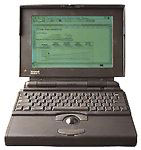
systems things are a little different. I bought my mother a PowerBook
150 so she could keep up with her email when she visits her
parents on the other side of the country. She needed something with a
modem and
an email program. Since the primary use of the computer involved a
telephone line, adding a power cord to the equation isn't at all
inconvenient. As it turns out, the original battery still holds a
two-and-a-half hour charge, but Mom still always connects the AC
power.
In my previous article covering
desktops, I mentioned that the 68k machines were of dubious value. As
a laptop, the story is a little different. While the lack of
compatibility with newer computers prompted my gradual laptop
upgrades (finally settling on a 2400c),
for many people that just want to keep up with their email while on
vacation, it is enough. While you might think that is all you would
do on your desktop, as you discover new things that frequently
changes.
Sometimes size is an issue. Size was an issue for me. My first
laptop was a Duo 210, which I
replaced after about a year with a 2300c.
I used the Duo 210 to check my email on holidays and write essays in
other peoples' dorm rooms.
There were a few drawbacks to this system. The first was that I
would have liked to have been able to take notes with it in class.
The battery only held a 10 minute charge, so this was not an option.
The second was that there was no ethernet access on the machine. This
made it difficult to exchange files with Windows machines as the Duo
series lack any removable drives. Adding ethernet would have been
expensive and bulky.
While I was using the Duo 210, a friend gave me her dead 5300cs.
While this had the ethernet and the PowerPC chip, it was simply too
large for me to carry around in the manner that I desired. I traded
the 5300cs for a 2300c that I used for a few months until this past
October. In October, I was offered a fantastic deal for a 2400c with
80 MB of RAM and a 4 gig drive, plus a whole bunch of expansion
cards. I am writing this article on that 2400c. It weighs about
four-and-a-half pounds, and in its Wetsuit 3.0 it is smaller than my
mother's purse and about a third of the size as my CD wallet.
The PowerBook 500 models are an
excellent series of laptops, but there are two main problems with
these. The first is that they are very large and somewhat clunky. The
second is that it turns out that the "intelligent" batteries aren't
so intelligent after all, and they tend to be completely dead by
now.
I am looking for a laptop for my father currently. He does not
need a battery, but he needs to be able to run a PowerPoint 98 slide
show on a digital projector. A 540c with a PowerPC upgrade card in it
would be ideal for this. Size does not matter, as he would merely be
throwing in the back of his car between lectures. It has an ethernet
jack that he can use to connect to the network to transfer his slide
shows from his Beige G3, so
zip-swapping would not be needed.
When looking to buy an older laptop, you must look at exactly what
you plan to do with it and be willing to be locked in by that. This
is in contrast to buying a desktop, because there are more tradeoffs
with laptops than with desktops.
For instance, a PowerBook 540 is more powerful than a PowerBook
180, but you may get better battery life out of the 180.
Alternately, you could go for the Duo 210, which is slower than both
of the other machines, but is also much smaller.
You must identify your priorities so you get what you need at the
best price possible.
Andrew W. Hill (a.k.a. Aqua) has been using
Macintosh computers since 1987 and maintains that the
Mac
SE is the perfect Macintosh, superior to
all - including the Color
Classic. He is on the verge of being
evicted from the family home due to its infestation of Macs (last
count: about 50). Andrew is attempting to pay his way through college
at UC Santa Cruz with freelance Web design and Mac tech
support.
Today's Links
Mac of the Day: PowerBook 2300, introduced 1995.08.28. The only Duo equipped with a PowerPC processsor run at 100 MHz.
\r\n\r\n";
if ((isset($pool) AND isset($type)) AND (isset($ip) OR isset($ok))) {
if (!isset($siteid))
$siteid="270";
if (!isset($pageid))
$pageid="0";
if (!isset($force))
$force="";
if (!isset($keywords))
$keywords="";
if (!isset($pos))
$pos="";
if (!isset($optcode))
$optcode="";
getad($siteid, $pageid, $pool, $type, $ip, $force, $keywords, $pos, $optcode);
# $adr = "http://adserver1.backbeatmedia.com:6789/servlet/ajrotator/$siteid/$pageid/viewHTML?pool=$pool&type=$type&ajip=$ip";
# $success = @readfile("$adr");
}
?>
Mac of the Day: PowerBook 2300, introduced 1995.08.28. The only Duo equipped with a PowerPC processsor run at 100 MHz.
List of the Day: Old Mac MP covers 604-based multiprocessor Macs and clones.
Our advertising is handled by BackBeat Media. For detailed
price quotes and advertising information, please
contactat BackBeat Media (646-546-5194). This number
is for advertising only.



 and
an email program. Since the primary use of the computer involved a
telephone line, adding a power cord to the equation isn't at all
inconvenient. As it turns out, the original battery still holds a
two-and-a-half hour charge, but Mom still always connects the AC
power.
and
an email program. Since the primary use of the computer involved a
telephone line, adding a power cord to the equation isn't at all
inconvenient. As it turns out, the original battery still holds a
two-and-a-half hour charge, but Mom still always connects the AC
power.