
2008 – I’ve written on this topic a few times before, and those articles continue to draw extremely high hit-counts despite the constant advance of technology. As it’s been well over a year since my last look at the subject and the tools available to Mac users have changed a bit, I thought it was time for a brief update.
The Problem
First off, the basics of the problem of watching DVDs from multiple regions on any computer, Mac or PC, remain the same, and the information in the previous articles remains valid, especially if you own an older Mac or a desktop tower that allows for the easy replacement of your optical drive. As always, the Mac specific section of rpc1.org remains the place to go to search for region-free firmware and flash utilities to make your Mac region-free.
In addition to a region-free drive, you still need the Region X utility, recently upgraded to version 1.6 and fully OS X 10.5 Leopard compatible for both PowerPC and Intel to reset OS X’s region change counter, which is separate from the region setting in your drive’s firmware. Also unchanged are the alternatives that may work for viewing foreign region DVDs on your out-of-region or region-locked Mac.
Here is a quick summary of ways to get around region coding, followed by some information on the prospects for newer Macs and my current preferred method that works well, provided you have the time and hard drive space.
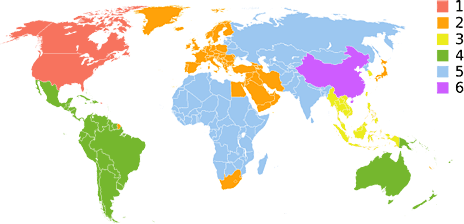
So with no further ado, here is a look at region coding and the Mac platform at the tail end of 2008. While this article assumes you live in the United States or Canada and have your DVD drive set to Region 1, the principals and solutions are the same regardless of your actual location and home DVD region. In the UK, for instance, you would be in Region 2, while South Korea, which represents about 20% of my DVD collection, is Region 3.
Flash Your Firmware
First and foremost, the easiest way to watch a DVD movie on your Mac is to buy or rent that movie in the same region as your drive. Both the drive hardware and the OS, whether Windows or OS X, check the region of every DVD inserted. These settings can be changed a total of 4 or 5 times and are then “locked”.
I put the word locked in quotes because both locks can be undone by the manufacturer, and the OS lock can easily be undone using the Region X utility for OS X or one of many similar utilities for Windows. The lock in the drive itself may be unlocked with a firmware update or reinstall, if such a thing exists, or you may just be out of luck.
Flashing your firmware to RPC 1, or region free, completely takes away the locking on the hardware side, and you then only have to worry about the region code in the OS, which, as described above, is very easily defeated. What is important to know, however, is that the OS region counter is connected to each DVD drive, meaning that if your computer has two DVD drives, their region changes will be counted separately. My Mac Pro has two DVD±RW drives, the upper drive that it came with being region coded for RPC 2 and the lower one, a 4-year-old Pioneer that I had flashed to RPC 1 and pulled from my Power Mac G4 before selling that machine.
Since I only own DVDs from two regions, the lower drive being region free is actually unneeded, though if I ever buy a movie from a third region, it will again come in handy. This is an absolutely easy system to deal with, as I simply put Region 1 movies in the upper drive and Region 3 movies in the lower drive – and don’t even have to bother with Region X, as neither counter ever advances. If I ever do buy movies from another region, this machine would remain ideal, as the upper drive would remain region 1 and never change, while the lower region-free drive would simply use the Region X utility to reset the OS counter every fifth change.
Use an External Drive
Most Macs are not as versatile as the Mac Pro in allowing dual optical drives, but that doesn’t mean you can’t enjoy the benefits of a second optical drive for foreign-region movies. Any number of drives can be connected to any Mac over USB 2.0 or FireWire, and while potentially slower than an internal drive (especially in the case of USB), it will provide adequate speed for watching a movie. Just like the dual drive Mac Pro described above, if your internal drive is set to your home region and your external to your alternate region, you will never run into region code issues on your Mac. If you deal with more than two regions, check the rpc1.org page before you buy an external drive to make sure it is flashable to RPC 1 region free – or just buy one external drive per region that you deal with.
While I went the upgrade route with my Mac Pro, my new MacBook Pro will remain RPC 2 for the foreseeable future, as I do not want to open the case to install a flashable drive and there is no firmware available for the Matsushita UJ-875 drive that it came with. An external drive is a viable option, but I have found another way deal with Region 3 disks that doesn’t require me to carry anything else with me. And since I have a region free Mac Pro at the office and a region free PowerBook G4 for short trips, I only need Region 3 compatibility on my portable when I take longer trips or need the MacBook Pro’s power.
Avoiding the Lock
On an RPC 2 drive with no other drive available, you have the following options, both of which require you to go into System Preferences and configure your Mac not to launch DVD Player when you insert a DVD movie. If DVD Player is autostarted, it will prompt you to change region setting and then lock your drive when you the fourth change. Set to ignore, the DVD movie will just mount on your desktop as a data disk and trigger any check of region code on insertion, though launching DVD Player manually will still trigger a check of region code.
You can use an alternate video player like VLC that doesn’t check the region code. Beware that your drive’s firmware still triggers the OS counter, which may then trigger a firmware setting change on your drive. It’s hit and miss on whether or not this will happen, with some Macs allowing any region movie to be viewed in VLC without triggering a change and others triggering a change and potentially locking you out of future switches when you hit the limit. If you know you have at least two changes left, try it and see. My Mac Pro works fine using VLC on Region 3 movies, but my MacBook Pro and PowerBook G4 prompt me to switch regions when I try. Your mileage will vary.
Rip and Burn
This brings me to my “newer” option, one that I’ve yet to have any issues with on my MacBook Pro – but it may not be completely legal. Again, start by setting your Mac to ignore the insertion of a DVD movie, which will then cause your Mac to treat DVDs as regular data disks. From here, use a utility like Mac the Ripper to rip the contents of the DVD to your hard drive. Then use a utility, such as Toast, to burn a new DVD from the ripped content.
Mac the Ripper gives you the option to strip region coding from the movie as you rip it. It also strips copy protection, so you are able to burn the movie to a blank DVD. If you plan on watching on a lower resolution laptop screen, Toast can shrink dual-layer movies to fit on a single-layer DVD with a reduction of quality. If your Mac has high resolution, you can use a dual-layer blank or adjust the copy settings to only copy the main movie and strip out languages, subtitles, and special features, which will often allow the movie to fit on a single-layer DVD at or near full quality.
Mac the Ripper 2.6 is an old version that is free and will rip most of the older DVDs and some newer ones. Version 3.0 is a new version that is donationware and will rip most newer DVDs. This is the best quality option if you own a DVD and want to have both a backup disk that you can use while you store your original, and that allows you to play your movie on any standard DVD player or computer.
Rip to Disk
A related option is to rip the DVD movie to an MP4 movie file. This is a better option if you want to watch the movie on something like an iPod or PSP, or want to watch the movie on your laptop while traveling without carrying DVDs with you in your carryon. Another benefit is that watching a movie from an MP4 (or any other video format) file compared to an actual DVD is that your computer will use less of its battery, as it won’t spin the optical drive or power the laser, but rather just the hard drive, which is probably spinning anyway. If you own a MacBook Air, this is your best option, and with a solid state drive (SSD) will barely put a dent in your battery life.
As when using Toast or a similar utility, you can adjust how large the file will be with the simple (usually) equation of larger files equaling better video quality. My MacBook Pro has 1440 x 900 resolution, and with an MP4 movie encoded in the default settings using HandBrake (my favorite encoder application), the quality is almost indistinguishable from the original. A typical two hour movie compresses to about 1.5 GB. HandBrake allows reduced quality settings that are perfect for my iPod nano, compressing movies down to about 700 MB, or at a high quality setting that I cannot differentiate at all from the original at about 2.5 GB. I rip almost everything to the normal setting. HandBrake, like Mac the Ripper, treats the DVD as a data disk and will, at least on my MacBook Pro, ignore the region code of the DVD and create a file that can be played on any computer.
Once again, legality is questionable, but my interpretation of federal law is that I can make a backup of data that I purchase for my own use. I used to make cassette copies of LPs – and later CDs – for the car, and I currently make CD-R copies of music CDs and DVD copies of DVDs for my own use while storing the originals away, only to take them out when I wear out or damage my copy. Let your own level of risk tolerance, your conscience, and the laws of your state and country be your guide.
More Good News
Finally, there is one other bit of good news since my last look at region free Mac use, and that is that Apple released a firmware patch for certain Matsushita drives that allowed the patch-writing community at rpc1.org to create region-free firmware for a number of previously unpatchable Matsushita drives. My MacBook Pro, the last of the non-unibody models, has a Matsushita drive that is too new to be included in the recent slew of RPC 1 firmware releases. I believe the UJ-865 is the newest drive for which an RPC 1 firmware is available, and my MacBook Pro has a UJ-875.
Even if firmware exists for your drive, keep in mind that flashing firmware can brick your drive, which will give you the dual benefits of making your drive useless and possibly voiding the warranty on your Mac. That is another reason why I won’t be making my MacBook Pro region free any time soon, but why I was happy to do so on my old PowerBook G4.
Previous ‘Region Free’ Columns
- Make Your Mac Region Free for DVD Viewing, 2006.06.23
- Region Free DVD Viewing Options for Intel and PowerPC Macs, 2006.09.12
- Region Free DVD Viewing on Macs and Windows PCs, 2007.09.07
Keywords: #regionfreedvd
Short link: http://goo.gl/0VbTos
searchword: regionfreedvd
