
Best Tools forthe Job
Switching Back to Windows after 3 Years with Mac OS X
- 2007.01.03 -Tip Jar
Anyone who has read my previousarticles knows that I am a Mac user who uses Windows - or aWindows user who uses Macs, depending on which computer I'm sittingin front of at a given moment.
I'll come right out and say it, I like both OS X and Windows fordifferent reasons and for different tasks. Both are easy (for me)to use, both are stable when properly configured (easier to do inOS X), and both do some things well that the other does poorly(or not at all).
Which brings me to my topic for this go-around: switching.
Switching
Apple had a large ad campaign not too many years ago about"Switchers", PC users who grew so frustrated with the state of PCmalware and other Windows problems that they ditched Windows,bought a Mac, and are now all smiles.
I was and remain a frequent switcher, switching platformswhenever it suits the work (or play) that I'm doing at the time. In1986, I switched from a proprietary (PASCAL-based) HP computer toWindows 386. In 1993, I switched from Windows 3.1 to MacintoshSystem 7. In 1998, I switched to Windows 98 and then immediately toWindows NT, and in 2003, I switched to Mac OS X. And 2006 sawme switch yet again, this time to Windows XP.
Now when I say switch, I refer only to my primary computer, as Ialways have more than one, and since 1993 I have always maintainedat least one Mac and one PC. My primary computer is defined (by me)as the one that has my master email archive and documents folder,but it's not necessarily the computer I spend the most time with oruse for the most challenging projects.
Since I started practicing law, my primary computer is the onethat I take with me to court, where I want access to the latestversions of all documents and files.
History
Here is a brief history of my switches in primary OS and thereasons behind them. These reasons will likely be very differentfor you or anyone else you might ask, with some things that areimportant to me meaningless to you, and of course vice-versa.
Let's start from the beginning. My Hewlett Packard Series 80personal computer was given to me in 1981 by my father, who boughtit for work and never touched it at home. It used a modified systemthat was either a dumbed down PASCAL or a souped-up BASIC,depending on how you look at such things. It came with a book ofprograms, and I actually was fairly decent at writing littleapplications to automate many of the things I liked to do. It had aword processor called Word 80, a version of VisiCalc, and a database that I neverplayed with.
When college came around and I started doing more advancedwriting, not to mention had a need to share my writing with others,it was time to retire the HP and get something semi-standard. Iwent to my university bookstore and was all ready to buy a Mac, asthat was what everyone in academia used back then, but the IBM PS/2with its 15" monitor and 256 colors was more than I could resist,especially compared to the 9" monochrome screens on the Macs Icould afford. It was a bad choice, but I was young and wanted toplay games.
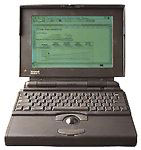 1993 saw me get marriedand land an overseas teaching job. My IBM desktop couldn't make thetrip on account of important restrictions and duties in Korea, so Ibought my first laptop and made my first switch to Macintosh. ThatPowerBook 145b was already outdated in1993 - it was a severely crippled design with its 8 MB RAMceiling and it had no video output and a monochrome display. Ididn't care; it was an ergonomic masterpiece that set the standardfor all modern laptops, and despite its limitations, Mac softwarewas so well written back then that it lasted for three years as myprimary computer and another two years as a secondary. I wish Istill had it.
1998 saw me working for the government and doing a lot oftravel. As a movie lover, my new laptop had to be DVD capable andhave an active matrix color screen. Sadly, my budget was $2,000,and Apple just didn't offer anything near my price that had what Ineeded. Only the passive-matrix "MainStreet" version of the popularWallStreet PowerBook came inunder my price limit, and the cheapest active matrix model was afull $800 over, meaning at that time it was simply out-of-reach.Windows 98 was horrible, and I quickly moved to Windows NT, whichwhile slightly user-unfriendly, was at least very stable - and farmore robust than the Mac OS of the time (8.5 if I remembercorrectly).
1999 saw Windows 2000 released, and I was a very happy camperfor the next four years, using various versions of the Mac OS onlyfor digital photography and Web content creation. Laptop PCs withtheir wimpy video chipsets just didn't handle Photoshop well, whilemy old Power Macintosh 7200 was stilla terrific Photoshop machine with its two fast SCSI drives and 256MB of RAM, which with Photoshop 3 running under Mac OS 8.1 wasquite a hot system.
I moved up to a Power Mac G4running at 400 MHz with a whopping 768 MB of RAM and OS 9 forimage work and still have that machine today running the latest MacOS X 10.4.8 with dual video cards and a 1.0 GHz processorupgrade.
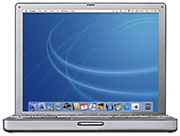 2003 wasthe year that the viruses took over Windows. I was in law school,and I kept getting infected despite my best efforts. I bought a12" PowerBook G4 as my antivirussolution. I used 12" PowerBooks (and for a little while a MacBook)as my primary computers until just two months ago, when I switchedback to Windows on my primary machine, this time to get tablethardware that is unavailable on the Mac platform. (See Tablet Computing Can ImproveProductivity and Why MicrosoftOneNote is the Best Digital Scrapbook.)
I'm still a huge fan of the 12" PowerBook and still preferOS X over Windows for portable computers, but where judgesdon't get upset over writing on a Tablet PC, they do object totyping on a conventional laptop.
2006 was the year that I started my own law firm, and as Istarted from scratch, I made a lot of mistakes in my implementationof technology. As a Mac enthusiast, I thought that going with allMacs would be the easy way to go, but I was wrong. Findingappropriate software was more difficult, implementing collaborativecomputing services was more difficult, and I finally hit oneroadblock too many.
The Latest Switch
That roadblock was shared calendaring that would be accessibleon every employee's computer and on my portable, with the copy onmy portable available and editable even when not on the network.This sounds like it should be easy, and if everybody in the companyuses one platform, it is. On Macs, there is the .mac calendarsynchronization using Apple's iCal. The program is very easy to useand was our shared calendar for the first few months I was inbusiness when we all used Macs.
The problem was that many of the judges I appear in front of gotangry when I looked up dates on a conventional laptop (12"PowerBook) in their courtrooms. I started playing with Tablet PCsand found that rather than judicial animosity, I got judicialcuriosity, with many judges taking an interest in the technologyand actually wanting demonstrations of it after the hearing. Incourt, looking through a local calendar (Microsoft Outlook) wasevery bit as easy as it was in iCal or Entourage on a Mac, butsince it was a tablet and had no screen sticking up, it was no moreintrusive to the court than a pad and paper.
Other benefits of the Tablet soon had me hooked, as I no longerhad to copy my handwritten notes into Word documents after court tokeep organized as my handwriting was now digital.
iCal and .mac don't share with PCs except for in a browser,which just doesn't work in court where I have no Internet access.Even if I did have access, I don't want to work with a slowWeb-based application when a judge is giving me the date of thenext hearing and I need to tell him right now if it is in conflict.Needless to say, other web-based solutions, such as those providedby Yahoo and Google, weren't valid options either, and I justcouldn't find anything that would synchronize with both Outlook onWindows and iCal or Entourage on the Mac.
Finally, I bought a server to handle that function.
My choices were a Mac running OS X Server or a PC runningWindows 2003 Small Business Server (SBS). OS X Server is anamazing product for sharing files and printers, hosting websites,and even for functioning as the boot drive for networked Macs. Itdoes not, however (at least to my knowledge) have an integratedcollaboration and scheduling package.
SBS includes a full version of Microsoft Exchange Server, whichis exactly the type of functionality that I wanted. It has emailand calendaring with capabilities far beyond the standard POP oreven IMAP email accounts and calendar synchronization that is farfaster and more reliable than a hosted system like .mac, which hadfour outages in the five months that I used it. Most important,Exchange lets everyone in my office have their own calendars whichare shared, visible to others in the office if permissions areassigned, or even multiple calendars.
Macs Less Than Fully Exchange Compatible
My calendar is shared, and it's visible on my staff's computersso that they can add and delete appointments as they answer thephones. My plan was that I would use Outlook on my Tablet PC, andsince Microsoft Entourage is Exchange compatible, that I would beable to keep on using Macs in the office for their simplicity andease of maintenance. I was wrong. Entourage is Exchange compliantand works great with your own email and calendars. It just doesn'tlike to share.
At a PC running Outlook, accessing another user's sharedcalendar is as easy as a single click. On a Mac running Entourage,you have to schedule the appointment in your own calendar and theninvite the shared user (me), and let Exchange tell you if theshared calendar is in conflict with the appointment. If there's noconflict, it's easy, but if there is, you just have to keep tryingto get a free block of time. This is very cumbersome, especiallywhen a potential client is on the phone trying to schedule anappointment and the secretary just wants to see if I have an openhalf-hour on Tuesday afternoon.
I even called Microsoft's Mac Business Unit technical supportand found to my delight that their workaround for this limitationin Entourage is to set up the Entourage program of my secretary formy Exchange account. This is not acceptable, as much of myemail is confidential and Entourage cannot be set tocalendar-only.
Even more baffling are Apple's own built-in applications.Apple's Mail is Exchange compliant for email, but it leaves outcalendars and contacts, as it is strictly an email client. AddressBook is Exchange compliant, but only for contacts, as it is, youguessed it, a single purpose application only for contacts.
iCal, Apple's calendar program, is the only part of Apple'sbundled office application package that is not Exchange compliant.iCal is a terrific application with tremendous versatility, muchlike the calendar in Outlook for Windows, allowing multiplecalendars to be viewed and shared. Sadly, Exchange calendars arenot on that list.
Perhaps Apple will add Exchange compliance to iCal in Leopard(OS X 10.5) - and perhaps they won't.
Maybe Microsoft will bring Entourage up to true groupwarestandards in the next version of Mac Office, but for now Entourage2004 is a single user application, not a groupware application likeOutlook for Windows.
There may well be a workaround like creating a dummy useraccount on my Exchange Server and using that account on all of ourcomputers including my Tablet PC. I just got tired of trying tomake a cross-platform solution work when the Windows half of mynetwork was already sharing easily without a hitch.
And so I have switched yet again, and in what most readers willconsider the wrong direction. My office is now entirely PC with theexception a single Mac that is used for image work (evidence) andfinancial applications. As it always has, it plays nice with ourWindows network in every way except calendar sharing, which (asdescribed above) is clumsy. The G4 Macmini was sold, fetching enough to pay for a pair of cheap PCs(both used).
My employees miss features like Dashboard and the prettierinterface of OS X, but the core applications we use - Firefox,Word, Outlook, and Adobe Acrobat Professional and Photoshop - areabout the same regardless of platform. The big difference isOutlook backed by Exchange, which finally gives me the schedulingfeatures I've wanted since I opened last March.
In my next installment, I plan on looking at the two platforms abit more in depth, focusing on the merits of the systemsthemselves, rather than on the specific applications or broadreasons why I switched back and forth when I did. 
Andrew J Fishkin, Esq, is a laptop using attorney in Los Angeles, CA.
Today's Links
- Mac of the Day: PowerBook 500 Series, introduced 1994.05.16. 'Blackbird' includes a 25 to 33 MHz 68040 along with smart batteries and grayscale or color displays.
- Support Low End Mac
Recent Content
About LEM Support Usage Privacy Contact
Follow Low End Mac on Twitter
Join Low End Mac on Facebook
Favorite Sites
MacSurfer
Cult of Mac
Shrine of Apple
MacInTouch
MyAppleMenu
InfoMac
The Mac Observer
Accelerate Your Mac
RetroMacCast
The Vintage Mac Museum
Deal Brothers
DealMac
Mac2Sell
Mac Driver Museum
JAG's House
System 6 Heaven
System 7 Today
the pickle's Low-End Mac FAQ
Affiliates
Amazon.com
The iTunes Store
PC Connection Express
Macgo Blu-ray Player
Parallels Desktop for Mac
eBay

