
2006 – A while back, I wrote an article about making your Mac’s DVD player region free. Much has changed with the introduction of Intel Macs, enough that an update is in order.
In the original article, I went over drive replacements and a utility, Region X, to reset the region counter in OS X, as well as a software alternative called VLC.
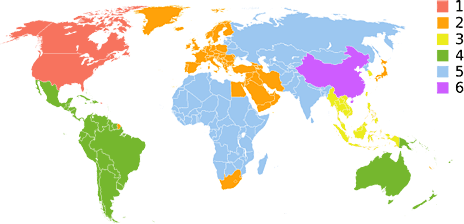
Those same solutions are all available with desktop Macs, and there is even a Universal Binary version of Region X, though the PowerPC version works fine under Rosetta.
The Intel Mac mini and iMac both use standard-sized drives, and while the Matsushita drives that Apple likes to supply are not flashable, Pioneer drives and others (check www.rpc1.org for your specific drive) can be flashed from RPC2 to RPC1 – region free.
The Mac Pro is even easier to modify, and with its extra optical drive bay, there are many options for those who don’t want to update firmware or replace what Apple supplied. In fact, if all you want is multiregion playback, you can hit eBay with $10 and buy an old 1x or 2x DVD-ROM drive from 1996 or so that is RPC1 by default, as all region coding was handled in software at that time.
So what do you do if you don’t want to flash firmware, or, worse yet, you’re using a portable for which there are no flashable drives available? (MacBook and MacBook Pro computers use 9.5mm drives, which at this point are only made by Matsushita, and thus are not upgradable.) You have two options – and while both work, neither are particularly elegant.
Use VLC
The first option is the same one I had recommended for PowerPC laptop owners who didn’t want to replace their drive, and that is to use VLC. VLC performs even better on an Intel Mac than it does on PowerPC, and just like on PowerPC, it doesn’t care about the region counter in OS X or whether your drive matches the disc you are trying to play.
The key to using VLC is to go into the system preferences CD/DVD pane and and deselect DVD Player as the default application for DVD movies. When you insert a DVD movie, it will simply mount on the desktop like any data disk would, and then you can manually launch VLC if your movie is from a foreign region.
For home region movies (US is region 1) you can still use DVD player, but the program will no longer launch automatically.
Many people like VLC, and it’s the simplest solution to the problem. VLC is not, however, a full-featured or particularly slick DVD player. When I had my MacBook, I had VLC installed, but I actually preferred method two, which I will describe next.
UPDATE 2006.09.18: It would seem that Matsushita has revised their firmware such that VLC is no longer a working solution on recently built ‘Books. My early-production MacBook worked fine with VLC, and its late-production replacements worked fine with Windows XP and DVDRegion+CSSFree, though to be honest I didn’t test VLC on the late production MacBook as I’d already moved to the Windows solution for foreign region playback.
The moral here is that you have to try it for yourself, and that depending on which Matsushita drive is in your Intel Mac, your mileage may vary.
The Windows solution bypasses the region code of the disk entirely, so for MacBook owners looking to watch foreign DVDs on their internal drive, this may be the only option.
Windows XP?!?
Intel Macs, in addition to their blazing speed, add one very significant feature that previous Macs never had: the ability to natively run Windows XP using Apple’s Boot Camp Beta. Windows XP, like Mac OS X, is a commercial operating system for which commercial applications are sold.
Just as Apple’s DVD Player is a very nice, integrated, and slick program for watching DVD movies, so too are the many commercial DVD programs available for Windows. The bundled Windows Media Player cannot play DVDs by default, but you can buy an add-on codec to enable it from the same company that makes WinDVD, my preferred Windows DVD software.
Other popular choices are PowerDVD and the same VLC software described above for OS X.
When I travel with a laptop, I generally don’t want to reboot my computer, as rebooting wastes precious battery runtime. If you’re travelling with an Intel Mac, however, I honestly think it’s worth the sacrifice. I compared WinDVD 7 and Apple’s DVD Player on a 2 GHz MacBook, and honestly, the Windows solution is better even without the region issue.
High-end applications like WinDVD and PowerDVD offer a lot of functionality that Apple’s DVD Player lacks, including controls to adjust color outside of the OS settings, sound settings, and terrific utilities to capture still and short clips to video and image files on your hard drive.
Apple’s DVD Player expressly blocks OS X’s screen capture capability, where the commercial DVD players give you terrific controls to pull content from a movie. Bookmarking scenes and enhanced navigation features are other benefits to using a commercial DVD player.
When I travel I tend to use my laptop more for games and movies during flight than for work (unless I’m forced), so the Boot Camp solution is a good option for those looking more for entertainment than productivity while sitting in coach.
Worth the Price
The reason I preferred the Windows solution for DVD playback is that VLC is a freeware program, and, like much freeware,it just doesn’t have the polish of a good commercial application. Of course, the advantage is that it’s free, and this being Low End Mac, that is important.
Personally, however, I prefer to pay for quality and stability than to save some money and sacrifice either stability or ease of use.
Making Windows Region-Free
Now if you want to try the Windows solution, we aren’t in the clear yet. You will need an application called DVDRegion+CSSFree or one of its equivalents. This little program cost me $19.95 about five years ago and has been upgraded many times (for free) since then.
This is a one-trick-pony that is sorely needed in an OS X version. Simply put, when you insert a DVD movie into your drive, this program reads it before the OS and then tells the OS that it’s region 1 (or whatever region you select). Your computer, Windows XP, and your drive don’t know any better and happily play your foreign DVD as though it was a regular Region 1 disk.
This is by far the most elegant approach to defeating region coding, and in five years I’ve never had a disk or drive that this program couldn’t deal with.
Who knows, if enough of us write to the company asking for an OS X version, perhaps we’ll be rewarded with our own native OS X version. This is the kind of utility that Macs are famous for, something that adds a needed function at little cost and with no penalties in ease of use. In short, it’s very Mac-like.
Until then, we’re stuck with VLC or booting into Windows XP.
Parallels Is Not Good for DVDs
One word of warning about the Windows solution, and that is that I wouldn’t recommend trying it under Parallels or any other emulation. So long as OS X has control over your drive, VLC is the only safe bet – and even with VLC there have been reports of drives changing region.
Remember, your drive can only change region a limited number of times, and once it’s done, it’s done. Getting Apple or anyone else to reset the hardware counter is very expensive, if they’ll do it at all, and that worry is another reason why I went with the Windows and DVDRegion+CSSFree solution when I had my MacBook.
Of course, the good news here is that you can try VLC, and if it never changes your drive’s region, you’re in luck (most people fall into this category). If it does change your region, chances are unless you’ve played with regions before, your Mac has three more switches, so you won’t be stuck and can just switch it back manually and then try another solution.
If you have a Windows box lying around you can play with the Windows software described above (WinDVD and PowerDVD both have free trials available, as does DVDRegion+CSSFree), so you can try before you buy.
One More Solution
One final option for those not looking for ultimate portability would be to buy an external DVD drive and run it from your FireWire, USB 2.0, PC Card, or Express Card connector. You can get a flashable drive or just set the external drive to the region you use less often, then with Region X you can reset OS X’s region counter and switch freely between your internal drive for your home region and your external drive for the second region.
Back in the day, I used a similar solution with my Lombard PowerBook, carrying two DVD ROM drives, one set to region 1 and the other to region 2. Using Region, the OS 9 version of Region X, I had the same functionality. Again some drives are old enough (WallStreet owners should check this out) to just be RPC1, and with Region or Region X you are good to go.
There you have it, an Intel-oriented look at multiregion DVD playback on the Mac.
I’ll add a final option for those with a lot of time to tinker, and that is a copy solution (I use Toast Titanium) and a CSS ripper (I prefer Mac The Ripper). Using my ancient G4 Power Mac and its RPC1 drive, I could make Region 1 copies of my Region 2 DVDs, and did this back in 2003 when I moved from a region-free ThinkPad T20 to my first 12″ PowerBook.
Which option works best for you depends on how often you play foreign region DVDs, and where you play them. For movie rentals while traveling, an internal solution like VLC or Windows software is the best option. For playing the foreign-region movies in your own collection, an external or second internal DVD-ROM drive makes a great, low-cost option.
For the most integrated option, swapping in a an RPC1-flashed replacement for your RPC2 internal drive gives you the best of all worlds, though at the highest cost – and unavailable for the MacBook and MacBook Pro. Finally, if you do have an RPC1 drive and still want to watch movies in Windows, just as you need Region X to maintain the region counter of OS X, you will need DVD Genie to do the same function in Windows XP.
Whichever approach you take, the situation is a lot better than it was three years ago when your only option for region free on an Apple laptop was VLC, which back in the 1 GHz PowerPC days provided jittery playback in addition to its unstable interface and frequent crashes.
Today you have a variety of options, from an Intel-optimized and greatly improved VLC to some outstanding software players under Windows XP and Boot Camp. While we don’t yet have a region-bypass utility for OS X like we do for Windows, it’s still undoubtedly the best we’ve ever had it for multiregion movie playback on a portable Mac.
The Latest on Region Free DVD Viewing
- Watching DVDs from Different Regions on Your Mac, Andrew J Fishkin, Best Tools for the Job, 2008.12.04. Hardware and software solutions for watching DVDs intended for a different region.
Keywords: #regionfreeedvd
Short link: http://goo.gl/Y6XLZI
searchword: regionfreedvd
