
The Mobile Mac
MacBook Pleases, but Two Weeks for Repair Is Excessive
- 2006.07.25 -Tip Jar
I've owned the MacBook for alittle less than a month and am largely delighted with itsperformance. Sadly, new-product blues have set in, and my blackbeauty is sitting at Apple's repair depot waiting on a new logicboard.
The problems I had were the same ones others have complainedabout: excessive heat and a "mooing" sound that started about twoweeks after I bought the MacBook. I knew the computer was runninghot, but as I read of newer MacBooks running as low as 55° C,the 72° C that mine hovered at had me worried.
Then I heard the "Moo" and decided to just send it in.
Now on sending it in to Apple, I expected the usual delightfullyquick turnaround, which last time I sent in a computer meant atotal of three days including shipping.
Apple's now had my MacBook at their depot for 12 days, thoughthe tech support rep this afternoon said the parts are in and mycomputer will be returned tomorrow, for a total of 14 daysincluding shipping. That's a long time to be without myMacBook.
Now for me its not that big of a deal; I've got other computersto use, and all of my client files are either on paper or hosted inLawLogix, our Web-based case management application.
The customer should not be kept waiting thislong.
What if I was a student, however, with all of my assignments onthe MacBook's hard drive and no access to another machine fortaking notes or writing papers? There has to be a point at whichApple or any other manufacturer just replaces the machine with anew one and relegates the customer's machine to refurbishment andresale as a refurbished computer through the Apple Store orotherwise. The customer should not be kept waiting this long.
On the good side, however, I know that I am waiting on a logicboard, and with what I've read about the MacBook Pros having theirlogic boards replaced by a new revision, my fingers are crossedthat a new revision of MacBook logic board is the reason for thedelay. I'll know in a few days, but I'm hoping to see a letter andan updated install DVD like MacBook Pro users are receiving.
I'll be content with lower operating temperatures and theremoval of the cow hiding inside.
Graphics and Gaming
As for the MacBook's performance, I know a lot more than I didwhen I wrote my first impression. No, the MacBook hasn't gotten anysmaller or lighter, but my other concerns have proven to beunfounded. The integrated graphics are far better than I hadallowed myself to hope. Using Boot Camp and Windows XPProfessional, the MacBook is a far better gaming machine than Iever dreamt it would be.
Rome: Total War is a game with very high graphicsrequirements, including 64 MB of VRAM, full DirectX 9 support,and support of all the fancy shaders and hardware 3D acceleration.Its not a first person shooter, but it's definitely a graphicallyrich and hardware intensive game.
Another game I was eager to play is Knights of the OldRepublic II: The Sith Lords. I played the first KOTOR on my 1.5GHz PowerBook which had a better than required video card - and Ifound it slow and a bit jittery.
Both of these games play beautifully on the MacBook underWindows XP with fluid graphics and smooth play. True Crime:Streets of LA is another graphically intense game that theMacBook handles with ease.
Only the Mac (universal) version of Doom III has been adisappointment, and I'm thinking some of that might be due to theAspyr port from the PC. I don't have the Windows version, but Iwould love to try it on the MacBook and think that performancewould be better. The Mac version is playable, just jittery, so Ihave high hopes under Windows.
No Region-free DVD
The other area of concern was DVD movies. You might think I'mcrazy worrying about DVD movies when moving from a 12" PowerBook toa 13" widescreen MacBook, but my worries were about region coding,not video quality. DVD movie quality on the MacBook is terrific,but Apple fitted it with the same Matsushita drive that is notflashable to region-free used in other ultra-thin computers.Standard laptop optical drives are 12.5mm in height, but theMacBook and MacBook Pro specify a 9.5mm optical drive. Certain IBM(now Lenovo) ThinkPads share this problem, but on the PC platformit's far easier to deal with region-locked drives than under MacOS X.
Fortunately, those same utilities that I've used for years on myPCs to watch Region 3 movies without using up my four regionchanges work on the MacBook, so long as its booted into Windowsnatively (this won't work on
There are other benefits, including the ability to skip trailersand the FBI warnings on some DVDs and an option to disable runtimeapplications like PCFriendly that are usually loaded with spyware.These other options don't always work, depending on the DVD itself,but I've never had a Region 3 movie fail to play or prompt me tochange my drive's region.
Don't get me wrong, I'm no fan of Windows and would prefer tokeep my MacBook in OS X as much as possible, but the fact isthat there is no hardware solution to make it region-free as oftoday.
When Pioneer releases a slot-loading drive in 9.5mm form factor,that may change. The good news is that there is a lot of very goodsoftware for watching DVD movies in Windows, and since I usuallywatch movies on a laptop while flying, booting into Windows towatch a Region 3 title is only a minor inconvenience.
The Case for a MacBook
Another problem I've had that is not at all Apple's fault isthat there just aren't very many cases out there for the MacBookyet. I had a very nice Waterfield sleeve case for my 12"PowerBook with a vertical orientation to fit in most backbacks, acover flap, and a clip on pouch that I liked a great deal.
Obviously the MacBook is longer in vertical orientation than the12" PowerBook, but in every other dimension it's almost identical.This means that I can still use my sleeve, though it looks a bitstrange with the last inch-and-a-half of MacBook sticking up pastthe end of the case, but the flap still folds over neatly andsecures it closed. SFBags will custom size its bags and alreadymakes one sized for the MacBook.
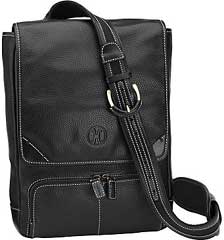 I just bought a very nice Cole Haan messenger bag that is a near perfect fit for theMacBook as well, but it was rather pricey at $220. This is theclosest I've found to a MacBook sized bag, though I think it wouldeven fit a 15" MacBook Pro (tightly).
Availability of bags aside, the MacBook is the perfect travelmachine with the exception of its weight.
Updates Around the Office
Other updates around the law office are minor.
We've fully transitioned to our new Web-based case managementsystem, and the results are terrific.
With two outages and frequent sync failures over the last fourmonths, iCal with .mac just wasn't doing it for our officecalendar.
Other software is unchanged, though we are looking at adding anapplication for automatically checking citations in briefs andcases that are scanned in - unfortunately that application isWindows-only. Still, we have a Windows PC in the office for justsuch instances, and if the requirements of the application aremodest enough, we can also do it under Virtual PC, which is installed on the G4 Mac mini or under real Windows on theMacBook, when it returns.
Hardware Changes
The 15" PowerBook is history. The 13" MacBook has almost thesame screen resolution 1280 x 800 vs. 1280 x 854), is considerablysmaller (though not much lighter), and the screen is much brighter.I switched between the two for some time and found that I justpreferred using the MacBook. I'm not sure if it's the unobtrusiveblack display surround, the fast keyboard, or the rubber-liketexture of the case, but I find the MacBook a more comfortablemachine to use. The humongous touchpad with two-finger right clickmay also play a large part.
The ultralight ThinkPad is also gone, replaced by an evensmaller (though slightly slower) one. I was very happy with thehardware design of the X32, but like the 12" PowerBook, it was justtoo large and heavy for its role. I traded it for a ThinkPad X41, a 2.7 lb. sliver of a machinethat still packs a 12.1" XGA screen, the wonderful ThinkPadkeyboard, and a little less than three hours on batteries.
It also has a large battery that boosts runtime to a hair overfive hours (six if I use very aggressive power management) and aplate battery that clips to the bottom and adds another two hours.This one is considerably smaller than the 12" PowerBook, and insmall battery form simply vanishes in any bag.
As an added bonus, there are quite a number of people installingOS X on regular PC hardware, and the closer a given PC is inspecs to an Intel Mac, the easier the job of creating a"Hackintosh" of your very own. The ThinkPad X41 uses the same IntelGMA 900 graphics as the original Apple Intel developer machines,which makes configuring video much easier than on the X32, whichuses a variety of ATI Radeon that has never been near an IntelMac.
I'm thinking about replacing the stock Intel wireless card withan Atheros card, as those are the same chipsets used by Apple andshow up on Hackintoshes as genuine AirPort Extreme.
The cheap PC laptops (see UsingLow-Cost Laptops as 'Not So Thin' Clients in the Mac Office)are doing fine. I even used one of them as my primary computer fora day when the MacBook was at Apple and the X41 still coming in themail. It was fast and easy to use, and it even has decent soundplaying CDs in the background. Web performance was fast enough thatI just went about my daily tasks barely noticing that I was workingon a 5-year-old $300 laptop instead of the latest and greatest2 GHz Dual Core MacBook.
The iMac G5 and G4 Mac minialso continue to delight, neither one having been shut down in wellover a month.
So things are good in Mac office land, and hopefully I'll havesome happy MacBook news on Thursday. 
Andrew J Fishkin, Esq, is a laptop using attorney in Los Angeles, CA.
Today's Links
- Mac of the Day: PowerBook 500 Series, introduced 1994.05.16. 'Blackbird' includes a 25 to 33 MHz 68040 along with smart batteries and grayscale or color displays.
- Support Low End Mac
Recent Content
About LEM Support Usage Privacy Contact
Follow Low End Mac on Twitter
Join Low End Mac on Facebook
Favorite Sites
MacSurfer
Cult of Mac
Shrine of Apple
MacInTouch
MyAppleMenu
InfoMac
The Mac Observer
Accelerate Your Mac
RetroMacCast
The Vintage Mac Museum
Deal Brothers
DealMac
Mac2Sell
Mac Driver Museum
JAG's House
System 6 Heaven
System 7 Today
the pickle's Low-End Mac FAQ
Affiliates
Amazon.com
The iTunes Store
PC Connection Express
Macgo Blu-ray Player
Parallels Desktop for Mac
eBay

