My First Mac
Confessions of a DOS Queen
Bonnie Wren (a.k.a. Ballpoint Wren) - 2001.04.20
A long, long time ago, in a university office far, far away, I was a DOS queen.
I wasn't born that way. As an English major working as a student secretary, I knew next to nothing about our new IBM clones. But my ability to press the on switch without flinching gave the other secretaries the impression I was a digit-head.
I'd never been considered computer-savvy before, and I liked it. So I went to great extremes to promote my new reputation, including reading the computer manuals.
Then some office bigwigs asked me if I would help the other secretaries with their new computers. Lucky for me most of the tutoring at first consisted of showing timid staff members how the caps lock worked. "See? It's just like an IBM Selectric!"
As the other secretaries progressed, so did I. Soon I was teaching classes like "Managing Your Directories" and "DOS is Your Friend." Staff from all over the campus would call me for help with their computers. When someone jokingly referred to me as the DOS Queen, I felt quite proud of myself.
Then the Macs arrived. In fact, in 1987 a Mac Plus was sneaked into my house by
my clueless engineer boyfriend, 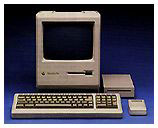 who obviously didn't
realize that Apple only stayed in business by making computers to
hold the trembling hands of technophobes and
computer-illiterates.
who obviously didn't
realize that Apple only stayed in business by making computers to
hold the trembling hands of technophobes and
computer-illiterates.
Hello! I could read a computer manual, couldn't I? What did I need a Mac for?
And talk about funny-looking - it wore a thing on its back called a "Kensington System Saver Fan" and rested on top of a 20 MB hard drive, for which my boyfriend had paid $800 dollars to a guy who built them in his garage.
I laughed about that all the way to work, until some real digit-heads from Computer Science & Engineering scrambled to write down the address of the garage.
Chastened, I gave in and tried it. Instead of DOS directories, there was a desktop with little file folders, and a word processor that introduced me to a compelling concept: "What You See is What You Get." Heady stuff for someone who hated memorizing all those embedded codes for Word Imperfect.
I returned to the office a changed woman. I still taught the classes, but half-heartedly, prefacing each one with: "It's a lot easier on a Mac. . . ."
Meanwhile, the Plus wove itself into every inch of my life. I wrote all my papers with Microsoft Word 3.0, balanced my checkbook with Quicken 1.5, and managed our wedding with Daytimer for Macs. We did our taxes with Macintax.
At night Hubby did . . . whatever it is engineers would do with Excel, Hypercard, and Pascal. On weekends we fought the Black Knight (Dark Castle), played Chessmaster 2000, or installed fun little things like a talking moose.
As the years went by, the Mac handled everything from subscription databases for a monthly parenting tabloid to churning out PTA minutes. You name it, my little Plus did it daily. And on System 5.
Hubby went bad, as they say, when his company sent home an IBM 386. After it died, they gave him a 486. When that crashed, he got a Pentium. Through all this PC death, the Plus and I kept on trucking.
In fact, the garage-born hard drive finally gave up the ghost in 1998, during a particularly strenuous game of Dark Castle (in which an 8-year-old was whipping his poor momma's behind most soundly).
I spent a few lackluster years with Hubby's Pentium - I set up my website on it using PageMaker - but I never clicked with Windows like I did with my old Plus.
That's when I discovered low-end Macs at garage sales. I found a 7100/66 with a Zip drive for my firstborn, a maxed-out 6115 for my youngest, and a beige G3 minitower with a 4 GB hard drive and 98 RAM for me, all for rock-bottom prices. (Thank goodness for Adam Robert Guha!)
Hubby's got a Pentium III now, but I'd still say the Macs are winning the war at my house.
Besides, the only thing that really matters is knowing even a DOS Queen can live happily ever after . . . if she moves up to a Mac.
Bonnie Wren writes Ballpoint Wren, humor columns and more. Pop on over and enjoy a few.