My First Mac
From Road Apples to Golden Apples
Mark Looper - 2000.04.25
The first computer I ever used was in junior high school in the mid-seventies, a TRS-80 with 4 KB of RAM. I then fell way behind the curve, not touching a computer again until I was in college, and not buying one of my own until a year and a half ago! I studied physics and am now a space scientist. From college to the present I have had access to mainframes and workstations, so I never saw the need to buy something that would depreciate as fast as personal computers do. Where I work now, though, most of the desktop computers are Macs, so when the time came that I changed my mind about getting a computer, I bought what I was used to and didn't default to the "Dark Side." Lucky me!
However, I had never done much purchase research on the World Wide
Web (boy, has that changed since!), and I maybe didn't choose as
wisely as I might have. The reason I finally decided to get a computer
was that since 1993 I have owned and driven trucks powered by natural
gas rather than gasoline, and in August 1998 I drove my Dodge van
Clean Across America
And Back, a round trip between Los Angeles and Maine, just to prove
it could be done, and I wanted to create a website on which to post 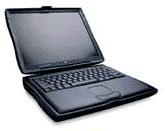 an
illustrated journal as I traveled. Actually, I already had a Macintosh LC II that my parents had given me a
year or so earlier, when they found it wouldn't run that year's tax
software; however, I couldn't get it to work with the Olympus D-220L
digital camera I had bought. (Yes, I was planning to lug the LC II and
a 15" monitor across the country - it's a big van!) So in June 1998 I
bit the bullet and shelled out for the best computer I could afford, a
PowerBook G3 Series with a 233 MHz
processor and no level 2 cache.
an
illustrated journal as I traveled. Actually, I already had a Macintosh LC II that my parents had given me a
year or so earlier, when they found it wouldn't run that year's tax
software; however, I couldn't get it to work with the Olympus D-220L
digital camera I had bought. (Yes, I was planning to lug the LC II and
a 15" monitor across the country - it's a big van!) So in June 1998 I
bit the bullet and shelled out for the best computer I could afford, a
PowerBook G3 Series with a 233 MHz
processor and no level 2 cache.
Readers familiar with Low End Mac will recognize both the LC II and the cacheless PowerBook G3/233/0 as two- and three-bullet Road Apples; both machines were badly compromised to keep costs down, the former with a half-width system bus and 10 MB RAM ceiling and the latter with the absence of a backside cache. I ended up donating the LC II and its monitor to a school I found on the Low End Mac/MacInSchool page for Macs wanted by schools, but I took the PowerBook on my road trip - and on many a subsequent one. I was glad I had decided to get a portable computer - it would have been difficult to lug the LC II around Europe when I posted an online journal for the summer 1999 tour of my church's choir! -- but I found its speed limitations to be increasingly annoying, especially when running Connectix Virtual PC and watching folders open more slowly than they did on the LC II!
As I learned more about Macs from the Low End Mac site and others, I realized that I had always had a soft spot in my heart (or maybe in my head!) for the old all-in-one compact Macs. Showing that I evidently had not learned all that much, I went out and bought another Road Apple, a Color Classic, which shared the limitations of the LC II. But this was the only compact Mac with a color screen available in the United States (just try to find a Color Classic II!), and with the screen resolution boosted to 640 x 480 pixels by MicroMac, I found its monitor easier to look at than the PowerBook's 12" passive-matrix screen, and have ended up using the Color Classic for most of my letter-writing and other basic tasks.
But this story has a happy ending: with a bit of luck and a bit of patience, I have managed to transform both of my former Road Apples into Golden Apples, so that they are now a pleasure to use!
First, in September 1999 I managed to snatch a 292 MHz G3 daughter card with 1 MB of Level 2 cache from The PowerBook Guy. Because the boot ROM is on the daughter card, swapping it for another Apple daughter card is the only way to upgrade modern PowerBooks (though the processor can be desoldered and swapped for a faster one, as Newer Technology is now offering for iMacs). This was top-of-the line and way out of my price range when new, but fifteen months later it was still faster than the then-current 300 MHz iBook and 333 MHz iMac, and about even with the 333 MHz Lombard PowerBook, all of which were slower due to smaller 512 KB level 2 caches. More to the point, for a lot less than the price of a new computer I was able to boost my PowerBook's speed by 130%!
Then, just days ago, I received the long-awaited Sonnet Presto Plus card with which to upgrade the processor, increase RAM, and add Ethernet to my Color Classic. My first look report appeared on this website, so I won't repeat myself here, but in brief, I gained about a factor of four in CPU speed and even more in math speed! My second ugly duckling is now a swan too, albeit a 68040 bird rather than a fast G3.
The PowerBook and Color Classic are the main computers I use at home; since I bought them, though, I have also added two even older Macs to my stable, an SE/30 and an SE. The SE/30 I bought and maxed out with 32 MB of RAM, mostly to experiment with operating systems, including NetBSD and a failed attempt to trick it into running Mac OS 8.1 using Pseud040.
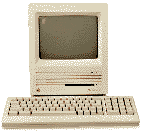 The SE was purchased because I wanted to see what it was like
to run using only floppy disks. Remember, I didn't use a personal
computer from the mid-seventies (the junior high's TRS-80) until I
began using Macs at my current job in 1993, so I missed that joyful
hard-drive-less experience the first time around! Both have ethernet
cards, so now my computers can all talk to each other via 10Base-T,
though so far I have just used a crossover cable and not invested in a
more permanent hub setup; it was a bit of a challenge fitting the
ethernet driver and network software on an 800 KB floppy with System
6.0.8 for the SE! You can see a family portrait of how we all
celebrated Y2K on my little (two pages) Mac Museum.
The SE was purchased because I wanted to see what it was like
to run using only floppy disks. Remember, I didn't use a personal
computer from the mid-seventies (the junior high's TRS-80) until I
began using Macs at my current job in 1993, so I missed that joyful
hard-drive-less experience the first time around! Both have ethernet
cards, so now my computers can all talk to each other via 10Base-T,
though so far I have just used a crossover cable and not invested in a
more permanent hub setup; it was a bit of a challenge fitting the
ethernet driver and network software on an 800 KB floppy with System
6.0.8 for the SE! You can see a family portrait of how we all
celebrated Y2K on my little (two pages) Mac Museum.
So maybe I'm just a gearhead, but for me the secret to Mac happiness has been upgradability; getting as much computer as you can find or afford, and then boosting its performance later as prices come down (as for the PowerBook) or as commercial upgrades become available (as for the Color Classic). This lets you get familiar with a machine's behavior and quirks, and then fix them as opportunity arises. In the case of my black-and-white compact Macs it's more a matter of inexpensive "performance art" (who really needs ethernet for an SE?) and with the Color Classic it's, well, it's a Color Classic thing - you wouldn't understand unless you're Of The Body - so my decisions were not wholly rational except in the case of the PowerBook!
Nonetheless, I have pretty much convinced myself that despite the affordability of the iMac, my next computer will be an obsolete Power Mac, probably the bottom-end model right when the price drops after a new lineup is introduced, at least unless the iMac becomes upgradable without a lot of hacking (desoldering processors from daughter cards, using the unsupported mezzanine slot, etc.). Are you listening, Steve J?