My First Mac
Ten Years With an SE
Matt Wolanski
I am 30-year-old working full-time as a pre-sales consultant for an IBM authorized assembler. I deal with the RS6000 product line, many of which use the PowerPC 604/604e CPU. I have worked since 1992 as the entire graphics arts/typesetting department for Presentations coupon books (this competes with Entertainment coupon book in several local markets).
My very first computer was a Texas Instruments 99/4A, with which I had the expansion box, printer, extra RAM, command modules, DS/DD dual half-height floppies, etc. I used this system from the 7th grade through most of college.
I resisted looking at Macs in the college library for the first couple of years, partly because I had seen Apple II type systems and had heard of so many different models (II+, IIe, IIgs, etc.) that I figured if they can't make up their mind what to call it, why look at.
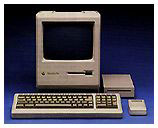 The first Mac I saw was a Plus in the school library, when a girlfriend
dragged me along to help her type a report. The library had dozens of
Mac Pluses connected to a LaserWriter. The only Intel based system I
had seen up to this point were 8088s or maybe ATs or XTs. Still I
resisted, since my TI was working fine for what I needed at the
time.
The first Mac I saw was a Plus in the school library, when a girlfriend
dragged me along to help her type a report. The library had dozens of
Mac Pluses connected to a LaserWriter. The only Intel based system I
had seen up to this point were 8088s or maybe ATs or XTs. Still I
resisted, since my TI was working fine for what I needed at the
time.
In my third year at college I became the monitor of a building in which there was a Mac lab with what were the latest and greatest Macs at the time (IIfx, IIci, etc.). It didn't take long to get hooked.
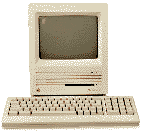 I bought a Mac SE in 1991 or
so. I took the RAM up to 4 MB soon thereafter. I added a Novy 33 MHz
68030 accelerator, 20 MB of RAM, and a 19" monochrome monitor a couple
years later. I have used this system to do many many things. I have had
a GCC laser printer, CD-ROM, Zip drive, Syquest drive, and various
modems attached to this system with little or no problem. I used it to
connect to the internet back in the days before the World Wide Web was
invented. I even ran software on this system that says "PowerPC
required" on the box. (Imagine trying to load a windows app that says
Pentium 90 required on the box onto an AT.)
I bought a Mac SE in 1991 or
so. I took the RAM up to 4 MB soon thereafter. I added a Novy 33 MHz
68030 accelerator, 20 MB of RAM, and a 19" monochrome monitor a couple
years later. I have used this system to do many many things. I have had
a GCC laser printer, CD-ROM, Zip drive, Syquest drive, and various
modems attached to this system with little or no problem. I used it to
connect to the internet back in the days before the World Wide Web was
invented. I even ran software on this system that says "PowerPC
required" on the box. (Imagine trying to load a windows app that says
Pentium 90 required on the box onto an AT.)
I bought a used Performa 630 CD (33 MHz 68LC040) system in order to have a color monitor to surf the Web a few years back, but I continued to use the accelerated SE to get serious work done, including several editions of a coupon book that has since grown to about 100 MB per edition.
About 6 months ago I bought a B&W G3/300 and it is fully 20 times faster than the Performa or the SE (the Performa was not noticeably faster than the SE, I think because of supporting color monitor and having to scroll around a lot on 14" monitor compared to 19" on the SE). Here it is only 6 months later, and I'm wishing I could buy a G4. Come to think of it, maybe I'll wait for the 700 MHz G4-IIs due out in late 2000.
If anyone is interested in a Mac SE accelerated with 20 MB RAM, a 730 MB hard drive, a 19" monitor, and a 28.8 kbps modem, I don't use it much since I got the G3. I'll even throw in an Apple LaserWriter that was working right up until it stopped feeding paper (I haven't had time to figure out what's wrong with it).
I have been unfortunate enough to use a 233 MHz Wintel system at work that was purchased new by the company when I started 2 years ago. They are already talking about a new software tool that I will have to use that will require a system about twice as powerful as this one is now.
I got nearly ten years of use out of my Mac SE and about 5 years use out of the Performa (if you include the previous owner's time), and who knows how much from my G3 (unless I sell it to fund a G4), but my Windows system is undone by a single application upgrade after only two years. (Admittedly, with the exception of the one application, a 233 MHz Pentium II is not quite ready for the junk heap, but the fact is that an entire pallet of 486 CPUs couldn't get $50 at an auction recently. How far behind is the Pentium II?) At least when a Mac SE or Mac Plus dies, you can make an aquarium out of it.