
The Efficient Mac User
How Consumer Reports Could Compare Macs Fairly
- 2005.11.23 - Tip Jar
Many Low End Mac readers have responded to last week's article on how badly Consumer Reports (CR) handles Macintosh computers in their holiday gift buying guide. There has been a lot of agreement and affirmation, and it's great to see that the word is getting out about the shortcomings of CR's ratings.
A few readers mentioned that they hoped for CR-style ratings charts in my article, but they were disappointed not to find them. I considered including charts with the original article, but I decided not to because I didn't have access to the data for all of the machines I wanted to include.
On further consideration (and after discussion with the editors at Low End Mac), I decided to follow-up with some Consumer Reports-style ratings charts that compare Apple's machines appropriately and fairly.
These charts show how CR could have compared Apple's computers with Windows PCs. They were created by the author, adpted from CR's data, and are provided as an example only and are not intended to replace CR's copyrighted material.
Disclaimer: The original CR data used to generate the charts below (on pages 36 & 37 of the December 2005 issue, Vol. 70 No. 12) only included a total of three Macintosh desktop computers and two Macintosh laptops. Thus, the four additional Macintosh machines shown below include ratings data that is approximated and not a product of CR's testing (or any other formal testing).
If you read the first article, you'll know that I had two primary complaints about the CR ratings charts. First, they segregated the Macs into a Macintosh "ghetto" so that point-by-point comparison was difficult or impossible. Second, they included a minimal number of Macintosh systems, in the process suggesting that the Apple line either didn't have machines that would fit into their categories or inferring that one system or another was worse than it purports to be.
Here, then, is my version of a good Desktop System ratings chart. Notice that I have added one of the Power Mac G5 systems to the "workhorse" category. (Click on the these charts to see the full-sized originals.)
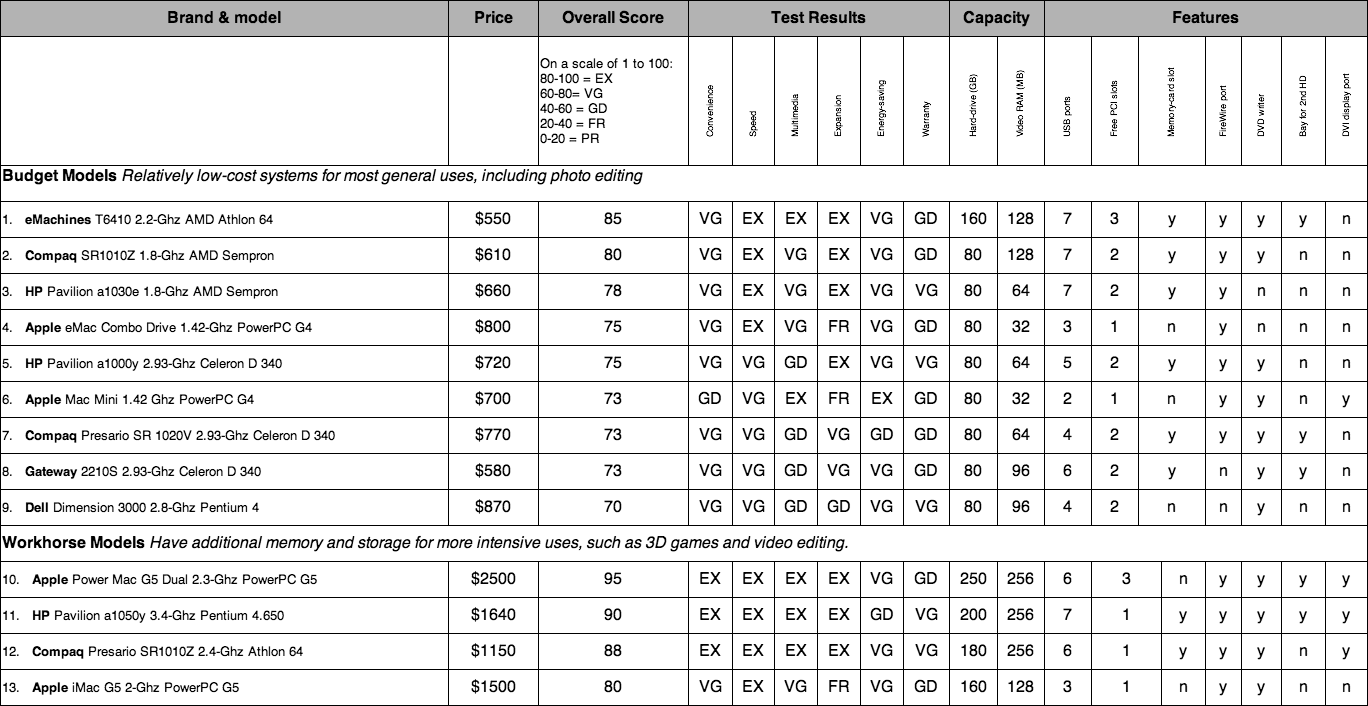
Ranking Key:
- EX = excellent
- VG = very good
- GD = good
- FR = fair
- PR = poor
Notes in the ratings:
Systems are ranked by their overall scores. The best that I can tell is that these are determined by the test results; therefore, the score and test results for the Power Mac G5 system (line 10) are approximated using the system specs and a comparison to the non-Macintosh machines on the chart.
USB ports listed do not include the two USB 1.1 ports available on Apple keyboards, which are supplied with all Macintosh systems listed except the Mac mini.
Warranty presents an interesting rating when it comes to the Apple machines, since CR ranks the Apple warranty as "Good" while they consistently give Apple very high marks for customer service and support.
Price is approximated for the system only, with the exception of the iMac and eMac, which both include built-in displays. Please note that the price for the Mac mini has been adjusted from CR's approximation, since they added in $78 for mouse and keyboard, which are not a part of the "system only" described.
Likewise, here is an adjusted version of the Laptop Computers ratings chart. This time you'll notice that I've added three additional Macintosh 'Books into the mix.
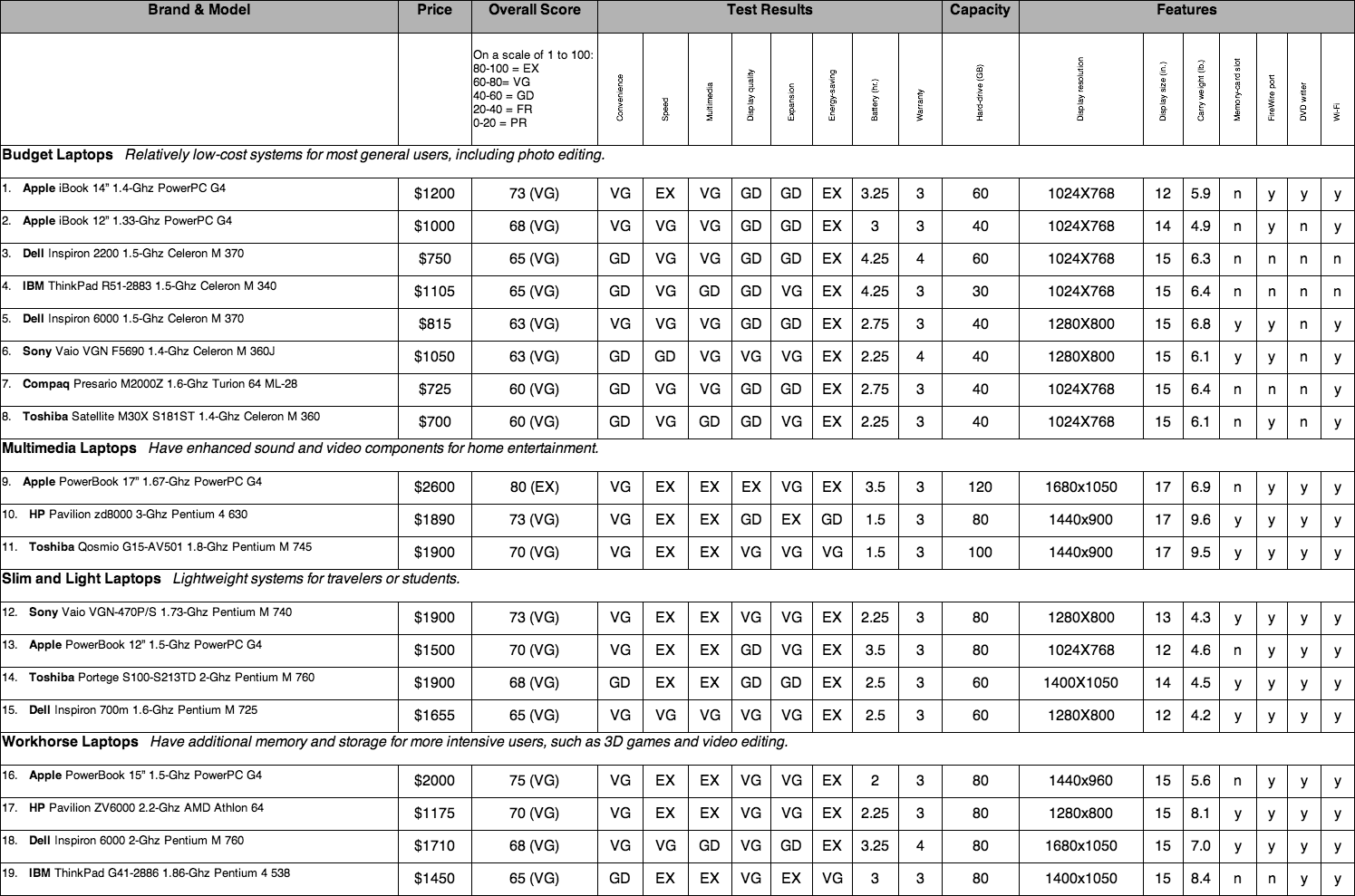
Ranking key is the same for both charts.
Notes on the ratings:
Again, systems are ranked by their overall scores. As with the desktops, I approximated results for the additional included machines: the 12" iBook (line 2), the 17" PowerBook (line 9), and the 12" PowerBook (line 13). This time, however, my approximations were based on comparisons to other non-Macintosh machines and to the Macs that were ranked.
Note also that the listings (taken from CR) show an older model for the 15" PowerBook, which now has a better screen resolution for the same price. (I'll grant that this is likely the case for many of the systems listed because of CR's lead time.)
As you can see, when placed side-by-side, the Macintosh systems hold their own and, in many cases, rise to the top for performance, features, and overall ranking. Consumer Reports truly ought to develop a more comprehensive and fair cross-platform rating system, especially given the rising popularity of the Macintosh platform.
If all other considerations are truly equal, CR should give consumers a clear picture of how Macs compare to their Windows PC counterparts.
One more conclusion that I arrived at through this exercise: CPU speed is fairly useless for determining the functionality of a machine. I know that Apple proponents (and Apple spokespeople) have been claiming this for years, but a close look at these charts shows it demonstrably. Anytime you can have 3 GHz, 1.8 GHz, and 1.67 GHz machines all performing equally with something as taxing as multimedia (see "Multimedia Laptops"), you know there is a disparity. This is not just a difference from one chip maker to another, either - notice the number of variations made by Intel but ranked approximately the same for speed and performance. Chip speed is truly no longer a predictor of performance.
Once again, I hope this is helpful in guiding your holiday
shopping. Shop smart! 
If you find Ed's articles helpful, please consider making a donation to his tip jar.
Join us on Facebook, follow us on Twitter or Google+, or subscribe to our RSS news feed
Today's Links
- Mac of the Day: PowerBook 190cs, introduced 1995.08.28. The last 680x0-based PowerBook could take a PowerPC upgrade.
- Support Low End Mac
Recent Content
About LEM Support Usage Privacy Contact
Follow Low End Mac on Twitter
Join Low End Mac on Facebook
Favorite Sites
MacSurfer
Cult of Mac
Shrine of Apple
MacInTouch
MyAppleMenu
InfoMac
The Mac Observer
Accelerate Your Mac
RetroMacCast
The Vintage Mac Museum
Deal Brothers
DealMac
Mac2Sell
Mac Driver Museum
JAG's House
System 6 Heaven
System 7 Today
the pickle's Low-End Mac FAQ
Affiliates
Amazon.com
The iTunes Store
PC Connection Express
Macgo Blu-ray Player
Parallels Desktop for Mac
eBay

