
No Windows for Me
A Month with Windows: One Apple Fanboy's Experiment
- 2008.02.12
I am what many people consider an Apple fanboy - even my column is entitled No Windows for Me.
But I'm also a naturally skeptical person. Is Apple really, truly better, or have I just accepted as fact what others say about Apple?
I have decided to perform a 30-day experiment by completely reversing my computing principles to test this.
Readers, this may shock you, but I am about to use Windows - for a full month. This begins when the experiment started, February 6, 2008. It will end one month later, on March 6, 2008.
Parameters
The main point of this experiment is to determine whether or not Windows is, indeed, unbearably horrid for the average, moderately skilled user. Plain English: To see if I am really as devoted to Apple as I think I am.
Readers, do not worry. I shall still be an Apple devotee. The mission is to see exactly why.
Machines I'm Using
The machines I am going to use for this experiment are both Windows XP Professional-based laptops.
 The
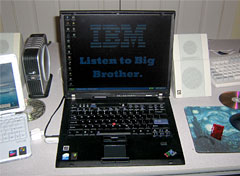
first machine is a Lenovo ThinkPad T60. Specs on it are a 2 GHz
Intel Core Duo with 1 GB RAM, a 100 GB hard drive, and a 15" 1400
x 1050 LCD.
The
first machine is a Lenovo ThinkPad T60. Specs on it are a 2 GHz
Intel Core Duo with 1 GB RAM, a 100 GB hard drive, and a 15" 1400
x 1050 LCD.
Here it is: (Yes, readers, I made that wallpaper and touched it up pixel by pixel in MS Paint. Score: Microsoft 0, Apple 1.)
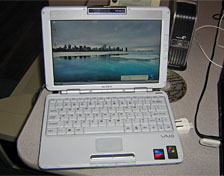
The second machine I will be using is a Sony VAIO PCG-TR3AP. It is what you'd call the exact opposite of the MacBook air. It has a small footprint but is 1.25" thick.
 Specs
on it are: 1 GHz Intel Pentium M, 1 GB RAM, 40 GB hard drive,
and 10.6" 1280 x 768 glossy display. It also has, may I note, a
built-in DVD/CD-RW drive. Very impressive for a laptop of that
size.
Specs
on it are: 1 GHz Intel Pentium M, 1 GB RAM, 40 GB hard drive,
and 10.6" 1280 x 768 glossy display. It also has, may I note, a
built-in DVD/CD-RW drive. Very impressive for a laptop of that
size.
Note the ThinkPad next to it and the CD behind it for comparison. It's really, really tiny.
Software I'm Using
For the most part, I am going reasonably standard.
For Web browsing I use Firefox 2.0.0.12 with the iFox Smooth theme, to make the UI look more like Firefox. No add-ons except for the theme.
For my music-listening pleasure, I use iTunes 7.6. It's the best.
For torrents, I use µTorrent. It gets reasonably decent download speeds, while having a nice, simple user interface and useful controls, settings, and features.
For typing, note taking, presentation making, and the like, I use Microsoft Office 2008. It's actually, I hate to admit it, an improvement over iWork and Office '03 in terms of sheer usability.
For AIM and Jabber chatting, I use Pidgin. It's a really simple, clean IM app, which runs under GTK+ and can be used in a console window, with its text-based derivative, Finch.
And, finally, to unzip the most stubbornly stuck files (Ain't I funny??), I use ZipGenius.
The Mission So Far
Readers, as this column is typed, a Lenovo ThinkPad T60 is humming away on my kitchen counter being typed on. It is the machine which I will begin speaking of. Right now, how it's all gone so far.
As for the ThinkPad, I got it with Windows XP Pro installed, and almost all of the drivers installed, save for the power meter utility. The internal wireless worked when I got it, as this is a used machine, thankfully. (I prefer used, readers, because all of the bugs are worked out by the owner, assuming he's honest.) Installing and setting up all of the above apps took around an hour and a half.
Installing the drivers was a fairly excruciating process, because of the individual driver applications. When you install them (luckily, the only one I had to deal with on this particular machine was the power meter), they tell you that the file may harm your computer and then open to a small "wizard" (in Mac terms, a setup app). After it hums away for a few seconds, the driver thingy installs and prompts you to restart your computer. Excruciating, actually.
The VAIO was a lot harder. It was originally running Ubuntu as my main Linux machine. I fooled around with it for a day or so to get the 1280 x 768 resolution working under Ubuntu but then kinda stopped using it. Anyway, I had to dig up some XP Pro CDs and install all of the drivers by the same method described above.
We, by the way, are not talking pedestrian drivers here. These are 15+ MB monsters we're talking about, with such obscure names as "p961b_fprx32_562ww.exe". Wonderful. They install in the same way, but these Sony drivers have different functions. All in all, I had to install about fifteen huge, complicated drivers, plus six fairly large applications (the above). It took me the better part of four hours, and, needless to say, I was quite exhausted after I finished.
Enough with setting up? How's the actual usage going so far?
It's going decently, thank you. Things I miss about OS X are Skitch, iChat, and Spotlight. I am also quite fond of Camino. On the other hand, Leopard on my 1.33 GHz iBook G4 with 1 GB RAM runs like retarded molasses in Antarctica, so I'm quite pleased with the overall speed of these Windows notebooks!
I have installed the somewhat-difficult-to-find-in-a-non-corrupted-download Windows Royale Noir theme on my machines, which does not cause any negative performance issues and causes the taskbar and windows to become a shiny black. So, you could say, one great thing is it's really easy to theme Windows XP without screwing up your system.
Preliminary Conclusions
I miss OS X. I love how fast XP is on my machine, but there are just some things you need to sacrifice speed for, like intuitive drawing/image webposting/screen sharing software, stellar AIM clients, and lightweight Mozilla-based browsers. Also, who else has a kewl translucent menu bar and full-size file preview? Didn't think so.
This experiment is not over; this is the preliminary overview with a smattering of how the first week has gone. Expect two more updates, one around February 20, and another in the second week of March.
Readers, please, please email me with your thoughts. I am open to comments, questions, concerns, and even rants.
Stay tuned! 
Read the conclusion in One month Windows saga: Not all that bad.
Join us on Facebook, follow us on Twitter or Google+, or subscribe to our RSS news feed
Benjamin Zalutsky is a recent Mac convert.
Today's Links
- Mac of the Day: Power Mac 7500, introduced 1995.08.08. This workhorse introduced a new desktop case and CPU daughter cards for easy upgrade.
- Support Low End Mac
Recent Content
About LEM Support Usage Privacy Contact
Follow Low End Mac on Twitter
Join Low End Mac on Facebook
Favorite Sites
MacSurfer
Cult of Mac
Shrine of Apple
MacInTouch
MyAppleMenu
InfoMac
The Mac Observer
Accelerate Your Mac
RetroMacCast
The Vintage Mac Museum
Deal Brothers
DealMac
Mac2Sell
Mac Driver Museum
JAG's House
System 6 Heaven
System 7 Today
the pickle's Low-End Mac FAQ
Affiliates
Amazon.com
The iTunes Store
PC Connection Express
Macgo Blu-ray Player
Parallels Desktop for Mac
eBay

