
Mac OS X comes with built-in integration to work seamlessly on a Mac Open Directory network or Microsoft Active Directory network. It is a fairly easy task to set it up to authenticate to a Unix/Linux OpenLDAP server. However, it is another matter to get it to read the home directory from OpenLDAP and mount it over NFS on a Linux server automatically.
The goal was to allow any valid network user to login to any Mac and have their home directory mounted from a Linux NFS file server. Getting to that goal required a series of baby steps and missteps. This article will take you through it as clearly as I can describe it. I found plenty of information on the Internet that covered bits and pieces – hopefully this will pull it all together for posterity.
Background Information
Before getting into the details of OpenLDAP, it is helpful to know how the Mac talks to Linux NFS servers and something about OS X AutoFS. For background information on connecting to Linux NFS servers, see Playing Nice with Linux NFS. And for additional background information on AutoFS, see Introduction to AutoFS in Mac OS X.
With the background stuff out of the way, we can focus on setting up OpenLDAP for Mac OS X clients. It turns out there is a little bit of work to do on both the OS X client and the Linux server.
Configuring OS X to Use OpenLDAP for Authentication
Open the Directory Utility in the Utilities folder, and add either the name or IP address of the OpenLDAP server.
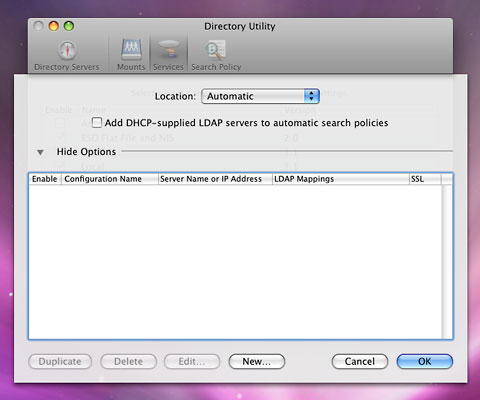
Then, on the Services tab, enable LDAPv3 for the service type. Edit it and select “RFC 2307 Unix” under LDAP Mappings. This should be the default setting.
You should not have make any fine grained changes to the LDAP Mappings, but it is nice to be able to drill down and change some of the settings if you want to customize things later.
Configuring OpenLDAP for OS X clients
OpenLDAP is an open source implementation of the Lightweight Directory Access Protocol (LDAP) used to centralize authentication and authorization in a network. In the Unix world, it serves the same role as Open Directory (based on OpenLDAP) in a pure Mac network.
In Red Hat Enterprise Linux, OpenLDAP runs as a service and is configured with files in the /etc/openldap directory.
To support OS X clients, the OpenLDAP schema needs to be extended by adding two lines to the /etc/openldap/slapd.conf file. The lines are added near the top of the file after the other include directives.
include /etc/openldap/schema/samba.schema
include /etc/openldap/schema/apple.schema
The samba.schema file is part of the Samba project and can be downloaded as part of the Samba source code. You can get the apple.schema directly from your Mac after installing the system tools. On my system, the Mac file was found in /private/etc/openldap/schema/apple.schema.
Copy each plain text file to the the /etc/openldap/schema directory on the Linux server. There were one or two attributes in the apple.schema file I had to uncomment. After installing the new schemas, restart OpenLDAP.
Adding Automap Records to OpenLDAP
With the Apple schema installed, automount map records can be added to the OpenLDAP directory that OS X will use to mount remote home directories for network users.
The version of OpenLDAP I used on Red Hat Enterprise Linux 5 did not have any automountMap objects defined. So I firstcreated two automountMap objects, one for auto_master and one for auto_home. These names will make sense if you read the background information on AutoFS. Here are the LDIF definitions for those objects:
dn: automountMapName=auto_master,dc=example,dc=com
objectClass: top
objectClass: automountMap
automountMapName: auto_master

dn: automountMapName=auto_home,dc=example,dc=com
objectClass: top
objectClass: automountMap
automountMapName: auto_home
Next, I created an auto_master record that tells OS X to look at the auto_home map to find out where the home directories live:
dn: automountKey=/home,automountMapName=auto_master,dc=example,dc=com
objectClass: top
objectClass: automount
automountKey: /home
automountInformation: auto_home
Finally, I created the auto_home record with the NFS server name and a wildcard entry for the home directory:
dn: automountKey=*,automountMapName=auto_home,dc=example,dc=com
objectClass: top
objectClass: automount
automountKey: *
automountInformation: -fstype=nfs myserver.example.com:/home/&
With the automount records in LDAP, OS X clients that are configured with the OpenLDAP server will try to mount the home directories of network users on myserver.example.com.
When the home directory is successfully mounted, it is fully integrated with the OS X desktop. The home directory gets mounted locally at /home instead of /Users, and files in the remote /home/user/Desktop directory appear on the Mac desktop.
Short link: http://goo.gl/J08Nwt
searchword: openldap
