
In the last few days, I have become the proud owner of a 12″ PowerBook G4, a replacement for my 12″ iBook G4 that died a few weeks ago.
Looking at the two machines, they are virtually identical specification-wise.
Both are 12″ models sporting a 1024 x 768 screen with 32 MB 4x AGP graphic chip, 133 MHz system bus with 1.25 GB DDR 2100 RAM, an AirPort Extreme card, and built-in Bluetooth 1.1.
The two main hardware differences are processors and graphics chip. The iBook has a 1.07 GHz processor vs. the 1.0 GHz processor in the PowerBook, and the iBook had ATI Mobility Radeon 9200 graphics whereas the PowerBook has an Nvidia GeForce FX Go5200.
Both machines are running from the same hard drive, a 120 GB Western Digital Scorpio with Mac OS X 10.5 Leopard. In fact, I simply pulled the drive from my iBook and put it straight into the PowerBook, and then I picked up where I left off – one of the amazing features of a Mac.
Is There a Difference?
So how do the two compare?
Does the very slightly faster processor in the iBook give it an edge? I Geekbench all my machines so I can compare, and the iBook benched at 613 compared to the PowerBook, which only benched at 598, a 2.5% difference.
From various forums and tech sites, I can gather that the different video cards perform pretty much the same, with the ATI card giving slightly better results in gaming, but would not necessarily in the iBook.
However, in the real world, the PowerBook certainly feels a lot faster. Navigating around the Finder is a lot smoother, and Quick Look for PDF and MP3 is a lot faster. Everything in general seems nippier, and even YouTube videos run a little smoother.
I have been trawling through web pages all day, flitting back and forth, running multiple tabs, and it coped very well with only Facebook chugging slightly occasionally.
The one place that my iBook choked on a lot was iTunes. At writing this, Apple are still releasing updates for iTunes for those PowerPCs running OS X 10.5 Leopard. 10.5.3 is the current version of iTunes, and it used to throw up the horrible spinning wheel of death a lot on my iBook – it is still there on the PowerBook, but not as much and it is more palatable.
Listening to music on the PowerBook, there is a huge improvement. The sound quality is amazing, with superb bass. It has the best sound I have heard on a laptop in a long time. I fired up some hip hop, and it thumped it out.
I didn’t expect there to be a massive difference speedwise between the two machines, but I am pleasantly surprised with the moderate increase in speed and stability.
iBooks were aimed at the consumer market, whereas PowerBooks were more expensive, tend to have better hardware and more reliability, and are aimed at the professional market.
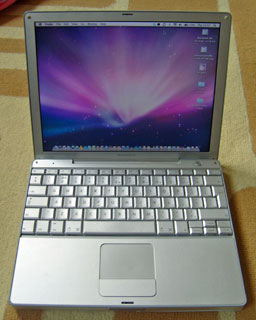 Simon Royal’s “new” 12″ PowerBook G4.
With the hardware aside, let’s look at cosmetics. This is where the the PowerBook comes in to a league of its own.
I have had many iBooks, both G3 and G4, and the white plastic feel was nothing new to me. Cosmetically they looked nice, but didn’t age very well. I have had plenty of Titanium PowerBook G4s, but never physically seen an Aluminum PowerBook before. I bought this 12″ purely on specs.
When it arrived and I pulled it from the box, I was amazed. This is a 7-year-old Mac, and it is is pristine condition with only a few tiny dents. The design and finish on the Aluminum ‘Book is amazing; it is jaw-droppingly gorgeous.
Both machines are 12″ models, but the PowerBook seems so much smaller than the iBook. There are no edges on the PowerBook around the keyboard, whereas the iBook has a thicker edging around the keyboard, making the PowerBook a quarter of an inch narrower.
The space at the top of the keyboard is slimmer, only housing the smaller power button as opposed to the larger power button and speakers on the iBook. The trackpad is smaller, and the mouse button is absolutely tiny on the PowerBook, which took some getting used to. This brings the whole depth of the PowerBook down by over half an inch.
With the lid closed, it is a thinner and smaller laptop than the iBook, and the silver metal finish throughout – even on the keyboard – makes it look awesome. It does make it a very slippery device to hold, and when you rest your wrists on the wrist pad you do find yourself slipping a bit. The metallic keys leave your fingers feeling a little shiny after typing for a while. (I wrote this article on it.)
Both machines are difficult to open and upgrade. My PowerBook came without a hard drive, so I had to fit mine before I could use it. Taking it apart is easier than an iBook. The PowerBook is all screwed together, and accessing the hard drive was fairly easy. The iBook tends to be clipped together, and opening one can be tricky without damaging the plastics.
I have had many an iBook that has suffered the infamous graphic chip problem where the solder points separate from the logic board, causing the logic board to fail and the machine to become unusable.
From what I have read, the 12″ PowerBook G4 is one of the most reliable Apple’s and does not suffer from the graphics chip problems of the iBook range.
If you are in the market for a mid G4 laptop and can’t decide which to choose, I would suggest a PowerBook. The looks, the design, and the build quality trounce the iBook.
Follow Simon Royal on Twitter or send him an Email.
Like what you have read? Send Simon a donation via Tip Jar.
keywords: #powerbook #ibook #12 #techspectrum #simonroyal
short link: http://goo.gl/k6YikJ
searchword: powerbookvsibook

I’ve switched hard drives with PCs before and it worked out pretty cool. I think that’s very cool, I also have two of them, an iBook G4 and PowerBook G4 with really no difference in the specs, I really like the performance of both of them for old computers, though the reason I’d choose the iBook is because the PowerBook isn’t in that great condition, it’s been beat up a lot and it can be a bit more convenient to take the iBook somewhere.