
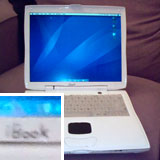
Lombard painted white.
I love to mod my Mac and personalise it, and over the years I have done some crazy things. But my latest idea has gained me some very interested looks.
A few years ago I painted a Lombard PowerBook G3 white and wrote iBook on it. It was a bad and quick effort painted on with a brush. Also notice the white keyboard instead of the standard bronze keyboard. It is a keyboard from a Clamshell iBook – they share the same connectors and are interchangeable.
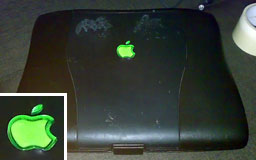
WallStreet PowerBook with green logo.
I have changed the Apple logo in a Wallstreet PowerBook G3 to green. Interestingly, the coloured logos you find in the top of an iMac G3 casing fit perfectly. (Publisher’s note: I just verified this by putting my WallStreet next to a Bondi blue iMac.)
I have changed the Apple logo in a Lombard PowerBook G3 to a retro rainbow Apple.
I took two iMac G3s and mixed up the coloured casings.
A Blank PowerBook Keyboard
About a year ago, I decided I was going to remove all the markings from my Titanium PowerBook G4‘s keyboard, leaving it totally blank. After reading around and searching the Net, there was surprisingly little info out there by people who had done it.
Armed with various sandpapers, I started sanding lightly. The first thing I noticed was how well this lettering was applied. I started off with some fine 200 grade sandpaper, but that wasn’t touching it, so I upped it to a 160 grade.
At this point, I realised it was going to take a lot of work, and having the keys still on the keyboard was going to make it hard. So I popped them all off carefully – even the spacebar, for some reason. One by one, with tiny amounts of sandpaper, I began sanding. The bigger the keys, the easier it was. The arrow and function keys were really fiddly.
I didn’t want to mark the keys, so I couldn’t sand too roughly, but I needed to apply enough pressure – otherwise it wasn’t going to work.
Five hours later and with very sore fingers, I had completed it; I popped all the keys back. Be careful, most of the keys just click back in, but the larger keys have metal supports that slide in holes and require a bit of skill to get them back on.
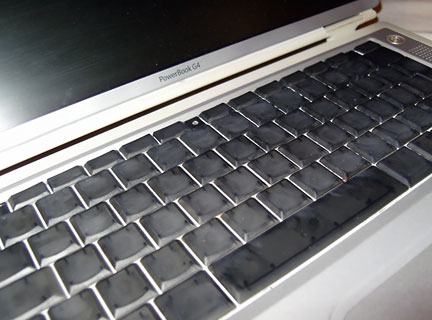
Titanium PowerBook G4 keyboard with markings removed.
The finished product was good. Some of the keys had some scratches on them where I had sanded too much. A quick polish up, and the ‘board looked really cool.
A Blank iBook Keyboard
Last week I was sitting there with my “new” iBook G4, thinking how could I mod this beauty, and I decided the first thing was to once again remove all the markings from the keyboard. A totally white ‘board would look amazing.
I washed all the keys before sanding too. This is a great opportunity to clean up your keyboard. With all the keys off, you can get all the grime out from underneath them too.
Learning from last time I used fine grade sandpaper to start with. The markings on the iBook keyboard were not as tough as the PowerBook and came off very easily. I sanded with the 240 grade initially, then smoothed them over with 800 grade wet and dry sandpaper. It only took a couple of hours.
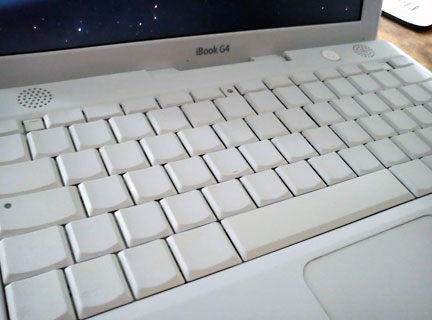
iBook G4 keyboard with all markings removed.
Do not try to shortcut it with a rotary tool. I tried and marked a few keys with nasty scratches. This is a long process, but if you want it to look good when finished, then you have to put the time in.
I am typing this article on a ‘board with no markings. For someone who can type reasonably well, it is amazing to know that your brain just knows where the keys are. Typing this, my fingers are just going in the right place without me consciously thinking about it.
Follow Simon Royal on Twitter or send him an Email.
Like what you have read? Send Simon a donation via Tip Jar.
keywords: #remove #markings #keyboard #ibook #powerbook #techspectrum #simonroyal
short link: http://goo.gl/QocpFz
searchword: removekeyboardmarkings
