
2010 – At Low End Mac, we don’t scoff if you are still using a G3. We don’t laugh if you are still using Mac OS X 10.4 Tiger. We embrace these and ask you to share your experience. This is why I am writing about how Tiger handles on my 500 MHz G3 iBook.
In this OS X 10.6 Snow Leopard multicore Intel age, you could be forgiven for thinking a G3 has no place, but you would be wrong. My little G3 iBook is still going strong, and while it won’t run OS X 10.5 Leopard – let alone Snow Leopard – it isn’t dead in the water yet.
Can a 500 MHz G3 running Mac OS X still be usable in 2010? I have an iBook G3 and am about to answer that question.
Tiger is still supported by most software makers, at least for now. The recent announcement that Firefox 3.7 will drop support for Mac OS X 10.4 is a bit of a blow, but Firefox 3.6 is still good, and there are plenty of other browsers still supporting 10.4.
What about speed? My 500 MHz iBook is maxed out with 640 MB RAM, and the extra memory helps. For anyone still using a G3, chuck as much RAM at it as you can – this just gives Tiger more breathing room and puts less strain on your hard drive.
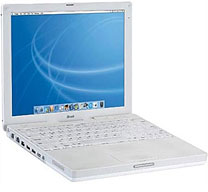 Boot time is under a minute, which is amazing for a 9-year-old machine. The Finder is very snappy with minimal lag. Loading apps is where you notice some slow down. Firefox 3.6 takes quite a few bounces before it is loaded, but once up and running, it browses and zips from web page to web page very quickly.
It handles Flash-rich sites quite well, although I use FlashBlock, a Firefox plugin, to stop all Flash animations from loading automatically, partly to save on page loading times and partly because they annoy me.
YouTube and online video sites do suffer on the G3 under Tiger. Earlier versions of OS X seemed to handle the combination of YouTube and G3 a bit better (see 3 Ways to Better YouTube Viewing on Older Macs), but then you run into the problem of browser plugins being out of date.
One trick I learnt very recently for low-end Macs is to use m.youtube.com, the mobile version of YouTube, which loads a small 3GP version of the clip in QuickTime rather than a Flash version within the browser. This means you can still play YouTube videos, just not in the conventional fashion.
Not for Heavy Lifting
Let’s face it. You are not going to be doing anything too heavy on a G3, so let’s be practical. I could show you how slowly iTunes encodes MP3s, how long it takes QuickTime to export video to different formats, or how iMovie just doesn’t run very well.
Running apps is pretty good. I am writing this article using Bean, a trusty lightweight word processor, and it boots within a few bounces and handles very nicely. This old iBook handles my favourite apps very well – Skype, Firefox, Spotify, SeaShore, and MacTracker.
Photoshop CS took a very reasonable 40 second to load, and working with a 20 MB TIFF file – moving it around and applying filters – handled surprisingly well. The 12″ 1024 x 768 screen is a little cramped in Photoshop with its many toolbars, but for occasional work the iBook is fine.
On the whole, Tiger at 500 MHz is a nice experience. Some things are little sluggish, but not as much as you might expect. (You do have to expect things not to be as fast or as smooth as a brand new MacBook Pro.)
iBook vs. Pismo
The iBook range is the lower consumer-aimed range and always trails behind the PowerBook range, which was aimed at businesses and the corporate market. I had a PowerBook G3 Pismo about a year ago running Tiger. It was a 400 MHz model with 1 GB RAM and a new 5400 rpm 40 GB hard drive. It had a Geekbench score of 226.
My 500 MHz iBook with 640 MB RAM and the stock 15 GB 4200 rpm hard drive has a Geekbench score of 234. While this is marginally faster, when you take into account that the Pismo has a 20% lower clock speed, it shows how much better the PowerBook range is. The Pismo also came in a 500 MHz model, and with maxed out RAM and a faster hard drive, it would blow my iBook out of the water.
In conclusion, if you want a simple portable machine for writing and browsing the Web, the iBook G3 is a great little machine. It is a great alternative to a Hackintosh netbook. Other G3s also cope well in this Intel age, as long as they are used for light tasks.
The G3 and Tiger are still great together, but how long this lasts only time will tell. With software makers slowly moving towards Leopard as a minimum requirement, the writing really is on the wall for Tiger. But as Dan Knight points out in Firefox 3.7 Will Drop Support for Mac OS X 10.4, as long as your hardware still works, Tiger will continue to run on it.
Further Reading on G3 iBooks
- Low End Mac’s Compleat Guide to the Dual USB iBook G3
- The Future of G3 iBooks in the Age of Leopard
- Best iBook G3 and AirPort Card Deals
Other G3 Macs
- Low End Mac’s Compleat Guide to the Pismo PowerBook
- Practical iMac G3 Applications and Upgrades
- Why the Blue and White G3 Is the Workhorse of the Mac World
- The Value and Limitations of the Beige G3
Follow Simon Royal on Twitter or send him an Email.
Like what you have read? Send Simon a donation via Tip Jar.
keywords: #osx #macosx #tiger #g3 #500mhz #techspectrum #simonroyal
short link: http://goo.gl/lcSQg9
searchword: tiger500mhzg3
