
I’m a keen follower of Mac web browsers, so when Apple released a new version of Safari – even a beta – I had to try it. Most owners of low-end Macs know they are for basic uses and browsing the Web, so finding a good browser that performs at a reasonable speed is vital to keeping these older machines going.
I use an 867 MHz 15″ PowerBook G4 running Mac OS X 10.5 Leopard on a daily basis. It is my main Mac, and I have been trying out a flurry of different browsers over the last couple of weeks.
Speed
Cruz and Stainless are promising streamlined browsers, but Firefox 3 still has that even mix of functionality, features, and speed. Okay, Firefox 3 can be a little sluggish at times, but I have found it to be the most compatible with the Web.
I was intrigued by Apple’s claims that Safari 4 Beta processes HTML almost three times faster than Firefox 3 – and three times faster than Internet Explorer 7. It is also supposed to process JavaScript 4.2x faster than Safari 3 and a whopping 30x faster than Internet Explorer 7, thanks to its Nitro JavaScript engine.
Not only that, Safari 4 supports HTML 5 and CSS 3 standards and is the first browser to pass the Acid 3 test. All in all, it looks a cracking browser on paper – but how does it perform in the wild?
I have always found Safari to have the edge in terms of speed over other Mac browsers, and Safari 4 Beta beats even Safari 3 for speed. Once installed, the first run seems a little slow, but give it a few minutes, and it wakes up into the speed demon that Apple promises.
Web pages load in lightning fast times, and even Flash-heavy sites that were really sluggish and choppy on Safari 3 and Firefox 3 loaded quicker. Although it didn’t resolve the choppiness of Flash videos, it certainly was an improvement.
Requirements
The system requirements for the new Safari 4 Beta are as follows:
- For Mac: Mac OS X 10.5.6 with Security Update 2009-001 or OS X 10.4.11 Tiger. 256 MB RAM. Will run on any G3, G4, G5, or Intel Mac with built-in FireWire.
- For Windows: Windows XP SP2 or Windows Vista. 256 MB RAM and a 500 MHz or faster Pentium processor.
It is interesting that Apple chose to support Safari 4 on Tiger. I thought it might be a Leopard-only application, especially with rumours that it will be bundled with the forthcoming release of Snow Leopard.
User Interface
You can have the world’s fastest browser, but if it looks ugly or is awkward to use, you are going to lose out. Apple has changed a few UI items in Safari 4 Beta – some good and some not so good.

Safari 4 moves tabs to the top of the browser window.
The first thing you will notice is that the tab bar has been moved from under the address bar to the top of the page. At first I found this odd, but after a few hours of use I have grown used to it. There have been a lot of complaints from other users about this, complaining that you have to move your mouse even further, but really it is only a little higher than before.
One new feature I do not like is the removal of the blue loading bar that has sat in the background of the address bar so you can see the progress of a page loading. Instead, you have a small spinning wheel – similar to the one you see on you Mac’s grey boot screen.
Fortunately you can use Terminal to change the tab bar position and to being back the blue loading bar.
To move the tab bar back to the position in was in Safari 3:
$ defaults write com.apple.Safari DebugSafari4TabBarIsOnTop -bool NO
To move it back to the top:
$ defaults write com.apple.Safari DebugSafari4TabBarIsOnTop -bool YES
To bring back the inline progress loading indicator:
$ defaults write com.apple.Safari DebugSafari4IncludeToolbarRedesign -bool NO
$ defaults write com.apple.Safari DebugSafari4LoadProgressStyle -bool NO
Top Sites
The biggest new addition to Safari 4 Beta is the new Top Sites feature. It is a page with thumbnails of web pages, allowing you to simply click on picture of a page – then it takes you straight to it. While this has been a feature of Opera for a while, a neat inclusion is that Safari will automatically update these, learning what sites you visit the most and keeping these in top Sites. The more you use Safari, the better its learning is. After only a few days of use, it has pretty much worked out the sites I visit, and while I could have put these in the bookmark bar, the top sites feature takes one manual step out of the process.
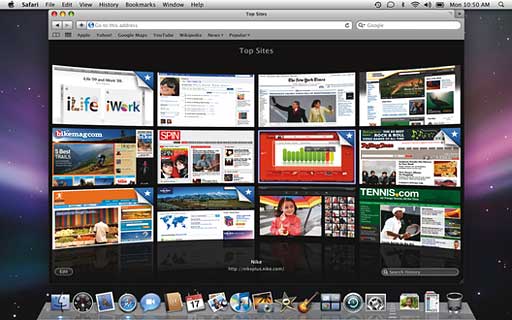
Safari’s new Top Sites feature uses CoverFlow.
You can set it to display six large thumbnails, twelve medium thumbnails, or twenty four small thumbnails.
This might be a novel idea, but it is very handy, and you get very used to it quickly.
Conclusion
Let’s not get carried away. This is a beta and not the full release, so you have to expect some bugs and glitches – although so far I have not come across any.
Safari 4 is shaping up to be an awesome browser. The new features are fantastic on the whole, and the increase in speed, even on my 867 MHz G4, is very impressive.
Will we see a second beta? Maybe. Will the final be launched to coincide with Snow Leopard? Most probably.
Give it a try. I think you will be impressed.
Follow Simon Royal on Twitter or send him an Email.
Like what you have read? Send Simon a donation via Tip Jar.
keywords: #safari4 #safari4beta #leopard #techspectrum #simonroyal
short link: http://goo.gl/hwrG3Y
searchword: safari4beta
