
Low End Mac Reader Specials
TypeStyler For Mac OS X is Now Shipping! Download The Free Fully Functional 60 Day Tryout at www.typestyler.com
OWC: Get the Right Memory / Ram for your Mac. Top Quality, Competitive Prices, Lifetime Warranty. Expert Support and Video Installation Guidies too! 4.0GB Matched Sets from $87.99, Options up to 32GB. Click here
Don't install Parallels to play poker online! Poker Mac will show you how
to download and install a native Mac poker application such as Full
Tilt Poker Mac.
Laptop Hardware Provided by TechRestore - Overnight Mac & iPod Repairs.
Compare products like desktop computers, apple laptops, apple macs, and LCD Monitors side by side! All the information and reviews to make the best purchasing decision for new mobile phones, sat nav systems, or MP3 players. The Ciao online shopping community makes searching products easy for you.
Mac Spectrum
Does Using Matched RAM Make Your Mac Faster or More Stable?
- 2009.04.28 - Tip Jar
Follow Simon Royal on Twitter.
Popularity: ![]()
![]()
![]()
![]()
Tweet this article. Short link: http://bit.ly/NiLpr
Is it important to used matched memory?
This question has bugged me for a while. When cramming as much memory in a Mac as you can, should you use the same size sticks and the same brand to ensure maximum compatibility and stability?
Most Macs don't need matched sizes, apart from some of the dual processor Power Macs, so you can put in any size with each other. I have had some Blue & White G3 Power Macs with 128 MB sticks and 512 MB sticks together, and they worked fine. But what about same brand sticks?
The trouble is, as my Mac expeditions are done on such a tight budget, I usually grab RAM where I can, so I have never had a chance to put it to the test. When testing these things out, it is always better to use the same hardware so you get an exact comparison.
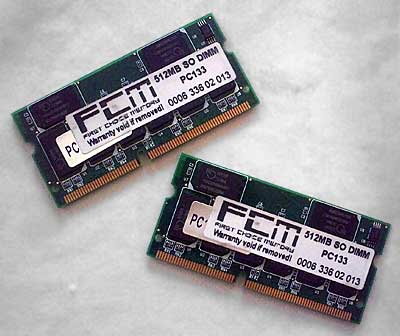
A pair of matched 512 MB modules from First Choice.
I recently obtained three more 512 MB sticks of PC133 144-pin Mac laptop RAM. Coupled with the existing 512 MB stick in my 867 MHz PowerBook, I now have enough to max both my 867 MHz and my 400 MHz PowerBook G4 to their 1 GB limits.
I first removed the 256 MB module in my 867 MHz PowerBook and popped in a second 512 MB stick. Both sticks were different brands, and I benchmarked the machine.
Xbench gave a result of 26.43 and Geekbench gave a result of 519.
Then I took both sticks out and put in two 512 MB sticks that were the same brand. For the record, they were made by First Choice Memory. I ran the benchmark tests again.
Xbench gave a result of 27.50 and Geekbench gave a result of 523.
A slight improvement. Xbench gave a 4% increase - which is quite a lot considering it is the same amount of RAM as before. Geekbench, however, only gave a 0.8% increase. But you have to bear in mind both programs use different methods of benchmarking.
Is it worth it to have matched memory? That depends on the financial cost of a matched pair against an unmatched pair.
In older machines, we tend to do everything possible to increase their potential. My machine is hardly stock. It has a faster 5400 RPM hard drive in it, I upgraded recently from 768 MB of RAM to 1 GB and then replaced that with 1 GB of matched RAM, all to slightly increase system performance.
There is a minimal increase in performance, enough to raise an eyebrow, so if buying matched RAM is drastically more expensive than buying unmatched RAM, I would have serious reservations.
Whether it increases system stability is another matter. My machine was rock solid before I switched to matched RAM, so it will be hard to tell if there is any improvement in that area. I bought some extra RAM cheaply, and it just happened to be a matched pair.
If you can get matched RAM without a price premium, do it. It helps
performance a bit, but from my experience unmatched RAM offers just as
much stability.
Recent Columns by Simon Royal
Royal also has his own Mac specific website.
- A Place for the Classic Mac OS in the Age of Snow Leopard, 10.19. Mac OS 9 has been out of production for nine years, but for basic tasks, such as word processing and email, it provides plenty of power.
- Adding USB 2.0 to a Titanium PowerBook G4, 08.20. TiBooks have built-in USB 1.1, but with a compatible USB 2.0 CardBus card, you can go 2.0. Problem is, not all cards work.
- 'Snow Leopard' and the End of PowerPC Macs, 08.14. Mac OS X 10.6 will be the first version of OS X without PowerPC support. That marks the beginning of the end for G4 and G5 Macs.
- Lombard, the Forgotten PowerBook, 05.06. Sitting between the legendary WallStreet and the widely known Pismo, Lombard provides great value and handles OS X nicely.
- More in the Mac Spectrum index.
Links for the Day
- Mac of the Day: Power Mac 4400, Nov. 1996 - Apple does cheap to compete with clones - and nobody is impressed.
- Group of the Day: Puma List is for anyone using Mac OS X 10.1.
- November 7 in LEM history: 00: PowerBook Lite dreams - Our first Macs - 01: OS 9, OS X, or Linux? - 02: Xserve for the classroom - 03: Panther on slot-loading iMacs - High capacity Lombard/Pismo battery - 05: Clean keyboard residue from laptop screen with ROR - SeaMonkey - 06: Dan Bricklin, inventor of the spreadsheet - Turn any Mac into a gameshow buzzer - 07: The transforming PowerBook 1400 - PowerBook 540 on Compact Flash
- Support Low End Mac
Recent Content on Low End Mac
- Quad-Core CPU Makes Sense in MacBook Pro, OS X 10.6 Causing Overheating, Overseas Power, and More, The 'Book Review, 11.06. Also Late 2009 MacBook reviewed, how to add RAM to new MacBook, 18.4in Acer notebook used Intel i7, and SanDisk SSD chosen for Sony VAIO X.
- Dumping Macs for Google Apps, SSD in iMac, Late 2009 iMac Performance Problems, and More, Mac News Review, 11.06. /newsrev/09mnr/1106.html
- WiFi Paranoia, iMac-O-Lantern, Magic Mouse Does Click, Free Clipboard Managers, and More, Charles W. Moore, Miscellaneous Ramblings, 11.05. Also strange time stamps, problem with ColorIt on Intel Mac, and the story behind OS X 10.5.4 install discs.
- IDE Is Dead; Long Live SATA!, Dan Knight, Mac Musings, 11.04. SATA has displaced parallel ATA. While IDE hard drives haven't disappeared, the best deals are in SATA hard drives.
- QuickTime X in Snow Leopard Imports, Trims, and Publishes Video Quickly and Easily, Alan Zisman, Zis Mac, 11.04. The long, slow process of importing video into iMovie to edit it, then render it to another format, is history as QuickTime X does that much more quickly.
- More links in our archive.
Recent Deals
- Best Mac Pro Deals, 11.03. Used 2.66 GHz 4-core, $1,300; 3.0 8-core. $2,299; refurb 2.66 4-core Nehalem, $2,149; 2.93, $2,549; 2.26 8-core, $2,799; 2.93, $4,999.
- Best iPhone Deals, 11.03. New 8 GB iPhone 3G, $$99; refurb 16 GB 3GS, $149; new, $199; 32 GB, $299.
- Best 12" PowerBook G4 Deals, 11.03. Used 867 MHz SperDrive, $348; 1 GHz, $499; 1.33 Combo, $298; SD, $559; 1.5 Combo, $448; SuperDrive, $589.
- Best Power Mac G3 and PCI Video Card Deals, 11.02. Used beige 300 MHz, $25; G4/366, $49; blue & white 350, $80; 400, $90; 450, $105; PCI video cards from $15; shipping additional.
- Best Power Mac G4 and AGP Video Card Deals, 11.02. Used 400 MHz, $50; 733 MHz, $69; 933 MHz, $209; 1.25 GHz dual, $299.
- Best 15" MacBook Pro Deals, 11.02. Used 2.0 GHz, $800; 2.2, $900; 2.4, $1,000; refurb 2.53, $1,449; 2.66, $1,699; 2.8, $1,949; 3.06, $2,169; new 2.53, $1,579; 2.66, $1,799; more.
- Best Mac mini Deals, 10.30. Used 1.33 GHz G4 mini, $379; 1.42, $389; 1.5, $419; 1.83 GHz Core Duo, $350; Core 2, $439; new 2.26 GHz nVidia, $580; 2.53 GHz, $770; Server, $990.
- Best G4 iBook Deals, 10.30. Used 12" 1.07 GHz Combo, $225; 1.33 GHz, $298; 14" 1 GHz, $349; 1.33 GHz, $398; 1.42 GHz SuperDrive, $498.
- Best Classic Mac OS Deals, 10.30. System 6.0.8 floppies, $10; 7.1, $12; 7.5, $20; 7.5 CD, $4; 7.6 $13; 8.1, $11; 8.5, $20; 8.6, $90; 9.0, $20; 9.2.2, $30.
- More deals in our archive.
About LEM | Support | Usage | Privacy | Contacts
Navigation
Used Mac Dealers
Apple History
Video Cards
Email Lists
Favorite Sites
MacSurfer
MacMinute
MacInTouch
MyAppleMenu
InfoMac
Macs Only!
The Mac Observer
Accelerate Your Mac
RetroMacCast
PB Central
MacWindows
The Vintage Mac
Museum
DealMac
DealsOnTheWeb
Mac2Sell
ramseeker
Mac Driver Museum
JAG's House
System
6 Heaven
System 7 Today
the pickle's Low-End
Mac FAQ
Abandonware
Petition
Mac vs. PC Info
Affiliates
The Apple
Store
Mac
Connection
B&H
MacMall
TechRestore
ExperCom
Crucial
Memory
batteries.com
Advertise
MacMinute
MacInTouch
MyAppleMenu
InfoMac
Macs Only!
The Mac Observer
Accelerate Your Mac
RetroMacCast
PB Central
MacWindows
The Vintage Mac
Museum
DealMac
DealsOnTheWeb
Mac2Sell
ramseeker
Mac Driver Museum
JAG's House
System 6 Heaven
System 7 Today
the pickle's Low-End
Mac FAQ
Abandonware
Petition
Mac vs. PC Info
Mac Connection
B&H
MacMall
TechRestore
ExperCom
Crucial Memory
batteries.com
