
My latest main Mac (since my Intel iMac died) is a Power Mac G4 Sawtooth that is way under Apple’s minimum requirements for Mac OS X 10.5 Leopard, but I set out on a mission to get it installed.
At Low End Mac, we pride ourselves in getting the most out of our Macs. I use G3s running Mac OS X 10.4 Tiger on a daily basis, some of which aren’t officially supported by Apple to run Tiger (see How to Clone Mac OS X to a New Hard Drive for more details).
Yikes & Sawtooth
This is one of the lowest-end G4s. The slowest G4 in the Power Mac range was Yikes, which used the same motherboard as the Blue & White G3 with a G4 chip running at either 350 or 400 MHz and with a PCI graphics card. Sawtooth introduced a new motherboard design, AGP graphics, and an AirPort Card slot; it came in 350, 400, 450, and 500 MHz versions.
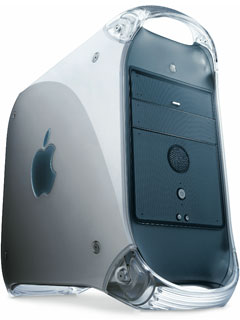 My Sawtooth
My Sawtooth is a 400 MHz model with 640 MB of RAM and three hard drives (a 20 GB drive with Tiger installed, a 120 GB drive for storage, and a spare 20 GB drive). Although mine is a Sawtooth, the previous owners removed the AGP graphics card and put in a PCI ATI Rage 128 Pro.
The spare hard drive was just begging to have Leopard installed, but being only a 400 MHz machine, it is way under Apple’s minimum requirement of 867 MHz.
3 Ways to Get It on There
There are a number of ways of getting around the installer checking whether your Mac meets the required hardware minimums.
Firstly, you can perform the Open Firmware hack. You boot your Mac into Open Firmware mode by holding Alt-Cmd-O-F during startup and inputting a command to override your CPU setting. This temporarily fools your Mac into thinking it has a faster processor, and this is reset once the machine reboots – but by that time you will have already installed Leopard.
The Open Firmware hack is the only option that doesn’t require the Mac to have an OS installation on it; it also uses a standard retail disc of Leopard.
Secondly, you can modify the installer DVD by making a read/write image and editing the installer files. Then you can either burn it back to DVD (dual-layer, unless you follow the instructions to reduce it to fit on a single-layer DVD) or restore the image to an external hard drive.
Editing the installer files on the DVD requires a machine already running OS X and with enough space to make an image. It also requires a degree of Mac knowledge to perform the editing, and it only needs to be done once.
I have used a modified DVD to install 10.5 on a 400 MHz PowerBook G4, and everything installed fine.
Thirdly, and by far the easiest method, is to use LeopardAssist. This is a small program that you run on your Mac prior to running the Leopard installer.
LeopardAssist requires a Mac with OS X already installed but very little Mac knowledge, although if you are planning to run an OS on an unsupported Mac, you are probably up for a bit of tinkering and therefore quite experienced. It also requires a regular retail DVD.
How Did It Go?
I used the LeopardAssist route, and it was painless. I booted the Mac into its existing Mac OS X 10.4 setup and then ran LeopardAssist, which is a very straight forward app and only takes a few clicks and then your machine restarts into the Leopard installer.
The installer worked first time without a hitch, although it was little slow. It took about 50 minutes to complete.
How Does It Run?
There will be a lot of people who wouldn’t consider running Leopard on a sub-1 GHz Mac, even though some are officially supported (like the 867 MHz 12″ PowerBook G4, 867 MHz Power Mac G4 Quicksilver, and 933 MHz iBook G4).
As ever, I try to push my Macs beyond their supposed capabilities.
I’ve been using the Sawtooth with 10.5 for a few days, and I must say am impressed with it’s performance. Don’t get me wrong, it is no speed demon, but it does well.
It boots quite quickly, taking only a few seconds longer than Tiger did.
Performance is sluggish, even with just the Finder running. Opening windows and general Finder tasks have a bit of unwanted lag, while menus behave very well. Cover Flow is painfully slow.
When you start loading apps, you really notice how different it is from Tiger. Small apps like System Preferences and Seashore (a small, free, open source image editor) takes too long to open. Firefox 3 takes around 20 seconds to open, and web pages are slow to load. When you start opening tabs, it really crawls.
How Could I Improve Performance?
Nothing short of a processor upgrade is going to make a massive improvement, but there are some things to make it a smoother experience.
The first thing would be to up the RAM from 640 MB to the 2 GB maximum. Even a supported Mac would struggle with just 640 MB of RAM.
Secondly, install a fast 7200 RPM hard drive. While my Sawtooth has three hard drives, the spare drive I used is only a 5400 RPM (the other two are 7200 RPM).
Thirdly, add a newer graphics card. The Sawtooth originally came with an AGP 16 MB ATI Rage 128 Pro (although mine has a PCI card for some odd reason). PCI cards are easy to add, but AGP ones are limited to AGP 2x and 4x, which are harder to find.
Will I Keep It on There?
In it’s current form, it’s too sluggish to be used as a main operating system. If I added some RAM and changed the hard drive and graphics card, it definitely would be useable.
I’m no stranger to Macs of the lower end – Macs that most people would have abandoned a long time ago – Macs I that with a little upgrading still have life left in them.
For now, I will go back to running Mac OS X 10.4, as this is my main machine and Tiger runs very fast even on a machine of this age.
Follow Simon Royal on Twitter or send him an Email.
Like what you have read? Send Simon a donation via Tip Jar.
keywords: #leopard #g4 #sawtooth #powermac#techspectrum #simonroyal
short link: http://goo.gl/PmnQkq
searchword: leopardsawtoothg4
