
Getting your PowerBook online wirelessly can be tricky. I take a look at which cards work.
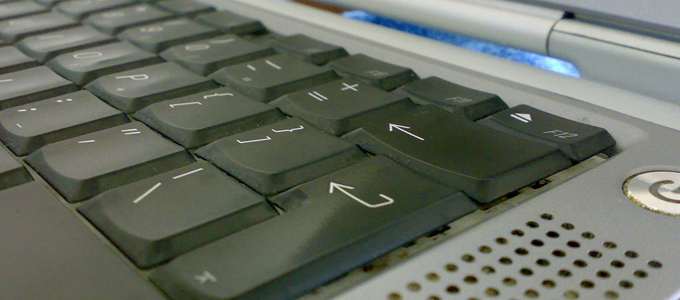
This quest started when I first bought my Lombard PowerBook G3. It was the last PowerBook not have an internal AirPort Card slot. The Pismo – the model after the Lombard – was the first PowerBook to have an AirPort slot. (Apple introduced AirPort with the original clamshell iBook.)
Luckily, all PowerPC PowerBooks, except for the 12″ PowerBook G4, have a PC Card slot (some have two). The G3 range and upwards are CardBus compliant.
This means you can use a PC Card in your PowerBook to get your device networking wirelessly. Depending on the card, will depend on how it works in your Mac.
Some cards are Broadcom based and work without any third party drivers, they are recognised as AirPort cards, and the Mac thinks no different. These are the easiest cards to use.
Others cards come with specific Mac drivers such as the Ralink ST2500 drivers. OrangeWare released a driver that enables a lot of “not officially supported” cards to work, such as the Sony PCWA-C300S.
The WirelessDriver Homepage has also released a Mac driver that enables a lot of Prism and Prism2 wireless cards, such as the WaveLAN/Orinoco, Cabletron, SkyLINE, and D-link PC Card cards for use with Mac OS X 10.2 and Darwin.
This article was first written in August 2008. It was last updated in September 2015.
Compatible Cards
Here is a list of compatible cards, some of which I have tried personally and some tested by fellow Mac users.
Dell TrueMobile 1300 & 1350 (CardBus, 802.11g)
Both show up in the Mac PC Card card tool as Broadcom based.
This is the best card I have seen and used. It works without any drivers: simply slot it in your PC Card slot, and when you boot up your Mac it says “new port found, AirPort”. These show up in the PC Card utility as “Broadcom 802.11b CardBus”. There are a number of people on eBay selling these cards, the main one being a seller called Value Solution.
I have used this card under both 10.4 and 10.5 and it worked perfectly without drivers.
This card was tested by myself.
Motorola WN825G (CardBus, 802.11g)
Shows up in the Mac PC Card card tool as Broadcom based.
This works just the like the Dell TrueMobile 1300. Just slide it in the PC Card slot, and your PowerBook thinks it is an AirPort card. I have used this card under both 10.4 and 10.5 and it worked perfectly without drivers.
This card was tested by myself.
Buffalo AirStation WLI-CB-G54A (CardBus 802.11g)
Another card the has the same chipset as the Dell TrueMobile 1350 and Motorola WN825G. I have used this card under both 10.4 and 10.5 and it worked perfectly without drivers.
This card was tested by myself.
Belkin F5D7010 (CardBus 802.11g)
Shows up in the Mac PC Card card tool as Broadcom based.
This works without third-party drivers in Tiger, but it requires drivers in Jaguar and Panther. Be careful with this one and get an early version. Belkin changed the chipset in later models, and they are not compatible with Mac OS X.
This card was tested by myself.
Asante FriendlyNET AeroLAN AL5403-XG (CardBus 802.11g)
I haven’t personally tried this card, but I am assured that it works. It requires no additional software and works with Apple’s AirPort software. This is a very hard card to find.
Sonnet Aria Extreme G54-CB (CardBus 802.11g)
I haven’t personally tried this card, but I am assured that it works. It requires no additional software and works with 10.2.6 upwards and Apple’s AirPort software 3.1.
Cisco Aironet 350 (PC Card 802.11b)
Shows up in the Mac PC Card card tool as “Cisco Systems, 350 Series Wireless LAN Adapter”.
This card comes with it’s own utility and doesn’t rely on Apple’s AirPort software. The card works fantastically, and the utility is very simple to set up.
This card was tested by myself.
Orinoco 802.11b Bronze (PC Card 802.11b)
This card has been tested in a PowerBook 1400cs. It was recognized in Mac OS 8.0 with the Wavelan drivers version 6.00.4, but would only connect to a computer-to-computer wireless network created on my iBook G3 (Original Airport) with no security. It would not connect to a wireless router (Linksys WRT45G) even after disabling security entirely. We assume there is some security aspect of modern WAPs causing issues with this card.
In OSX 10.1 and 10.2 it requires the drivers from Sourceforge. However it should work in OSX 10.3 upwards using the built in Airport software.
This card was tested in OS8 and reported by Lucas Salzman.
Orinoco 802.11b Silver (PC Card 802.11b)
This card reportedly works in OS7 to OS9 with drivers from Proxim/Lucent and in OSX 10.1 and 10.2 with drivers from Sourceforge. However it should work in OSX 10.3 upwards using the built in Airport software. The Silver card only supports 64-bit WEP encryption.
This card is for use in your internal Airport slot, but should also work in some PC cards slots.
Orinoco 802.11b Gold (PC Card 802.11b)
This card reportedly works in OS7 to OS9 with drivers from Proxim/Lucent and in OSX 10.1 and 10.2 with drivers from Sourceforge. However it should work in OSX 10.3 upwards using the built in Airport software.
This card is for use in your internal Airport slot, but should also work in some PC cards slots.
Unknown Compatibility
The following cards I know about and am looking for. Some people have had luck with them, but some haven’t:
- Belkin F5D7011 (CardBus 802.11g)
- MacSense Aerocard Plus (PC Card 802.11b)
USB Devices
There are also USB wireless sticks that work with Mac OSX. One is from D-Link but you have to make sure you get a specific revision and this works with Apples built in Airport software. There are also a few Realtek based devices which require third party wireless control panel to operate. I will keep a look out for these.
Hacking the AirPort Slot
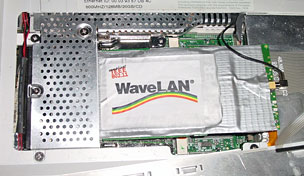
If you want to use an internal card in place of the original overpriced Apple AirPort card, check out DIY AirPort (for that Old iBook) on GeekTechnique, which explains how to modify a Lucent/Orinoco Silver card to fit into the iBook’s AirPort slot and work.
I have tried the hack at GeekTechnique, and it works in iBooks – but not PowerBooks. The AirPort slot in PowerBooks is in the wrong place, and while the Lucent/WaveLAN/Orinoco Silver will function in the AirPort slot, it is too long to close the bottom of the case.
I have also tried this AirPort hack in an iMac G3. Earlier models were not AirPort compatible, while later models require an AirPort bracket to install it. So, I got hold of an AirPort bracket for an iMac G3 and tried my Orinoco card in it. Fitting it in was a tight squeeze, but it did not require any trimming and hey presto it worked no problems.
Conclusion
If you know of a card that works or definitely doesn’t work, please let me via email. The more the merrier.
I hope to keep adding to this article.
Follow Simon Royal on Twitter or send him an Email.
Like what you have read? Send Simon a donation via Tip Jar.
keywords: #wifi #cards #powerbook #pccard #slot #airport #buffalo #motorola #techspectrum #simonroyal
short link: http://goo.gl/VzmhvO
searchword: wificardbus
