
I have a lot of Macs similarly spec’d, and I began noticing a lot of difference between them, so I set about benchmarking them and comparing the results. I thought I would share my findings with you.
To compare the machines, I used Xbench and Geekbench. On all the machines and all the tests, each machine had nothing running except the benchmarking software and we started from cold.
Here are my test machines. All are running Mac OS X 10.4.11 Tiger, the last version of OS X for G3 Macs.
Lombard PowerBook G3/333 MHz
512 MB 133 MHz L2 cache, 384 MB of RAM, stock 6 GB hard drive
Xbench: 7.74 – Geekbench: 174
Dual USB iBook G3/500 MHz
256 KB 500 MHz L2 cache, 384 MB of RAM, stock 10 GB hard drive
Xbench: 8.54 – Geekbench: 219
Snow iMac G3/500 MHz
512 KB 500 MHz L2 cache, 640 MB of RAM, stock 20 GB hard drive
Xbench: 11.01 – Geekbench: 212
Pismo PowerBook G3/400 MHz
1 MB 200 MHz L2 cache, 1 GB of RAM, new 5400 rpm 40 GB hard drive
Xbench: 12.72 – Geekbench: 226
Sawtooth Power Mac G4/400
1 MB 200 MHz L2 cache, 640 MB of RAM, 20 GB 7200 rpm hard drive
Xbench: 12.75 – Geekbench: 255
Pismo PowerBook upgraded with 550 MHz G4
1 MB 250 MHz L2 cache, 640 MB of RAM, 80 GB 5400 rpm hard drive
Xbench: 20.99 – Geekbench: 360
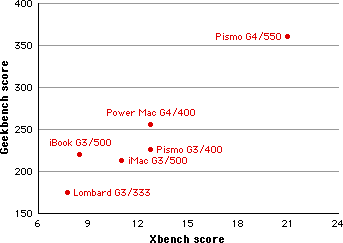
I was a little surprised by the results. All machines have a 100 MHz system bus and PC100 RAM fitted, putting them on an even more even footing for comparing.
The biggest shocks where the poor results of the iBook G3 (with the lowest L2 cache) and iMac G3. These were aimed at consumers rather than the business market, and it shows in the results. The Lombard PowerBook G3 (which has 512 KB of L2 cache, as does the iMac) isn’t too far behind the iBook G3, yet it has the same amount of RAM and only two-thirds of the iBook’s CPU speed.
Even more of an oddity is the iMac vs. the Pismo PowerBook G3. The Pismo is often regarded as the daddy of G3 PowerBooks, being the last in the range and having official support for Mac OS X 10.4. My Pismo is only a 400 MHz model (these also came in 500 MHz), yet it outstripped the 500 MHz iMac and iBook by quite a lot. It has a 20% lower CPU speed, but the added RAM and, to some degree, the faster hard drive seem to aid the PowerBook very much.
I recently lost my Intel iMac (it died a few weeks ago), so I have been using the Power Mac G4 as my main desktop machine. Compared to the Pismo G3, it certainly feels a lot snappier, and the Finder is more responsive. However, viewing the benchmark results, the Power Mac barely creeps ahead. Both machines have 1 MB L2 cache. I would have expected to see a bigger difference in the Power Mac vs. the Pismo due to the G4 in the Power Mac.
With this in mind, the Pismo G3 is already maxed to its 1 GB limit of RAM, while the Power Mac G4 has only 640 MB of RAM, way under its 2 GB limit for OS X (1.5 GB if you are running OS 9).
The Pismo upgraded with a Daystar MachSpeed 550 MHz G4 processor amazed me. This isn’t my machine. It belongs to a friend of mine (thanks Michael) who has recently restored this beauty with my help, and he pointed out that the MachSpeed website states that G4 upgrade supposedly makes it twice as fast as a standard 400 MHz G3 Pismo.
While we didn’t see his Pismo G4 being twice as fast as my Pismo G3, the results were close to it. We also have to bear in mind I am running 1 GB of RAM and he only has 640 MB. If he were to max his to 1 GB,I think we would easily see it running twice as fast.
Conclusion
While it is hard to compare machines with different variables – some have faster processors, some have less RAM, and some have stock hard drives while some have new ones – we can see a pattern emerging.
Macs aimed at the consumer market and having a lower price tag do not perform as well as those aimed at business users costing a lot more. They also are less upgradeable or at least harder to upgrade.
Could We Change the Results
Some of the test machines didn’t have a lot of RAM. Would maxing these machines to their maximum help?
This is an interesting question. I wouldn’t recommend running Mac OS X 10.4 with less than 512 MB (although both the Lombard and the iBook only had 384 MB), but older RAM can quite often be very expensive, so is it financially viable? Would it change the order of the results?
The short answer is no. The order of the results wouldn’t change, but I think we would see a narrowing of benchmark results between some of the machines, with the exception of the iMac G3. It might creep slightly ahead of the Pismo G3.
If we maxed the Lombard PowerBook G3 to its maximum of 512 MB, I think it would still come in last, but not that far behind the G3 iBook (also maxed to 640 MB). The lower processor and low RAM limit would stop the Lombard from sprinting ahead. But it really does exceed in performance over what you would expect from this aging G3.
The Lombard requires very specific sticks of 256 MB for it to recognise all of it. I had a number of 256 MB sticks that would only register as 128 MB. It requires 16 chip (8 on each side), and the RAM on the underside of the processor card needs to be the shorter (low profile) type, not the large square type that is compatible with the upper slot.
The iMac G3 would creep further ahead of the iBook if it was maxed out to 1 GB of RAM, but purely because it has a higher RAM limit and twice the L2 cache.
The Pismo PowerBook G3 is already maxed to 1 GB, so no difference there, but I think the iMac G3 would creep slightly ahead – remembering that is has a 500 MHz processor vs. the Pismo’s 400 MHz, the iMac still loses in sheer horsepower as it has 25% more processor power but only half the L2 cache, which really seems to let it down.
This Power Mac G4 maxes out at 2 GB – having the highest RAM limit. This gives it a huge advantage and would seriously improve performance and bring it closer to the Pismo G4. However I think the Pismo G4 would stretching out ahead by miles maxed out with 1 GB of RAM – but then it does have a 550 MHz G4, compared to 400 MHz in the Power Mac and slightly fast L2 cache of 250 MHz vs. the Power Mac’s 200 MHz.
Graphics Card
One final component that can help a Mac’s performance is its graphics card. The Power Mac is the only Mac in this list with an upgradeable graphics card, via its PCI or AGP slots, although it is limited to 2x or 4x AGP cards. It is also the only Mac with 16 MB of graphics memory. The iBook and Pismos have 8 MB AGP ATI Rage Mobility 128 built in graphics and the iMac has 8 MB AGP ATI Rage 128 Pro. The Lombard has the slowest graphics capabilities with its non-AGP 8 MB ATI Rage LT Pro.
The more graphics power your Mac has, the less it relies on the CPU for graphics processing.
Final Conclusion
I always believe the more RAM the better. It gives the machine so much more breathing room.
There is more to consider when comparing machines than just the processor speed and RAM, although most people will only take these two factors into account. These results show that machines with the same CPU and L2 cache will perform similarly if they have the same amount of RAM.
Maximum RAM is always something to consider. 512 MB sticks of 168-pin RAM for the iMac and Power Mac are still quite expensive at around £25 each. To max the iMac would cost £50, which is not too bad. However, the Power Mac would cost £100 (as it has 4 slots and is capable of taking up to 2 GB). This is a lot of money considering the age and value of the Mac itself. The RAM will cost more than the value of the machine!
The Lombard can take two 256 MB sticks of 144-pin, which are relatively cheap to pick up. But the 512 MB sticks of 144-pin RAM suitable for the Pismo and the iBook is very expensive at around £40.
One thing to remember when using Xbench and Geekbench is that Geekbench only takes processor and RAM into account, whereas the results from Xbench offer overall system performance, so adding a faster hard drive will improve the results.
I hope this has opened your eyes to differences in performance between similarly spec’d Macs. There is a lot to consider when choosing a Mac – look deep into what CPU version it uses, how much L2 cache it has, what its maximum RAM limit is, how expensive RAM is, and how easy it is to add a faster hard drive.
Follow Simon Royal on Twitter or send him an Email.
Like what you have read? Send Simon a donation via Tip Jar.
keywords: #g3 #g4 #lowend #performance #comparison #techspectrum #simonroyal
short link: http://goo.gl/jRKyIb
searchword: g3g4comparison
