
Low End Mac Reader Specials
Memory To Go Special: MacPro 8 Core 8GB kit $232 / 4GB kit $116 / 2GB kit $72. New Macbook 2GB DDR3-$65. HARD DRIVES available -- Free shipping / LIfetime warranty.
Download Typestyler, still the Ultimate Styling Tool for Internet, Print and Video Graphics. Works great in Classic with a Native OS X Version on the way. Free Tryout: www.typestyler.com
LA Computer Company: Specials on AppleCare, iMac's, Apple Batteries and Apple A/C Adapters. Also Great prices on Used Apple Computers. Call 1-800-941-7654 Click Here.
Mac users can finally play Party Poker for Mac. Not only that, they can also learn how to play PokerStars for Mac.
Laptop Hardware Provided by TechRestore - Overnight Mac & iPod Repairs.
Compare products like desktop computers, laptops, and LCD TVs side by side! All the information and reviews to make the best purchasing decision for a new cell phone GPS products or MP3 players. The Ciao network makes searching products easy for you.
Mac Spectrum
How to Clone Mac OS X to a New Hard Drive
- 2008.10.07 - Tip Jar
Popularity: ![]()
![]()
![]()
![]()
![]()
A mate of mine who has only been using Macs for a few weeks has been using a PowerBook G3. We installed Mac OS X 10.4 "Tiger" on it, and then he got a larger hard drive. He was about to reinstall OS X when I suggested cloning.
Being a PC user, he was new to the idea, so I emailed him some instructions, and it worked with no problem. So for anyone new to cloning, here is how to do it.
Cloning makes a complete bootable copy of your hard drive onto another drive.
Here is what you will need:
- a Mac with Mac OS X Tiger or Leopard installed
- a new hard drive
- a FireWire or USB enclosure for the drive (not necessary if you have a Power Mac with room for another internal drive)
- a copy of SuperDuper [Editor's note: You can also use Carbon Copy Cloner.]
Let's get started.
First, put your new drive hard drive enclosure. Plug it into your Mac, and switch the Mac on. If your enclosure needs to be plugged into a power source, do this and then switch it on.
Once the Mac is booted, you will need to format the new drive into a Mac format in Disk Utility (in the Utilities folder inside the Applications folder). Down the left hand side Disk Utility will show both drives. Select the one in the enclosure.
You will see five tabs across the middle of the screen: select "Erase". Double check the Volume Format is "Mac OS Extended (Journaled)" and give it a name (or leave it as it is). Then select the "Erase" button. The new drive will erase within a few seconds and your drive is now ready for cloning.
Don't worry - you cannot erase your existing hard drive with Mac OS X installed on it, as it is the drive you have booted from and is therefore locked.
Download SuperDuper. It is free when used for cloning. Install it and run it.
In the SuperDuper screen, you will see three drop downs.
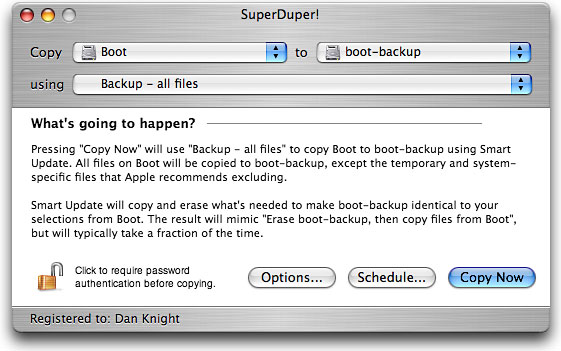
In the first one, labelled "copy", select the drive in your Mac. In the second drop down labelled "to", select the new drive that you just formatted.
The third one should be labelled "using" - select "Backup - all files".
New select the "Copy Now" button.
If you are connected via USB 1.1, it will take quite a while (maybe an hour or two). If you are connected via FireWire or USB 2.0, then it will be quicker (maybe 20 minutes - depending on how much is on your hard drive).
Once completed, shut down the computer and external hard drive. Remove the internal drive and replace it with the new one you just cloned to - and boot the machine.*
If successful, the Mac will work exactly as before. You will not notice anything different, except a larger drive.
If it hasn't worked, the machine will not boot.
* Editor's note: You may want to test the clone drive before performing the transplant. To boot from the external drive, hold down the Option key during startup. Your Mac will display icons for any bootable drive. Select the new drive, click on the right arrow icon, and your Mac should boot from it. If not, erase the new drive and try again. Once you know it's working, transplant it. (Note that some of the oldest G3 Macs can't boot into OS X via USB.)
You can also use this procedure to clone OS X to another Mac - just install the cloned drive. As long as it's not too big for that Mac's drive controller to recognize (see How Big a Hard Drive Can I Put in My iMac, eMac, or Power Mac?), you should be good to go.
We've been doing this at Low End Mac headquarters for years, and it works very well. The registered version of SuperDuper is also a great backup program, which we use regularly.
Carbon Copy Cloner works as well as SuperDuper for cloning, and version 2.3 will also let you clone Mac OS X 10.2 and 10.3. (SuperDuper only supports OS X 10.4 and 10.5.) dk
Recent Columns by Simon Royal
Royal also has his own Mac specific website.
- The Leopard Experience at 867 MHz, 12.02. Mac OS X 10.5 requires an 867 MHz G4 with 512 MB of memory, but is performance really acceptable on a minimum spec system?
- Will Snow Leopard Support Some PowerPC Macs?, 11.26. It just doesn't make sense that Apple would ship a new OS that won't support Macs sold less than three years ago.
- Could Linux Ever Replace Mac OS X?, 11.24. Linux has become more powerful and more friendly month after month, but can it compare with the Mac OS X experience?
- Leopard Runs Very Nicely on PowerPC Macs, 11.19. Some claim that Mac OS X 10.5 is so optimized for Intel Macs that it runs poorly on PowerPC hardware. That's simply not the case.
- More in the Mac Spectrum index.
Links for the Day
- Mac of the Day: eMac, Apr. 2002 - 50 lb. 17" white G4 eMac replaced the iMac for the education market.
- Group of the Day: MacCube is the email list for Cube users.
- December 3 in LEM history: 01: The future of low-end Macs - Internet charges and Low End Mac - 02: A smooth switch with Move2Mac - 04: Upgrading from Mac OS 9 to 10.3 - PC malware: The best reasons to use a Mac - No sympathy for bashing Macs in schools - 'Book fragility - 07: Switching to Mac tripled my productivity - Leopard on a G3 iMac (with a G4 upgrade)
Recent Content on Low End Mac
- OS X More Efficient than Linux, Snow Leopard and PowerPC Macs, and Eudora Woes, Charles W. Moore, Miscellaneous Ramblings, 12.03. A user reports both Panther and Leopard run more smoothly and use memory more efficiently than Linux. Also thoughts on PowerPC abandonment in Snow Leopard and replacing Eudora in Leopard.
- A Used 17" PowerBook as a Budget Notebook Alternative, Charles W. Moore, 'Book Value, 12.02. Sure, you can buy a refurbished 13.3" MacBook for under $900, but you could also have an expansive, feature laden 17" PowerBook in the same price range.
- The Very Best Macs: Sometimes Apple Just Nails It, Andrew J Fishkin, Best Tools for the Job, 12.01. Apple has produced lots of good Macs, a few dogs, and some 'best of breed' models that stand apart from the pack.
- Apple Could Buy Dell, and Linux Is No Threat to Mac OS X, Charles W. Moore, Miscellaneous Ramblings, 12.01. Apple has the cash to buy Dell outright, and the idea has some merit. Also, why Linux still isn't ready to displace the Mac OS.
- More links in our archive.
Recent Deals
- Best PowerBook G3 Deals, 12.03. Used 14" WallStreet G3/266 MHz, $90; Lombard G3/400 MHz, $150; Pismo G3/400 MHz, $300; 500 MHz, $350.
- Best 17" PowerBook G4 Deals, 12.03. Used 1.5 GHz, $685; 1.67 GHz, $699.
- Best Intel iMac Deals, 12.03. Used 17" 1.83 GHz, $550; 20" 2.0, $650; refurb 20" 2.4, $999; 2.66, $1,299; 24" 2.8, $1,549; 3.06, $1,899; rebates and free shipping on new.
- Best Mac OS X 10.4 'Tiger' Deals, 12.02. DVD upgrade from 10.3, $75; full version, $129; family pack, $200; 10-user Server, $350; unlimited users, $400.
- Best iMac G5 Deals, 12.02. Used 17" 1.6 GHz Combo, $400; 1.8 SuperDrive, $450; 1.9 iSight, $599; 20" 1.8 GHz, $500; 2.0, $600; 2.1 iSight, $700. Shipping additional.
- Best 17" MacBook Pro Deals, 12.02. Used 2.16 GHz Core Duo, $1,330; 2.33 Core 2, $1,499; close-out, 2.4, $1,800 after rebate; new 2.5, $2,000 a/r; new hi-res, $2,499 a/r; refurb 2.6, $2,399.
- Best iPod nano Deals, 12.01. Refurb 3G/4 GB, $79; new, $105; refurb 8 GB, $99; new, $115; 3G/8 GB, $134; 16 GB, $174. Prices include ground shipping.
- Best 12" PowerBook G4 Deals, 12.01. Used 1.5 GHz SuperDrive, $481/C$599 plus shipping.
- Best Mac Pro Deals, 12.01. Used 3.0 GHz 4-core, $2,102; new 2.66 GHz 4-core, $1,949 after rebate; 2.8 4-core, $2,099 a/r; 8-core, $2,515 a/r; 3.0 $3,320 a/r; 3.2, $4,099 a/r.
- More deals in our archive.
About LEM | Support | Usage | Privacy | Contacts
