
I deal with older (pre-G3) systems regularly, both through my consulting work and my personal collection, the Vintage Mac Museum. Here are some tips I’ve found for keeping the old beasts running.
Swapping Parts, Opening Cases
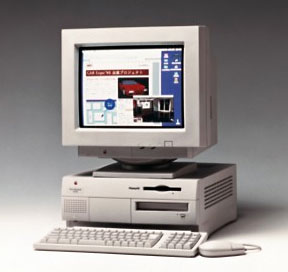 It’s handy that old Macs are usually dirt cheap, since they may have hardware problems or failed components and be in need of some spare parts. If you use a particular old Mac regularly or have just acquired one and all isn’t working, find some spares to cannibalize parts from. Yard sales, flea markets, craigslist, and eBay are great sources of old systems; if you’re in the Boston area, try the MIT Flea in the warmer months.
Getting the case open or the part you need removed can sometimes be challenging. Use your spare to learn how to open the case – that way you can test whether that cracking sound you hear is normal (as the instruction tell you) or a learning experience (hint: small plastic pieces shouldn’t fall out of the case). Many good take apart guides are available free online.
Don’t force connectors, switches, and cables; they shouldn’t be super difficult to connect or remove. If they are, you’re probably overlooking a small tab or screw somewhere (this is where the test model with sacrificial plastic is so handy). Floppy drives and CD drives often need lubricants; WD40 has worked well for me (YMMV), though I’m sure I’ll get flamed for admitting this.
I tend to replace items as modules rather than doing component repair (resoldering capacitors and the like); this usually comes down to swapping one or more of the following items:
- PRAM battery (very common)
- hard disk drive (common)
- optical or floppy disk drive (try lubricating)
- power supply (more common with age)
- motherboard, RAM, or video cards (uncommon)
- CRT or LCD screen assembly (if working, may be dim or blurry)
I don’t repair CRT screens, high voltage power supplies, or monitors: It’s easier, safer, and cheaper to just dispose of them (during my town’s hazardous waste recycling day each quarter) and replace with a spare.
More Tips and Suggestions?
I’m sure there are many other tips and suggestions on the topic of working with old and vintage Macs; contact me with your suggestions, and we may do a follow-up to this column with additional ideas.
This article was originally published on Adam’s Oakbog website. It has been adapted and reprinted here with his permission.
Keywords: #macrepair
Short link: http://goo.gl/9mc8Ee
searchword: gettinginsidemacs
