
I deal with older (pre-G3) systems regularly, both through my consulting work and my personal collection, the Vintage Mac Museum. Here are some tips I’ve found for keeping the old beasts running and exchanging data with current systems.
Exchanging Data & Networking
Exchanging data between new and old Macs can be challenging, whether over a network or via removable media (sneaker-net). It’s often necessary to set up a bridging arrangement using one or more intermediate computers to get files and software moved across Mac generations. Macs didn’t have built-in ethernet until the Quadra series, and the AppleShare AFP network protocol has changed over the years.
Fortunately Mac OS 8 and 9 support AppleShare IP and thus can talk to Mac OS X servers via TCP/IP. All 68040 Macs can run Mac OS 8.1, and pre-G3 PowerPC models can support flavors up through Mac OS 9.2.2.
Set your Mac OS X system to a static IP address on your network and enable Personal File Sharing (choose System Preferences under the Apple menu, then Sharing). In the Chooser on the older Mac, select AppleShare, click the AppleShare IP button, and enter your server’s address. You’ll be prompted for the login name and password (which you can save), and the shared drive mounts on the desktop.
Jaguar and Panther Work Best
Mac OS X 10.2 Jaguar or 10.3 Panther file sharing seems to work most reliably with Mac OS 8.x and 9.x; 10.4 Tiger and 10.5 Leopard systems also work, but not as reliably, particularly with large file transfers. Apple is aware of this problem (the 10.4.11 update addresses part of this issue), but a 10.2.8 or 10.3.9 equipped G3 or G4 with sharing enabled makes an ideal file server to use with both older and newer Mac OS versions.
Bridging LocalTalk Macs
To reach System 6 and 7 Macs that don’t have ethernet, LocalTalk Bridge can save the day. This free extension from Apple allows a Mac equipped with both ethernet and LocalTalk (RS-422 serial) ports to bridge the two networks. The bridge Mac can talk to the older Macs via LocalTalk (using serial cables or PhoneNet adapters) and the newer Macs via ethernet. Enable File Sharing on the Bridge machin, and you have a server the older systems can talk to.
Sneaker-Net
Sneaker-Net is also an option. Zip disks make a great transfer medium for old Macs, since Zip drives are available in SCSI, IDE, and USB flavors; you can copy something from a Mac OS 8 or OS 9 machine to a modern OS X system on a disk using HFS+ formatting. In my experience, 100 MB disks are the most reliable size and are supported in all flavors of Zip drives.
On the lowest end, all beige Macs (68k and early PowerPC) have floppy drives. Mac floppies came in 400K (single sided), 800K (double sided) and 1.4 MB HD (high density) flavors. Nearly all floppy-equipped Macs can read/write 800K disks; some old models won’t read HD floppies, and some newer models won’t handle 400K format. USB floppy drives can be found (also dirt cheap these days) that work with OS X, though you usually need to stick with 1.4 MB HD floppies on these drives.
Quadra and PowerBook 5xx: The Ultimate Bridge Machines
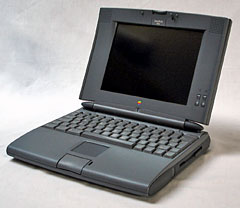 For the Museum and when working with client Macs, I’ve found Macintosh Quadras and PowerBook 5xx models to be the Ultimate Bridge Machines. These systems have built in ethernet ports (AAUI adapter required) and RS-422 serial ports for LocalTalk. Running Mac OS 8.1, they can network via AppleShare IP to a file server running Mac OS X (be sure to set AppleTalk to the ethernet port), mounting the OS X disk on the OS 8 desktop. With LocalTalk Bridge installed and File Sharing enabled, I can then access the OS 8 disk on System 6 and System 7 desktops. Copying files between, say, a Mac Plus running System 6.0.8 and a Power Mac G4 Cube running OS X 10.3.9 just involves a relay step via the Quadra or PowerBook.
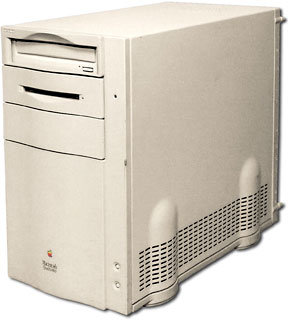 If networking doesn’t work or you need to deal with floppy disks, again the Quadra or PowerBook 5xx work handily: both have floppy drives that support 400K, 800K, and 1.4 MB HD disk formats. Note that some floppy drives may not mount 400K disks on the desktop, but they can write 400K volumes with Disk Copy if needed.
I used all this bridging capability recently to extract a needed file from a 400K disk image I had archived on my OS X system: copy the disk image to a PowerBook 540c over ethernet, create a 400K floppy disk with Disk Copy 4.2 on the PowerBook, read the 400K floppy in a Mac Plus running System 6.0.8, copy the needed file back to the PowerBook via LocalTalk, and then copy it back to my OS X Mac via ethernet!
A lot of steps, but it’s possible! Besides, I’ve always loved the 540c, so I’m glad to see this model still performs useful tasks.
More Tips and Suggestions?
I’m sure there are many other tips and suggestions on the topic of working with old and vintage Macs; write in to the Low End Mac Mailbag or contact me with your suggestions and we may do a follow-up to this column with additional ideas.
This article was originally published on Adam’s Oakbog website. It has been adapted and reprinted here with his permission.
Keywords: #macnetworking #fileexchange #vintagemacnetworking
Short link: http://goo.gl/3Wv0uE
searchword: vintagemacnetworking
