
This is the first in a series of articles showing how Adam Rosen uses four vintage Macs to read, recover, convert, transfer, and return files to his clients. Today’s installment covers the Mac Plus.
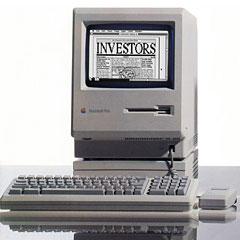
The Vintage Mac Museum contains several dozen models of Macs, but most only get used occasionally. A few carefully chosen machines are all that are really needed to bridge the generations and provide access to the vast majority of Macintosh software and files.
With the arrival of a few large file transfer jobs at Oakbog – one contained 111 floppy disks worth of archives – I thought I’d devote a few posts to the workhorse machines in the collection.
The Mac Plus was Apple’s longest-selling Macintosh model and is a very versatile machine when dealing with old Mac disks and software. It’s 800K floppy drive can read and write both 400K and 800K disks, allowing the machine to boot up in the original Mac OS all the way though System 7 via floppy disk.
The Apple 800K drives made by Sony are tanks – much more reliable than 400K drives – and able to read many old disks that 1.44M SuperDrive floppy drives cannot. Apple ran these mechanisms with variable speeds to squeeze in more data, so you need an original Apple drive to read single-sided and double-sided Mac floppy disks.
Equally useful on the Plus is the external SCSI port, which I have connected to a whopping 30 MB external hard drive (in an original Apple drive enclosure, of course). With System 6.0.8 installed and 4 MB (!) of RAM, things run pretty zippy (in a relative sense) for an old machine. Most programs written for pre-System 7 versions of the Mac OS will run on System 6, which is particularly handy for non-32-bit compatible software like the original MacWrite or early versions of Microsoft Word.
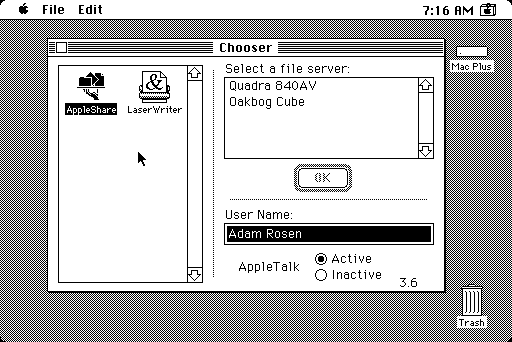
You can select a printer or file server using the Mac’s Chooser.
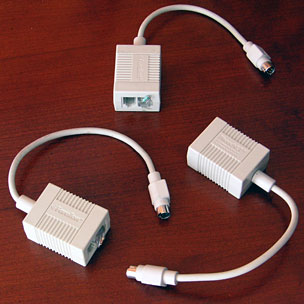 System 6 can use AppleTalk to communicate with other Macs on a network. At the Vintage Mac Museum, a small LocalTalk network using PhoneNet connectors and telephone cabling (remember those?) runs between the Plus and a Quadra 840av running Mac OS 8.1 with File Sharing enabled. The Plus can access the Quadra via AppleShare in the Chooser, and using this link files from floppy disk can be relayed up the chain.
It’s fun to work with the Plus, a 9″ black & white Mac with that distinctive sounding keyboard. I have Talking Moose installed, which still makes me laugh, as well as old games like MacYahtzee and Tetris. Takes me back to my college days.
A Kensington System Saver fan sits atop the handle, reminding us that it isn’t only current Macs that tend to overheat due to lack of adequate ventilation.
The design shares the same monitor and power supply as the 128K and 512K Macs, so it isn’t hard to find spare parts. The biggest challenge is nursing along the old SCSI hard drives with System 6 installed. Note: If you’re putting your own system together, these disks require formatting with the Apple HD SC Setup Utility, not the newer Drive Setup application.
Next: Quadra 840av Running Mac OS 8.1
This article was originally published on Adam’s Vintage Mac Museum Blog. It has been adapted and reprinted here with his permission.
Further Reading
- Why Should I Choose System 6 for My 8 MHz Compact Mac?
- The Compact Mac Trio: System 6 or System 7?
- The Joy of Six: Apple’s Fast, Svelte, Reliable, and Still Useful System 6
- Still Useful after All These Years: The Mac Plus
- How to Set Up Your Own Mac Plus (or Later) Web Server
- Care for a Mac Plus
- 25th Anniversary of the Macintosh Plus
Keywords: #macplus #system6
Short link: http://goo.gl/oduyF4
searchword: macplusworkhorse

Hi Adam,
This article was a nice read. I’m currently working on getting a Mac Plus up and running for a Computer History Museum here in the UK. This particular Mac Plus also has 4Mb ram and is connected to a 20Mb SCSI HDD running OS6.
The machine will go on display and will be a hands-on piece, so all visitors can play and use the machine as they like to get a feel for early computer history.
I have one problem at the moment, at the end of the day lots of our machines are turned off in one go via a central power hub. The Mac Plus used to be on display without the HDD, and so when it was inadvertently shut down in this manner, it would repeatedly eat the system OS disc inserted.
I’m trying to find a way around this, as shutting down the vast number of computers we have one by one would result in an incredibly long process each evening, and simply put, a lot of the volunteers who work there are unfamiliar with Macs of any age. This has resulted in destroyed OS6 floppies.
Would you have any ideas?
Many thanks,
No Mac should be shut down by turning off its power until you have used the Shut Down command. It will then tell you it is safe to turn off power without damaging any mounted floppy disk or hard drive.
Hi Dan,
Oh I agree with you completely. Its just the place is staffed by volunteers, most of whom are unfamiliar with old Macintoshes (or even new ones come to that). Its one thing to have them know the shutdown process, its another if they follow it, and I’m only there at weekends.
Love your site by the way, I’ve been reading since 2001. Came here shortly after getting on-line with my first Mac (iMac DV+).
Many thanks