
These days many people have some or most of their music libraries on their computers, and that is often managed with Apple’s free iTunes software. It’s very nice to have such quick and easy access to your music library, but by default this plays back only in the room where the computer is located. Wouldn’t it be nice if you could listen to iTunes throughout the whole house or office?
Running a Wire
 Connecting a cable from the computer to the stereo is the classic (and easiest) solution – and sometimes all that’s necessary. Every modern Mac or PC has a stereo mini jack for audio output, suitable for use with headphones or other audio equipment. Simply connect the computer’s audio output to any available input jack (AUX, TAPE, VCR, etc.) and start playback in iTunes.
If your stereo or AV system has multiple speakers setup throughout your home, instant multiroom audio. If not, at least you’ll have much nicer single room performance.
Some homes or offices already have dedicated multiroom audio systems installed, like a Bang & Olufsen or Sonos. These are very nice indeed, but they are high-end options that can cost many hundreds or thousands of dollars and require professional installation- and your computer may be in the wrong room to connect to the main unit.
For best results, you want the audio cable to be short (ideally 6’/2m or less) – this type of cable is very susceptible to hum and noise problems. The longer the cable, the more hum you may hear out of the stereo. Also the “hard wire” solution is more convenient for desktops than laptops, especially when more than one person wants to listen to music but the laptop is traveling.
Fortunately, some relatively inexpensive gear from Apple offers a nice alternative – and complement – to your existing systems.
AirPort Express and AirTunes
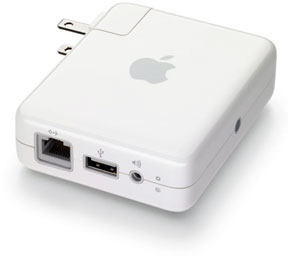 For some time now Apple has supported streaming audio from iTunes on your home or office network via wired and wireless connections. This features is called AirTunes and utilizes the audio output capabilities of the Apple AirPort Express or Apple TV products. Once configured, these devices can act as “remote speakers” for your iTunes library, relaying audio from your computer to other parts of the house.
To setup an AirTunes relay, you’ll need at least one AirPort Express or Apple TV. This gets connected to an audio playback system in the destination room – a stereo system, a pair of powered speakers, a boombox, etc. For wireless relaying capability, you need to have a WiFi network in place (any kind of wireless router will work).
In the remote room, connect the AirPort Express/Apple TV to an ethernet cable (if available) or configure the device using the Apple AirPort Utility to join your existing wireless network. Give the box a name that relates to where it is located (e.g., Kitchen, Living Room), then select on the tab that says Music and make sure the “Enable AirTunes” box is checked.
Click Update to apply the settings, and your device will reboot. Now connect the audio output of the AirPort Express/Apple TV to your playback system. Back in iTunes, go to Preferences, select the Devices tab, and make sure the option to “Look for Remote Speakers connected with AirTunes” is checked (this is the default).
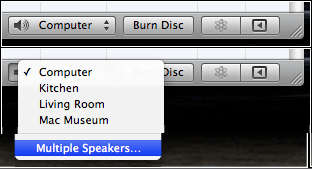 At the bottom right of your iTunes window there should now be a popup menu for speaker selection. Initially this will say Computer. Click and hold on this menu and you should see the new system (e.g., Living Room) listed, along with an option to select Multiple Speakers (left).
To change the output, select Living Room. To play both simultaneously, select Multiple Speakers and select both Computer and Living Room in the box which comes up. The iTunes speaker menu will then say “Multiple Speakers (2)”.
Press play in iTunes, and voilà! – multiroom playback for a fraction of the cost of a dedicated system.
Want more rooms? Pickup another AirPort Express (new or used), hook up that old stereo in the garage or basement, and expand away!
In my house, my primary computer with iTunes is located in my second floor office and connected to a dedicated audio system. I have an AirPort Extreme router and three AirPort Express wireless relays to the Living Room (first floor, stereo system), Kitchen (first floor, powered speakers), and my Mac Museum (second floor, powered speakers). No audio cables are longer than six feet.
For a total cost comparable to one Sonos or B&O interface box, I now have a four room audio system and can listen to music, news, and those joyful NPR Pledge Drives (seemingly every other weekend) throughout my entire house!
Bonus for the True Geek: For those with an old Mac or PC around with built-in (or external) speakers, Rogue Amoeba makes an application called Airfoil that allows audio streaming from iTunes to the external computer as a playback device. Airfoil is $25 demoware and the current version requires Mac OS X 10.5 Leopard or Windows XP as a minimum on both the main iTunes computer and the remote one(s).* See the Airfoil website for instructions and downloads. (For earlier versions, click here.)
Apple Remote for iPhone & iPod touch
 Okay, so now you have multiroom playback going, but most of us are still singleroom-at-a-time people. If you’re not in the same room as your computer, how can you control iTunes playback?
The pièce de résistance of the AirTunes Home Audio Experience is the free Apple Remote application for the iPhone and iPod touch. This handy software allows your iDevice to act as a handheld remote for your iTunes library (or any Apple TVs on the network), browsing playlists, controlling volume, showing album artwork, and even turning on and off individual speakers.
A WiFi network and one-time pairing is required (similar to setting up a Bluetooth device) to link the handheld with your library. Once connected, your remote can roam with you throughout your house or office, giving you full command of your iTunes playback wherever you are located.
I’ve been introducing clients and friends to this technology for the past year, and every single person is delighted at the capabilities. Some have even purchased (or justified) an iPod touch just for this application. “Impresses the friends and neighbors”, as they say, and at a reasonable cost. Truly a Poor Man’s Bang & Olufsen!
The True Geek, or anyone without an iPhone/iTouch but with a second computer, can also control iTunes on the primary computer using Screen Sharing (Macs), Remote Desktop (PC), or VNC software (cross platform) – for more on these options, see Methods of Macintosh Remote Control.
* An earlier version of Airfoil Speakers for Mac is compatible with Mac OS X 10.4 Tiger.
This article was originally published on Adam’s Oakbog website. It has been adapted and reprinted here with his permission.
Keywords: #multiroomaudio #airtunes #lowendaudio
Short link: http://goo.gl/7yz7tj
searchword: multiroomaudio
