
The Budget Mac
Every Working Computer Is Useful to Someone
- 2008.11.19 - Tip Jar
I wrote this at a brand new hotel and conference center at the University of Illinois, Urbana-Champaign. It was "Adobe Day," where official reps from Adobe come out to present new features of Creative Suite 4.
The Marketing Machine
I was surrounded by creative professionals of every skill level in the birthplace of supercomputing, hearing about bleeding edge software features, and I couldn't help but laugh. "1,700-person years went into the upgrade from CS3 to CS4," according to the rep.
I laughed because, while the new suite is impressive, the clients I normally deal with will probably never need any application from Adobe (with the exception of Acrobat or possibly Elements), and watching the parade of high-end features was so foreign to my everyday experience. Note that I said my clients will probably not need CS4. That doesn't stop people from wanting the latest version of Photoshop, even if they'll only take 200 digital photos in their entire life and have no other use for an image editor.
Adobe, like Microsoft, has become so dominant that it's filtered down into the consciousness of even the most basic computer user.
Do I Need It?
That's where I usually step in, when someone is asking him or herself, "What's right for me, and do I really have to spend that much?"
More and more, thanks to open source software, the answer to the latter question is "No!" But in addition to that is a resource that a lot of people overlook: used computers.
My personal philosophy, which stems from a lifetime of recycling and learning to make the most out of the least, is that every working computer is useful to someone, and despite what the Marketing Machine claims, any computer made in the last six-to-eight years will be enough for most users.
For families struggling to balance the cost of gas, food, clothes, textbooks, and the occasional toy for their kids, the $350 price tags on the cheapest desktops available at Big Box stores is hard to swallow, especially once purchasing a warranty and extra software pushes that price way up. Nothing gives me more satisfaction than showing them that they have other options, whether it be refurbs, used machines, or upgrading a computer they already have.
Budget Macs
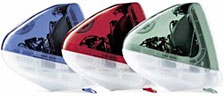 I especially love introducing families who have kids in
elementary school to the slot-loading, all-in-one iMac G3,
starting with the first FireWire
model. The selling points are compelling: for somewhere in the vicinity of $100
and with minimal upgrades to the stock configuration, you can have a
compact, fairly rugged machine capable of running Mac OS X.4.11 (and OS
9) that works with almost any printer, can go online wirelessly, can
play a wide variety of educational games made between 1995 and 2005,
and is virtually immune to viruses and other malware.
I especially love introducing families who have kids in
elementary school to the slot-loading, all-in-one iMac G3,
starting with the first FireWire
model. The selling points are compelling: for somewhere in the vicinity of $100
and with minimal upgrades to the stock configuration, you can have a
compact, fairly rugged machine capable of running Mac OS X.4.11 (and OS
9) that works with almost any printer, can go online wirelessly, can
play a wide variety of educational games made between 1995 and 2005,
and is virtually immune to viruses and other malware.
Combined with free apps like NeoOffice (or Bean, AbiWord, or iText) and the GIMP, and not having to buy a new monitor or printer, and it becomes a very easy sell. I offer lessons, too, so that parents and kids who aren't familiar with anything but Windows can start to feel at home with their Mac. In my experience to date, thanks to the intuitive nature of OS X, it takes a surprisingly short amount of time for them to feel like pros.
Then, when the kids get older, start high school, and maybe want more power from their computer to learn image editing or to get more out of the modern Web (especiallystreaming video), I offer a trade-in program that allows them to move up to, say, a Power Mac G4 for not much more than they paid for the iMac. The credit from the trade-in can go towards a monitor, and the beautiful thing about the G4s is that they are very upgradeable, meaning I can customize them for the family's needs and budget.
Environmental Footprint
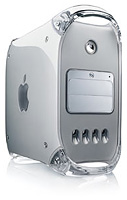 Say what you
will about energy requirements for older hardware, the negative
ecological footprint of a Power Mac G4 sitting in a high schooler's
room while he writes an essay or plays Runescape is much smaller that same
Power Mac corroding away in a dump. Keeping perfectly good machines in
service and out of the landfill is a significant goal for me.
Say what you
will about energy requirements for older hardware, the negative
ecological footprint of a Power Mac G4 sitting in a high schooler's
room while he writes an essay or plays Runescape is much smaller that same
Power Mac corroding away in a dump. Keeping perfectly good machines in
service and out of the landfill is a significant goal for me.
Helping families find a good computer at an affordable price is very satisfying. Watching a grandmother discover how easy it is to video chat with her grandkids across the country is a joy. Seeing the lightbulbs go on when people realize their Office files created on a Windows PC will work on a Mac, and watching the disbelief cross the face of a parent when you explain that the computer doesn't need to run anti-virus software - these are the experiences that motivate me.
We're fortunate to live in a world where Macs and OS X exist, and though they're not right for everyone, they fit the bill for a lot of people.
My next article will cover the challenge of finding resources, both
hardware and software, for older Macs. Just a hint: Low End Mac is a
great place to start! 
About the Author
Allison Payne grew up in the 80s surrounded by computers and later found herself troubleshooting the pesky things wherever she went. Just before deciding to swear off of them completely, she was introduced to Mac OS X. The rest, as they say, is history.
Her husband gave her his college PowerBook 1400 to play with, which led to an obsession with vintage Macs of all varieties. It also led her to Low End Mac. Now, when she's not fixing everything her users break at her day job or herding her brain-cell-deficient cats, she owns and operates Alliance Family Computers, designs bizarre video games with her kid brother, participates in ill-advised month-long writing challenges, and maintains a petting zoo of vintage Macs in her basement.
Join us on Facebook, follow us on Twitter or Google+, or subscribe to our RSS news feed
Today's Links
- Mac of the Day: 17" MacBook Pro Core Duo, (2006.04.24. The top-end MacBook Pro has a 1680 x 1050, 2.16 GHz Core Duo CPU, and supports Apple's 30" Cinema Display.)
- Support Low End Mac
Recent Content
About LEM Support Usage Privacy Contact
Follow Low End Mac on Twitter
Join Low End Mac on Facebook
Favorite Sites
MacSurfer
Cult of Mac
Shrine of Apple
MacInTouch
MyAppleMenu
InfoMac
The Mac Observer
Accelerate Your Mac
RetroMacCast
The Vintage Mac Museum
Deal Brothers
DealMac
Mac2Sell
Mac Driver Museum
JAG's House
System 6 Heaven
System 7 Today
the pickle's Low-End Mac FAQ
Affiliates
Amazon.com
The iTunes Store
PC Connection Express
Macgo Blu-ray Player
Parallels Desktop for Mac
eBay

