
2011 – We old time G4 users have grown used to the neglect by Apple and Adobe, which want to lure us into buying their newfangled stuff by constantly locking out older hardware. But, my fellow G4 users, the battle is not yet lost!

 Stuck with my 800 MHz PowerBook G4 (TiBook) with 1 GB of system memory (RAM) and 32 MB ATI Mobility Radeon 7500 graphics for my mobile work, I couldn’t believe there was no way to watch my favorite YouTube videos smoothly.* So I entered an exciting evening of research and experimenting.
All Good Things Come in Threes
My first attempt to get YouTube going on my Early 2002 PowerBook was using a small program called YouView. It is developed and maintained by Mr. Gecko’s Media. YouView lets you browse and watch YouTube Videos on your Mac OS X 10.4 Tiger and 10.5 Leopard systems.

YouView lets you watch YouTube videos on OS X 10.4 and 10.5.
The author asks for a $4.99 donation, which I gladly paid for, motivating him to continue supporting our Tiger machines. After the registration, you get a key that enables additional features, such as downloading a video or converting it.
It is fully functional without registering for the additional features. I’ve been using it for a couple of hours, and it has worked very reliable on my TiBook. All videos played in 480p and ran smoothly. Higher resolutions up to 4k are supported, but I decided not to kill my TiBook. Other than the hassle of having to start up another app when I feel like watching YouTube videos, I couldn’t find anything negative with YouView. It does exactly what it promises.
Does the Same, Looks the Same – Yet It’s Different
However, even if it should cease operation one day, there is an alternative in town, MacTubes. I found out about MacTubes on the PPC Luddite blog, which, by the way, is a must-have bookmark for everyone using PowerPC Macs.
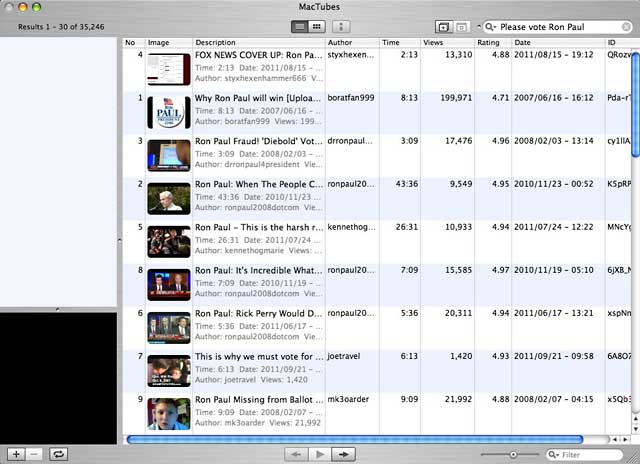
MacTubes lets you browse, play, and download YouTube videos on PowerPC Macs
MacTubes basically does the same as YouView – it is a stand-alone application that lets you browse, play, and download YouTube videos. From a user’s perspective, MacTubes and MacView are pretty similar, but it’s always good to have an alternative at hand in case one ceases operation.
I’ve been goofing around with MacTubes for 10 minutes and then went back to YouView – not because something is wrong with MacTubes, but because I installed YouView first and saw no reason for also using MacTubes. Both applications work just fine.
A Promising Solution for the Future
However, the “hero of the month” badge goes to someone else: The TenFourFox team and their QuickTime Enabler (follow the link to “download the .xpi”). What does it do? It grabs the URL and uses QuickTime 7 to stream the video. The good news is that you can start it directly from your browser. We oh-so-lazy folks don’t need to fire up another program. And it even plays H.264 video!

QuickTime Enabler lets you launch YouTube videos in TenFourFox and watch them using QuickTime
 Just right-click on the black video box on YouTube (yep, the one that talks about upgrading Flash). From the contextual menu (right), choose the desired resolution of the video. QuickTime Enabler supports videos from 480p (SD) up to 1080p (HD). Unless you have a really fast PowerPC Mac, I wouldn’t recommend going higher than the SD/480p version. After picking the SD option, it took 2-3 seconds for the player to come up and starting playing the movie. Very smooth playback on my 800 MHz TiBook. Users of Quick Time Pro can even save these videos directly to their hard drive.
However, before you dash away to YouTube, let it be known that Quick Time Enabler is still in alpha stage. While it is very convenient to open movies directly from TenFourFox 8, it still has trouble with some videos, especially those with ads. Sometimes I also got an error saying “not a movie file”. A reload helped to solve the problem and make the video play.
Still, I’m very pleased with the performance and handling, and I hope that subsequent releases will improve reliability. There are even plans for expanding the site support to other pages than YouTube, which would be awesome.
So YouTube and a ten year old PowerBook G4? Not a problem!
* Publisher’s note: I have been using dual-processor Power Macs for so long that I was surprised to hear this. I used CPUPalette, part of Apple’s CHUD developer tools, to disable the second CPU on my dual 1 GHz Power Mac G4. Lo and behold, terrible image stuttering. The problem was worst with Safari, not as bad with TenFourFox, and least bad with Camino. dk
Keywords: #youtube
Short link: http://goo.gl/12sXZN
searchword: youtubeg4
