
Classic Macsin the Intel Age
Upgrading Your eMac for Better Gaming and Hi-res Video Performance
- 2008.07.11 -Tip Jar
Well, time for another "hot rodding" article. In my previous oneUpgrading a DigitalAudio G4 to Work Better in Leopard, I was modifying a dual processor 533 MHz Power MacG4 to run Mac OS X 10.5. This time I am hot rodding a 1.25 GHz eMac to run Leopard withspeed and also run games. I'm hoping on getting it to run HDTV as well.
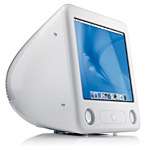 We're starting outwith a stock eMac this time: 256 MB of RAM, 17" display, Combo drive,and 40 GB hard drive.
I started with the hard drive. 40 GB is fine on the Digital Audio,but since I'll be using this Mac to store my entire iTunes library,HDTV movies, and games, I figured a larger hard drive would be nice. Iremembered having an 80 GB drive around; I think I found it in a"Dumpster Dell" a year ago. The Dumpster Dell itself was worthless (AMDK6-2 333) and didn't work; but I did save the hard drive beforethrowing the Dell back into the dumpster.
Crossing my fingers, I put it in the eMac and booted from a Pantherdisk that happened to be lying around. Believe it or not, the dumpsterdrive showed up in the installer's Disk Utility as 'WDC CAVIAR 80.00GB'. It was for some reason formatted in FAT32.
I took this good opportunity to format the 7200 rpm drive as HFS+,naming it "Dumpster Dell" just for fun.
So now I had a big hard drive, but I wasn't done yet.
I went to a local computer store and bought a 1 GB memory stick- they had a discount on memory sticks from that particular company (Ithink it was A-Data), and I got it quite cheaply. Now the eMac had 1.25GB of RAM and an 80 GB drive.
I still felt like something was missing, though. That's right - theAirPort Card!
A quick Google search revealed that I needed an AirPort Extremecard. Crap. I had a few regular AirPort cards that were unused, but noExtreme. I was about to get out my checkbook when I remembered thepurchase of my Digital Audio. When the computer arrived, included wasalso a box of miscellaneous stuff. I didn't care about that stuff thenand put it somewhere. I found everything in a closet. I dug through thebox. ATA cables, floppy cables, a Zip drive, a Pro Mouse and. . . Hurrah! In that box was an AirPort Extreme card. Iinstalled it in the eMac, and now I was ready to rock.
Well, not just yet. I needed a SuperDrive to complete this project.Luckily I salvaged a DVD/RW from the Dumpster Dell. It was beige andquite scratched, but inside the eMac, that wouldn't matter.
The Leopard DVD booted, and I installed OS X 10.5 on the "DumpsterDell" partition. That was a few weeks ago, and while it was installing,I worked on an article for Low End Mac.
Finally the cool intro music played, and I had to fill in myaddress, name, telephone number, etc. When that was done, I created anaccount with the full name of "Carl Nygren" and the short name of"dumpsterdell".
Leopard felt very speedy on the eMac. I started updating to 10.5.4and downloaded all other updates as well. When that was done, I hadmyself another iHotrod to play with.
I started by installing my three favorite games for the Mac (and thePC): Star Wars Jedi Knight II: Jedi Outcast, and its successor, StarWars Jedi Knight III: Jedi Academy. I also installed the great RPG gameStar Wars: Knights of the Old Republic.
I started playing Jedi Outcast, which despite its age (2002) can putsome pressure on PCs because of its engine. Making my way through thegalaxy as Kyle Katarn, I didn't notice any of the lags I saw on theeMac before its upgrade. Very good. I ran it at 1024 x 768 resolutionwith no worries at all.
How about the other two games? Jedi Academy also ran very smoothlyat 1024 x 768 - it still chopped at times though, like when I was inlightsaber combat with three Sith at once ("Die, Jedi!"). Knights ofthe Old Republic ran very well at 1024 x 768 - no lags at all.
I'm a huge fan of Star Wars, so that's why I play those games. (I'dlove to see a Jedi Knight IV someday!) But other games? I installed oneof my all-time favorites for the PC, Return to Castle Wolfenstein. Nolags at all. It has the same engine as Jedi Academy and never chopped,not even a tiny tiny bit.
So it's great for gaming, but how about HDTV?
I chose to watch an episode of House in 720p. Using Apple'sQuickTime Player (the best player out there), it played just fine.After watching it to the end, I got one of Microsoft's 1080p samples.Look at that quality! It chopped a bit at times; but other than that,decent. I still wouldn't recommend going over 720p though.
And everything else? Well, Front Row runs (of course), and so doesTime Machine. Oh, and that AirPort Extreme card works fine too.
Was it worth the effort to upgrade?
I was certainly lucky to salvage a working 80 GB drive from adumpster find, but they're not very expensive. If you're willing to paya little for the SuperDrive, the 80 GB drive, and the memory stick(and, of course, AirPort Extreme), you have a powerful machine thatwill serve you well for years to come.
I like G4 Macs because they are generally easy to upgrade and CPUupgrades are available for older, slower models. G3s are nice too, butmany of them (not the Pismo, dual USB iBooks, andslot-loading iMacs) lack AGP graphics, and as such are notcompatible.
So, yes, it's definitely worth it. If you need raw power, however,I'd recommend going with a G5. No matter how good G4 Macs are, it's anaging chip, and the G5 has so much more power.
I'd just like to add a fun thing: I liked the Dumpster Dell name somuch that I set that name for the hard drives on all my 680x0 Macs.:-)
I'd also like to update you on all those Macs I'll be picking up.We've planned it for later this week or early next week, and oncethey're up and running, count an article. 
Join us on Facebook, follow us on Twitter or Google+, or subscribe to our RSS news feed
If you find Carl's articles helpful, please consider making a donation to his tip jar.
Today's Links
- Mac of the Day: PowerBook 190cs, introduced 1995.08.28. The last 680x0-based PowerBook could take a PowerPC upgrade.
- Support Low End Mac
Recent Content
About LEM Support Usage Privacy Contact
Follow Low End Mac on Twitter
Join Low End Mac on Facebook
Favorite Sites
MacSurfer
Cult of Mac
Shrine of Apple
MacInTouch
MyAppleMenu
InfoMac
The Mac Observer
Accelerate Your Mac
RetroMacCast
The Vintage Mac Museum
Deal Brothers
DealMac
Mac2Sell
Mac Driver Museum
JAG's House
System 6 Heaven
System 7 Today
the pickle's Low-End Mac FAQ
Affiliates
Amazon.com
The iTunes Store
PC Connection Express
Macgo Blu-ray Player
Parallels Desktop for Mac
eBay

