
In my quest for an up-to-date browser to use in Mac OS X 10.4 Tiger on my two old Pismo PowerBooks, one that I had consistently passed over was OmniWeb, which was the very first OS X web browser out of the blocks a decade ago. OmniWeb was originally developed for the NextStep platform in 1995, then migrating to OpenStep, and finally to Mac OS X.
OmniWeb was also the last major commercial software browser holdout (except for iCab, currently at version 4.8a, which remains nagware), finally dropping its licensing fee in February 2009.
That fee had been one reason for my looking elsewhere, but it wasn’t my biggest objection to OmniWeb; I dislike thumbnail bookmarks tabs. You can switch to a text-only tab list, but it still lives in a vertical slide-out drawer, which can be positioned at either the left or right of the browser window, still eating up the same amount of precious screen real estate for us small-display laptop users, which is my main complaint about the thumbnails – not the pictures.
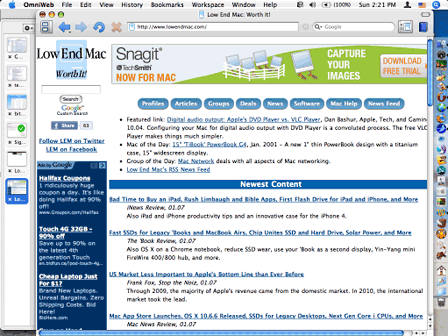
Low End Mac viewed in OmniWeb on a 1024 x 768 display.
Even with the tab drawer reduced to about its minimum useful size, I still can’t get all of Low End Mac’s home page to show on my Pismo’s 1024 x 768 display; I have to scrolling sideways. I also find it particularly tedious and counter-intuitive having to navigate there to close tab windows.
However, OmniWeb is one of the rapidly diminishing selection of actively developed browsers that still supports Tiger. As a Tiger holdout, I appreciate any developer still taking an active interest in supporting the last Mac OS X version that (officially) supports G3 and slower (than 800 MHz) G4 Macs, for which I give the Omni Group developers appreciative credit, so I thought OmniWeb deserved a fresh new evaluation
I’ve been using OmniWeb for the past couple of months or so, and I’m happy to report how pleasantly surprised I’ve been at how nice-working OmniWeb is on both the Pismo (550 MHz G4, 1 GB RAM, OS X 10.4.11) and on my Late 2008 Unibody MacBook (Core 2 Duo 2.0 GHz, 4 GB RAM, OS X 10.6.6).
The thumbnail tabs are still an annoyance, but I can tolerate that, especially for speed and stability on Tiger, which OmniWeb 5 has.
None of the browsers I’m using with Tiger is really satisfactory, and I’ve long suspected that browser compatibility will probably be what ultimately ends the Pismo’s run as a production workhorse.
Opera 10.6.3 is pretty good – fast and quite stable – but it has a compatibility bug with PowerPC that causes it to bog down badly with long paroxysms of spinning beach ball when entering text in fields, such as when doing Google or Bing (a surprisingly good search engine) searches. It’s also no longer current. Opera 11 doesn’t support PowerPC; 10.6.3 is the end of the road for Tiger (and OS X 10.5 Leopard) on PPC Macs. SeaMonkey and Camino both still officially support OS X 10.4, but they seem to get slower and slower on the old 550 MHz G4 Pismos with each incremental version upgrade. I still use one or the other for web posting and certain other chores, but the writing is in the wall there as well.
In general, I’m finding OmniWeb, which is based on Apple’s WebKit, a more satisfactory surfing tool on Tiger than any of the Mozilla Gecko-based siblings (Firefox 3.6.13, SeaMonkey 2.0.11, and Camino 2.06), although it’s no ball of fire speed-wise on these old 550 MHz G4s. (I hasten to emphasize that the Intel versions of all these browsers are gratifyingly speedy on Core 2 Duo machines like my MacBook.)
Consequently, I will keep using it, possibly for the duration, although I’ll be pleasantly surprised if any major browsers are still actively being developed for Tiger by the end of 2011. [Update: The last version, OmniWeb 5.11, was released in December 2011, still supporting Tiger.]
I still don’t like icon tabs, and OmniWeb (on the G4 Pismos) also sometimes goes into spasms of unresponsiveness while it’s executing tasks.
Workspaces
On the plus side, OmniWeb has what is probably the best session save and resume implementation of any browser, with its excellent Workspaces feature that automatically saves your open windows and tabs (including their sizes and positions on screen) and restores them when you relaunch OmniWeb, as well as enabling you to manually store your own arbitrary sets of workspaces for later recall and quickly switch between them with a key shortcut or menu choice.
You can organize Workspaces by dragging and dropping the contents of one workspace to another, take a snapshot of a workspace and instantly restore the workspace from the snapshot, cancelling any modifications made during a work session, and share workspace files with other OmniWeb 5 users.

You can block ads with OmniWeb, choose to view popups only when you ask for them (like if you specifically click a link), tell OmniWeb to block any ad content coming from a known ad server, block all Flash content, and much more.
OmniWeb is highly custom configurable with extensive Preferences options, such as allowing you to specify preferences that apply to specific websites. Adjust the font size on a given page, and the adjusted font size will be used on all other pages of the same site. Preferences are saved automatically and retained between browsing sessions.
I’m giving OmniWeb a three out of four rating on Tiger under present circumstances. It’s arguably the best of what’s currently available for OS X 10.4.
New in version 5.10.3: Fixes a crash encountered if you were running on Mac OS X 10.4 Tiger.
Rating: 
System requirements: Mac OS X 10.4.8 or later.
System Support: PPC/Intel
Freeware.
Keywords: #bestbrowser #tigerbrowser #osxtiger #omniweb
Short link: http://goo.gl/EXak02
searchword: omniwebontiger
