
'Book Value
2 Weeks with OS X 10.6.4 and Safari 5
Charles Moore - 2010.06.30 - Tip Jar
I've been checking out two major Apple software updates for the past couple of weeks - Mac OS X 10.6.4 and Safari 5 - with mixed results.
OS X 10.6.4
I had high hopes for OS X 10.4. I haven't been enchanted by Snow Leopard up to this point, and I keep asking myself why I don't just terminate the pain and go back to OS X 10.5.8 Leopard, which I have installer on my Unibody MacBook's other hard drive partition. Leopard has proved a delightfully smooth and reliable performer on that machine.
However, in the interest of research, I've gritted my teeth and persevered with Snow Leopard.
Unfortunately, version 10.6.4 has me still gritting.
Hotter Than Leopard
Initial indications seemed promising. On a fresh bootup, 10.6.4 seemed to run significantly cooler on my 2.0 GHz MacBook - not as cool as 10.5.8, but a definite improvement over 10.6.3. Alas, after a few hours of runtime, and with my fleet of three or four browsers plus Thunderbird running, the processor temperature crept up again, hanging mainly in the 70-80°C range and spiking into the low 80s at times. With Leopard, you rarely see temperatures hotter than the low 70s - and it's mostly 60s.
Rebooting after a week of uptime brought the temps back down, but only temporarily.
While on the subject of temperature, I also briefly tried out the new Version 3.1 final of Mozilla's Thunderbird email client last week and discovered that it spikes the processor temperature by 4-5°C when started up - behaviour that I'd noted with version 3.1 beta builds even when it's idling. Reverting to T-Bird 3 cooled things off somewhat.
Restarting the Dock
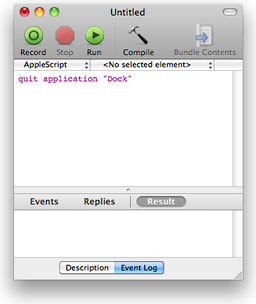 Banefully, the dreaded Spaces/Dock switching hang bug has not
been squashed in 10.6.4, and indeed at times seems worse than it had
been in 10.6.3. A wonderful workaround that rescues one from the
necessity of rebooting each time this one kicks up (about a dozen of
them respectively in recent evening computing sessions) is a little
AppleScript called QuitDock. I found this in a great little tutorial article posted way
back in 2002 on the Mac Net Journal site by Rob McNair-Huff, with
instructions on how to implement easy Dock restarting with one click by
enlisting the help of a simple AppleScript.
Banefully, the dreaded Spaces/Dock switching hang bug has not
been squashed in 10.6.4, and indeed at times seems worse than it had
been in 10.6.3. A wonderful workaround that rescues one from the
necessity of rebooting each time this one kicks up (about a dozen of
them respectively in recent evening computing sessions) is a little
AppleScript called QuitDock. I found this in a great little tutorial article posted way
back in 2002 on the Mac Net Journal site by Rob McNair-Huff, with
instructions on how to implement easy Dock restarting with one click by
enlisting the help of a simple AppleScript.
You can create a very simple AppleScript using OS X's bundled ScriptEditor utility (Applications > AppleScript > Script Editor), save it as an OS X applet, and drop it it into the Scripts folder (Scripts menulet > Open Scripts Folder or drag it to either HardDrive > Library > Scripts or HardDrive > Users:username > Library > Scripts ), where it can be accessed when you need to quit and restart the Dock.
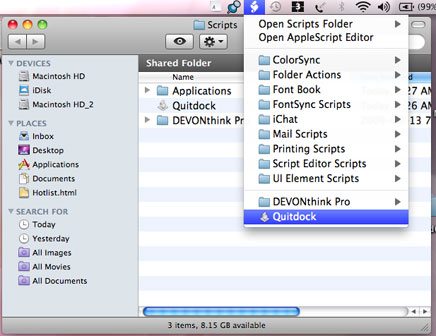 The
Script Menu appears on the menu bar at the top of your screen (if you
don't see it, open the Scripts Utility (Application > AppleScript
> Scripts Utility) and make sure the "Show Script Menu in menu bar"
checkbox is checked), from where you can conveniently access your
applet.
The
Script Menu appears on the menu bar at the top of your screen (if you
don't see it, open the Scripts Utility (Application > AppleScript
> Scripts Utility) and make sure the "Show Script Menu in menu bar"
checkbox is checked), from where you can conveniently access your
applet.
To create your Dock quit applet, open the Applications folder and find the AppleScript folder, double-click on Script Editor, and when the program opens, type: quit application "Dock" in the window text field. That's your AppleScript soon-to-be applet.
Save the new script an OS X applet, store the saved applet in the Scripts folder, and, if you wish, drag its icon to the Dock to create a one-click shortcut, and you're done.
If it wasn't for this script, I would have reverted to Leopard long since, but it's still an unsatisfactory state of affairs.
Other Troubles with 10.6.4
Other tiresome issues with 10.6.4 that I had never noted in Leopard or earlier OS X versions are really slow Carbon app launches and a frequent (but sporadic) "takes forever" lag in going into hibernation when I select the Sleep command, as well as a maddening propensity to wake from sleep randomly without being asked.
Safari 5
Moving along, I'm happy to report that I like Safari 5 a lot better than I do OS X 10.6.4, and indeed it's become one of my three core browsers - displacing Firefox (at least for the present).
It's Fast
I'm still not smitten with Safari's ho-hum appearance and limited feature set, but I've found its speed and stability seductive. Apple claims that the new Nitro JavaScript engine on the Mac version of Safari 5 provides a 30% performance increase over Safari 4, and my seat-of-the-pants impression gives me no reason to doubt it.
Apple also claims that Safari's JavaScript performance is 3% faster than Google's Chrome 5.0 browser, and over twice as fast as Firefox 3.6. Safari 5 also loads new web pages faster, thanks to Domain Name System (DNS) prefetching and improved caching of previously viewed pages, which it returns more quickly.
Safari Reader
Safari 5's marquee feature is Safari Reader, which that lets you display just the text of a Web page in a scrollable view and eliminate distractions with a simple menu selection, a keyboard shortcut, or just click the handy "Reader" icon, which shows up in the address field when Safari 5 detects an article.
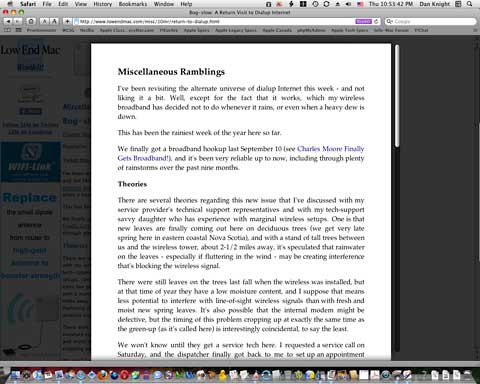
Safari Reader showing a recent Low End Mac column.
Being as sites like Low End Mac get most of their revenue from online advertising, I have mixed feelings about this innovation, but I suppose it's the shape of things to come. [Editor's note: You do have to load the page, ads and all, before you can invoke Reader, so we don't see this as a serious threat to site income. dk]
Extensions
Also new with Safari 5 is more user-friendly support for
plugins extensions, if they're something you're into.
I use a couple of plugins with Firefox, but there're neither a
dealmaker nor a dealbreaker for me. You can find a selection of Safari 5
extensions listed online.
Safari Annoyances
On the downside, there are still some really annoying aggravations with Safari 5.

Safari 5 shows a maximum of 12 tabs on a 1280 pixel wide display.

Low contrast background tabs, a Safari tradition.
I don't like tab bar filling up and overflowing off the end. With Opera and Chrome, the tabs just keep shrinking, presumably ad infinitum, as you open more pages. With FireFox, tabs spill off the ends as well by default, but there is a hack to defeat that and impose Opera-like behaviour. However, if such a hack is possible with Safari, I'm not aware of it. While on the topic of tabs, I also don't like the dark, low-contrast text titles on Safari's individual tabs.

Safari's small reload button in the address field.
The Stop/Reload button works fine, but having it so tiny and at the right-hand periphery of the address field is tedious - and why does one have to fiddle with a menu command to get the previous session to restore?
More Safari 5 Pros
Back in the positive column, Safari has had a trip to the fat farm and been trimmed to 56.7 MB in size, a substantial reduction from Safari 4's 80 MB and much smaller than Chrome's 147 MB - nearly dead-even with Firefox's 56.1 MB, but still a lot porkier than Opera, which weighs in at 36 MB.
System requirements for Safari 5 for Mac OS X are OS X 10.5.8 (PPC and Intel) or OS X 10.6.2 or later. Safari 5 for Windows requires Windows XP SP2, Vista, or 7, a minimum 256 MB of memory, and a system with at least a 500 MHz Intel Pentium processor.
About LEM Support Usage Privacy Contact
Follow Low End Mac on Twitter
Join Low End Mac on Facebook
Favorite Sites
MacSurfer
Cult of Mac
Shrine of Apple
MacInTouch
MyAppleMenu
InfoMac
The Mac Observer
Accelerate Your Mac
RetroMacCast
The Vintage Mac Museum
Deal Brothers
DealMac
Mac2Sell
Mac Driver Museum
JAG's House
System 6 Heaven
System 7 Today
the pickle's Low-End Mac FAQ
Affiliates
Amazon.com
The iTunes Store
PC Connection Express
Macgo Blu-ray Player
Parallels Desktop for Mac
eBay

