
'Book Value
Bringing Back Pismo
Charles Moore - 2010.11.04 - Tip Jar
A reader named Stephanie writes:
Hi Charles,
I am doing some year-end clean up and cannot let go of my Apple Pismo PowerBook. The hard drive failed a few years back, and of course I was told by the Apple dealer that it would not be worth it to try and replace it, that Safari wouldn't even run on it. Of course, I am a librarian by training, and I know there no such thing as "the answer", so I found you via a Google search.
Okay, the bottom line is could I replace the hard drive and use this computer in my kitchen for just web surfing for recipes? Could I do this myself, and would it be prohibitively expensive? It is a beautiful machine, and it is a shame that it just sits on my desk gathering dust.
I also have one of the first generation iPods, and after one battery replacement, it still works fine. Someone laughed at it once and asked me where I got the "brick". I was proud, because I consider myself a relic too, one of the last generations to be taught to respect and take care of your things, so if I can fix it I will be glad to try.
Anyway, I would appreciate your expert advice if you are so inclined.
Thanks,
Stephanie
Hi Stephanie,
Absolutely the old Pismo is worth reviving. I'm not one to give up on a tool that still can do what I require of it just because it's got some age on it either. I love old stuff!
!'m still using two Pismos for my utility composing and editing (involves a lot of Web surfing too) and "road" computers, respectively. Not sure what the Apple dealer was about, telling you Safari won't run on a Pismo. It works just fine on my machines running Mac OS X 10.4.11, and at this writing a currently supported version of the browser too, although I prefer Opera or SeaMonkey for most surfing I do in the Pismos.
Recipes should be a breeze.
The Pismo hard drive is very easy to replace (relatively speaking). It's a 20 minute job for someone who's done it before, a bit longer if you're feeling your way. Good on you for wanting to bring this great old laptop back to life.
Incidentally, I also had one of the original 2001 iPods, and it outlasted its original battery, which I replaced, but the hard drive finally died, and I handed it off to my techie daughter to use for parts for a same vintage iPod she had.
Back to the Pismo.
First you will need a hard drive. Other World Computing offers a nice selection of ATA hard drives for PowerBooks. A couple of examples:
- 80 GB Hitachi/IBM Travelstar 5K160, 5400 RPM, 8 MB data buffer, ATA/7, 9.5mm, $57.99
- 80 GB Western Digital "Scorpio", 5400 RPM, 9.5mm, 8 MB data buffer, $63.99
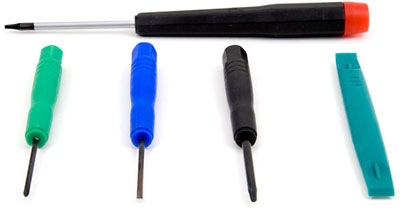 Tools necessary are a Torx T-8 screwdriver, a small Philips
screwdriver, and maybe a bent heavy-duty paper clip. If you
don't have the Torx and can't find one locally, both the needed
screwdrivers are included in Other World Computer's handy $4.99
five-piece Mini Tool Kit.
Tools necessary are a Torx T-8 screwdriver, a small Philips
screwdriver, and maybe a bent heavy-duty paper clip. If you
don't have the Torx and can't find one locally, both the needed
screwdrivers are included in Other World Computer's handy $4.99
five-piece Mini Tool Kit.
I could give you a detailed explanation of the disassembly process, but better to recommend that you check out iFixit's illustrated guide to Pismo teardowns - and specifically the section on replacing hard drives.
Personally, I never bother removing the keyboard ribbon cable and just leave the keyboard inverted on the palm rests and trackpad. This saves a couple of disassembly reassembly steps and eliminates the possibility of damaging the cable while disengaging the connector, which, as iFixit notes, can be stubborn to remove. The heat sink screw nearest the palm rest may be slightly hidden, but that's easy to work around. I don't remove the AirPort Card either if I'm just changing the hard drive.
If the plastic pull tab to unseat the processor card is still intact, which it probably is if your Pismo has never been apart, all well and good. I've often found the tab missing on processor upgrade cards, in which case I insert a straightened paper clip, with about 3/16" of its tip bent at a right angle, into a small hole in the nearside right-hand corner of the processor card and gently but firmly pull upward, which disconnects the card from its multi-pin connector socket. iFixit specifies a nonmetal tool, but I'm not sure what that would be. With care, the paper clip has worked fine for me in many Pismo processor card removals.
You'll need your Torx T-8 screwdriver to remove and replace the four screws that fasten the drive to its mounting cage. One step the iFixit guide fails to mention is disconnecting the old hard drive from its ribbon cable and removing it from the cage. Care must be exercised when connecting the cable to the replacement drive, making sure the multi-pin ganged connector is properly lined up with the pins on the drive before pressing it home. Once the drive cage is back in and the logic board end of the drive connected, put the processor card back in its place and press down gently but firmly home to seat in its logic board connector socket. Replace the processor heat sink. (it's a good idea to make sure the heat sink and processor contact pads have a very thin coating of thermal paste. You should be able to get the tiny amount you need from a local computer repair shop, but if not, it's available here.
If you can't find any, it probably wont be a problem anyway. Just don't wipe any old grease off either contact surface.
This somewhat prolix explanation probably makes this job sound more complex than it really is. It's mostly pretty intuitive.
I hope this helps, and let me know how it turns out.
About LEM Support Usage Privacy Contact
Follow Low End Mac on Twitter
Join Low End Mac on Facebook
Favorite Sites
MacSurfer
Cult of Mac
Shrine of Apple
MacInTouch
MyAppleMenu
InfoMac
The Mac Observer
Accelerate Your Mac
RetroMacCast
The Vintage Mac Museum
Deal Brothers
DealMac
Mac2Sell
Mac Driver Museum
JAG's House
System 6 Heaven
System 7 Today
the pickle's Low-End Mac FAQ
Affiliates
Amazon.com
The iTunes Store
PC Connection Express
Macgo Blu-ray Player
Parallels Desktop for Mac
eBay

