
'Book Value
Migrating to an Intel Mac More Difficult than Expected
Charles Moore - 2009.02.20 - Tip Jar
Popularity: ![]()
![]()
![]()
![]()
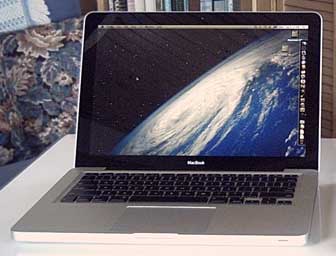
Two weeks after it arrived, progress with my new Unibody MacBook is proceeding slowly. I had imagined that I would have switched over to it for production by now, but things have not gone as smoothly as I had hoped - not, I hasten to add, due to any problems with the machine itself, which has thus far been performing flawlessly, but rather with my transition from PowerPC to Intel.
Eudora
The notable sticking point is email. So far, I've been unsuccessful in getting Eudora 6.2.4 to configure properly - particularly to send email from the Intel machine running Mac OS X 10.5.5 "Leopard". The application starts, but it chokes on importing my settings from Eudora installed on my PowerPC Macs (I have 22 email accounts configured) and won't connect with SMTP servers through the Apple external modem on my dialup connection.
Webmail works fine.
Some folks report having been able to get Eudora 6.2.4 to work in Intel Macs, but I'm not sure if that includes over dialup, and I've even found the the PowerPC version cranky under Leopard, although it is a smooth and swift performer with Mac OS X 10.4 "Tiger" and earlier versions of OS X.
I'm probably going to have to bite the bullet and switched to a different email client, but I am very reluctant to do so at this point, because there is none I find even ballpark satisfactory compared with classic Eudora. I've never liked Mail, and I'm off-put by any three-box interface email client, which is most of them. I need something that will work dependably over dialup, import and efficiently search my dozen years of Eudora email archives, work efficiently with multiple accounts and SMTP servers, and be slick and easy to back up and to swap mailbox files among several Macs - now across the PPC-Intel divide as well. A tall order, and currently the main sticking point.
Other Migration Issues
In general I've had little luck importing settings form the PowerBook via Migration Assistant. For whatever reason, stuff wasn't working properly, so I've been reinstalling applications in some instances and re-entering registration information and user settings manually, which is time-consuming. I also finally have WindowShade X (which I simply cannot abide trying to get along without) working and still have to install TypeIt4Me, another add-on that I consider absolutely essential to my workflow.
My suite of production applications, utilities, and a few key system add-ons (like WindowShade X) function as a tightly integrated ecosystem, as it were, and I'm not inclined to go live for actual production work until I have it all functioning in synergistic harmony.
Another application I'm reluctant to leave behind is Color It! 4.5, which so far refuses to work on the MacBook, although developer Digimage Arts says it should work under Rosetta on Intel Macs. I'll have to try a clean reinstall from the software CD.
As far as it goes, the machine is a joy to use so far, but I'm not anticipating a switch over for production work until next week at the earliest, and I am setting no arbitrary deadlines.
Happily, my 17"
PowerBook G4 continued to do a superb job, so there is absolutely
no pressure other than my own curiosity about finding out how I'll
enjoy working in the Intel space, so for now I'll stick with what's
working until I have the new unit tuned and configured to my liking.
Join us on Facebook. Follow us on Twitter.
Charles Moore has been a freelance journalist since 1987 and began writing for Mac websites in May 1998. His The Road Warrior column was a regular feature on MacOpinion, and he is a news editor and columnist at Applelinks.com. If you find his articles helpful, please consider making a donation to his tip jar.
Other articles by Charles W. Moore
- Don't Kill Caps Lock, Learning to Love the iOS Keyboard, and an Adaptive iPad Keyboard, Miscellaneous Ramblings, 2012.02.06. The Caps Lock key has a useful function, the iPad's keyboard really is useful, and checking out an adaptive keyboard for the iPad.
- MacBook Air vs. MacBook Pro, Looking for a Vertical MacBook Stand, and SE/30 Internet Tips, Charles Moore's Mailbag, 2012.01.31. Whether a MacBook Air makes as much sense as a MacBook Pro, finding a vertical stand for a MacBook, and tips for getting an SE/30 on the Internet.
- Moving from Pismo to MacBook Air, Pros and Cons of Cheap PC Laptops, and More, Charles Moore's Mailbag, 2012.01.23. Also which upgrades make sense for an older PowerBook or MacBook.
- More in the 'Book Value index.
Links for the Day
- Mac of the Day: Mac IIfx, introduced 1990.03.19. This 'wicked fast' 40 MHz Mac trumped the 33 MHz DOS world.
- February 14 in LEM history: 98: A perfect compact Mac - 00: Extended computer warranties worth the cost? - Making your PC work with your Mac - 01: Customize Microsoft Word - 02: Quadra revives a passion for computing - 03: Real world performance - DIY Pismo screen replacement - Best Mac for writing - 03: Fastest browser on the Mac - 06: 15" MacBook Pro - Impressions of a newly acquired Lisa - Finding and using free WiFi - Apple should liberate OS 9 - 07: New Mac mini cheaper than upgrading a Power Mac - 08: Falling in love with OS X
- Support Low End Mac
Recent Content on Low End Mac
- PowerBook 165c: 19 Years of Color to Go, Chris Carson, Building Bridges, 2012.02.14. Until 1993, all of Apple's notebook computers had black and white displays. The 165c gave us a color PowerBook for the first time.
- Mac and iOS Browsers: Options Galore, Freeware Forum, 2012.02.10. Safari is adequate on Mac and great on iOS, but the range of good alternatives is stunning. LEM writers share their favorites.
- White MacBook Goes End-of-Life, Logitech Touch Mouse Supports Gestures, Firmware Updates, and More, The 'Book Review, 2012.02.10. Also MacBook Air better than any Ultrabook, docks for MacBook Pro models, Intel offers improved SSDs, and more.
- Fix Home Button Delay, Tablet the Ultimate Mobile PC, iPad Notebook a Possibility, and More, iOS News Review, 2012.02.10. Also using your iPad at work, two photo editors, a new iPad text editor, Macally's magnetic iPad 2 stand, and more.
- Apple's Support Lead Shipping, Smartphones Outsell PCs, OS X Ported to ARM by Intern, and More, Mac News Review, 2012.02.10. Also the power of Tex-Edit Plus, Google and Twitter are already censoring the Web, Snow Leopard Security Update, and more.
- LogMeIn: Remote Screen Sharing for the Rest of Us, Alan Zisman, Zis Mac, 2012.02.09. Configuring the Mac's built-in screen sharing to work over the Internet can be difficult or impossible. LogMeIn makes it easy.
- More links in our archive.
Recent Deals
- Best 17" MacBook Pro Deals
- Best iPod classic Deals
- Best eMac Deals
- Best MacBook Air Deals
- Best iBook G4 Deals
- Best iPad Deals
- Best Classic Mac OS Deals
- Best Apple TV Deals
- More deals in our archive.
About LEM Support Usage Privacy Contact
Follow
Low End Mac on Twitter
Join Low End Mac
on Facebook
Low End Mac Reader Specials
TypeStyler 11 is now in the Mac App Store!! -- Special Introductory Price of $59.95!! -- To Buy From The Mac App Store Click Here Now!! Or buy direct
from Strider Software.
Don't install Parallels to play poker online! Poker Mac will show you how to download and install a native Mac poker and Mac Casino applications in minutes.
Favorite Sites
MacSurfer
Cult of Mac
Shrine of Apple
MacInTouch
MyAppleMenu
InfoMac
The Mac Observer
Accelerate Your Mac
RetroMacCast
PB Central
MacWindows
The Vintage Mac Museum
DealMac
Deal Brothers
Mac2Sell
Mac Driver Museum
JAG's House
System 6 Heaven
System 7 Today
the pickle's Low-End Mac FAQ
Affiliates
Amazon.com
The Apple Store
The iTunes Store
PC Connection Express
GainSaver
Parallels Desktop for Mac
eBay

