
'Book Value
Plastic or Aluminum: What's the Better MacBook Now?
Charles Moore - 2009.01.26 - Tip Jar
I've been trying to decide whether the timing of my column last week on Apple's low-end 2.1 GHz $999 MacBook White was impeccably bad or inadvertently appropriate in drawing attention to that heretofore somewhat ignored model the day that Apple unexpectedly released a substantial upgrade of the product.
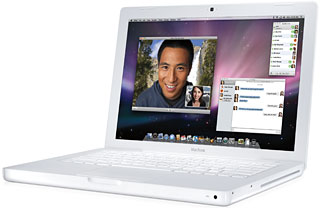
The MacBook White.
If you read that column, you'll perhaps recall that I concluded my commentary deducing that Apple would not want to continue the manufacturing, parts sourcing, and inventory complication of building two completely distinct families of MacBook indefinitely, and that that the polycarbonate model would likely be replaced by an entry-level unibody machine.
Changes to the MacBook White
Au contraire, as it turned out. Last Tuesday, Apple quietly rolled out an impressively enhanced update of its price leader MacBook, replacing the poky old Intel GMA X3100 integrated graphics chipset with the same (claimed to be up to 5x faster) Nvidia GeForce 9400M graphics used in the Unibody MacBooks and the MacBook Air.
The entry-level MacBook also got slightly downclocked from its erstwhile 2.1 GHz to the same 2.0 GHz Penryn Core 2 Duo CPU with 3 MB on-chip shared L2 cache used in the base Unibody. The MacBook White also gets a faster 1066 MHz frontside bus (up from 800 MHz in the preceding model) plus 2 GB RAM standard instead of the former 1 GB, all for the same US$999 price - and it still has a FireWire 400 port, which is huge for some of us. Unchanged are the standard 120 GB 5400 rpm SATA hard drive (upgradable to 320 GB) and dual-layer 8x SuperDrive.
Well, perhaps my surmise was not entirely off-base. Using the same CPU and graphics chipset in both the plastic and aluminum MacBooks should result in some economies of scale, and parts-sourcing/inventory rationalization for Apple, as well as goosing sales.
One way to look at it is that in order to come up with something to address the market share challenge posed by small, cheap PC laptops (so-called netbooks), Apple has decided, at least as a first response, to stick with its entry-level price point but add value - a substantial amount of value - by upgrading the polycarbonate MacBook with some solid specification enhancements, arguably creating the most value for dollar spent that Apple has ever offered in a notebook.
Looking Ahead
My initial thought after hearing the news was "I want one," reasoning that my biggest objection to the superseded version had been its lazy graphics support - not that I'm a gamer or into a lot of video or high-end graphics work, but I'm inclined to keep my computers for a long time. With Mac OS X 10.6 "Snow Leopard" coming, reportedly optimized to utilize graphics processors more extensively than previous OS X versions, that is something to consider. The new Nvidia GeForce 9400M graphics should handle Snow Leopard more than adequately, the standard 2 GB of RAM is serious added value, as is the faster frontside bus - and it's the last Apple laptop with a FireWire 400 port.
The "downgrade" in processor clock speed by 100 MHz (5%) and retention of 667 MHz DDR2 memory instead of the faster 1066 MHz DDR3 used in the unibody models should be relatively inconsequential performance-wise, given the faster graphics and bus, so the update is basically all good with nothing important lost and a lot gained.
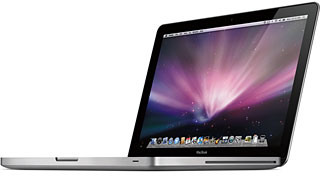 And yet, oddly enough, focusing on the
specification enhancements for the new low-end model, I've found myself
even more inclined more toward buying a base unibody machine as my next
computer, even though the value of the new white model is very tough to
beat.
And yet, oddly enough, focusing on the
specification enhancements for the new low-end model, I've found myself
even more inclined more toward buying a base unibody machine as my next
computer, even though the value of the new white model is very tough to
beat.
Polycarbonate or Aluminum?
There is no denying the seductiveness and solidity of the unibody enclosure compared with the styling and robustness of the polycarbonate enclosure, which essentially dates back to the first dual USB iBooks of 2001. I like the whitebook's look well enough, but having bought a 12" iBook back at the end of 2002, it's more than a bit "been there, done that" for me - and as someone commented last week, "The white one is a better buy, but the aluminum is gorgeous."
Then there are the screen backlights: the white model still uses a traditional CCFL tube rather than the Unibody's state-of-the-art LED backlighting - not in itself a deal-breaker, but anther factor to consider.
On the other hand, I prefer the conventional trackpad with a separate button on the old school model to the glass one in the Unibody with its integrated click function, which is just a bit too needlessly gimmicky for my taste. However, since I use an external mouse most of the time anyway, that's not a really critical issue for me either.
Neither is the matter of Mini DVI vs. Mini DisplayPort, as I don't usually use external monitors with my laptops and could not justify the cost of the DisplayPort-only 24" Cinema Display in any case.
The 40 GB greater standard hard drive capacity in the Unibody would provide a comfortable amount of headroom, but I'm still getting along with an 80 GB unit on my current PowerBook, so 120 GB should be plenty for me at this time - and they're so easily upgraded in these machines.
FireWire support is more important - or is it? I do have one external hard drive that is FireWire-only, but my 1G FireWire-only iPod died some time ago. Both my flatbed and slide scanners are FireWire/USB ambidextrous, and while I really like FireWire Target Disk Mode, I don't use it often enough to say I couldn't work around not having it. Bootability is probably the most compelling FireWire consideration for me. I'm told that Intel Macs will boot happily from USB drives, but I'm wondering if that really includes support so solid and dependable that you can use a USB drive as a substitute boot drive as I did for several days recently while troubleshooting an issue with my main boot system on my PowerBook.
As for other distinctions, being slightly smaller and thinner in form factor and half a pound lighter in weight definitely cuts in favor of the Unibody, making it closer to being a true replacement for the old 12" PowerBook as a serious road warrioring machine, and 30 minutes more rated battery life could prove useful as well. Another intangible is that the Unibody represents the future, as opposed to the whiteBook's mature and thoroughly-developed past.
The price of the white unit is certainly attractive. I live in Canada, and Apple Canada wants Can$1,149 for the white model (which at the current exchange rate makes it cheaper in Canada than the US), but will sell you an Apple Certified Refurbished 2.0 GHz Unibody for just $50 more than that, and even the full price of Can$1,399 is a very decent deal as well, being only Can$250 more than the white model as opposed to the $300 difference at the US Apple Store.
I'm still on the fence, but definitely leaning toward the Unibody.
Join us on Facebook, follow us on Twitter or Google+, or subscribe to our RSS news feed
Charles Moore has been a freelance journalist since 1987 and began writing for Mac websites in May 1998. His The Road Warrior column was a regular feature on MacOpinion, he is news editor at Applelinks.com and a columnist at MacPrices.net. If you find his articles helpful, please consider making a donation to his tip jar.
Links for the Day
- Mac of the Day: Power Mac 8200, introduced 1996.04.22. The minitower version of 7200 was never sold in America.
- Support Low End Mac
Recent Content
About LEM Support Usage Privacy Contact
Follow Low End Mac on Twitter
Join Low End Mac on Facebook
Favorite Sites
MacSurfer
Cult of Mac
Shrine of Apple
MacInTouch
MyAppleMenu
InfoMac
The Mac Observer
Accelerate Your Mac
RetroMacCast
The Vintage Mac Museum
Deal Brothers
DealMac
Mac2Sell
Mac Driver Museum
JAG's House
System 6 Heaven
System 7 Today
the pickle's Low-End Mac FAQ
Affiliates
Amazon.com
The iTunes Store
PC Connection Express
Macgo Blu-ray Player
Parallels Desktop for Mac
eBay

