
'Book Value
The Value of the Overlooked $999 2.1 GHz MacBook White
Charles Moore - 2009.01.20 - Tip Jar
Since the Unibody MacBooks made their entrance last October 14, very little attention has been paid to the mildly updated holdover entry-level 2.1 GHz MacBook White that was announced at the same time - and most of what has been said is focused narrowly on the price cut to $999 from $1,099 for the previous entry-level model.
The last representative of Apple's best-selling notebook computer model ever really deserves more respect than that.
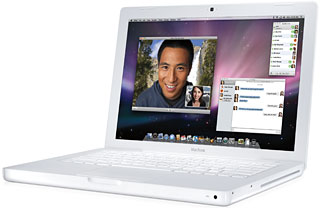
The white MacBook
I suppose that it's partly because the polycarbonate-bodied 13.3" MacBook, a conventional machine that owed much in terms of styling to the iBooks it replaced, was never terribly exciting at the best of times. The dual USB iBook form factor had been around what seemed like forever (five years), and had it not been for the availability of a black MacBook, albeit at a hard-to-justify $200 price premium for some black pigment in the polycarbonate resin its case was molded from and a somewhat larger hard drive, it would have been even a bigger yawner aesthetically.
Now that the MacBook has been in production for just shy of three years, it just can't compete for attention with the swish new Unibody model.
'Old School' Virtues
However, the "old school" MacBook still has its virtues, one being that it sells for $300 less than the 2.0 GHz Unibody MacBook. It is also the last Apple portable with a FireWire 400 port and the only consumer MacBook with any sort of FireWire support, which is huge for some users.
It's also easy to forget how well-endowed all Macs really are, including this price-leader MacBook and even the Mac mini. The base MacBook comes with a Penryn Core 2 CPU with an enhanced SSE4 vector engine and a 3 MB level 2 (L2) cache shared by both cores that's actually faster than the base Unibody's CPU (although the MacBook White runs on a slower, 800 MHz frontside bus), Apple's iLife suite of applications bundled, and iSight camera, a better array of I/O ports than the upmarket unibodies, a MagSafe power adapter, and, of course, Mac OS X.
Okay, the truly price conscious and those with really constraining budget realities are just not going to get excited over a $1,000 notebook, even if it is a Mac, when they can get a pretty decently featured PC "netbook" for $300, but in the context of Apple notebook history, this 2.1 GHz Core 2 Duo unit offers the most power and features for your purchase dollar you've ever been able to get - much more than the last $999 Apple notebook - a G3 iBook - ever represented.
Looked at from that perspective, it's a bit of a steal.
'Old School' Drawbacks
Of course, the 2.1 GHz MacBook is well short of perfection, even if it does now come with an 8x dual-layer SuperDrive. Serious gamers (or even many casual ones) would not even consider one of these machines in light of the plastic MacBook's most serious Achilles' heel - the mediocre video supported by its slow Intel GMA X3100 integrated graphics that uses 144 MB of system memory for graphics, an issue that has been dealt with handily in the new aluminum MacBooks, which boast the all-new Nvidia GeForce 9400M integrated graphics that Apple claims are up to five times faster than the X3100 can manage.
That said, if you're not a serious gamer and don't use your laptop for higher-end graphics or video editing, you will probably find the old school MacBook's graphics performance more than adequate (although one other point to consider is that OS X 10.5.6 "Snow Leopard" reportedly leans a lot more heavily on its supporting hardware's graphics system than previous versions of OS X have).
Another caveat is that while the old school MacBook's polycarbonate case is supposedly extremely tough and claimed by some to do a better job of absorbing knocks and bumps when you take your laptop on the road than metal-skinned machines, throughout its model run some owners have complained about cases cracking. You can read more about that issue in Apple's forums and at MacInTouch.
The MacBook's standard 120 GB hard drive offers a serviceable, although not cavernous, capacity by today's standards, but it's really easy to upgrade the hard drive. It also includes a not really adequate 1 GB of RAM, but that can be expanded to a very respectable 4 GB. The 13.3" 1280 x 800 resolution glossy display has a tried and true CCFL backlight instead of the snazzy new LED backlighting in the Unibody MacBook, and its battery provides a competitive 4.5 hours of runtime.
A Proven Design
An awful lot of people have bought these MacBooks in their various revisions, and the case crack issue notwithstanding, reliability horror stories have been relatively rare. The design has to be pretty thoroughly debugged by now, and if you prefer known-quantity mature technology, then this is your machine among current Mac laptop offerings.
And if you want one, the opportunity to buy new may be drawing to a close. There were rumors prior to Macworld Expo that the 2.1 GHz MacBook would be discontinued. That hasn't happened yet, but I deduce that Apple will not want to continue the manufacturing, parts sourcing, and inventory complication of building two completely distinct families of MacBook indefinitely, so that at some point - likely not far off - the plastic model will be replaced by an entry-level Unibody MacBook.
Join us on Facebook, follow us on Twitter or Google+, or subscribe to our RSS news feed
Charles Moore has been a freelance journalist since 1987 and began writing for Mac websites in May 1998. His The Road Warrior column was a regular feature on MacOpinion, he is news editor at Applelinks.com and a columnist at MacPrices.net. If you find his articles helpful, please consider making a donation to his tip jar.
Links for the Day
- Mac of the Day: PowerBook 2300, introduced 1995.08.28. The only Duo equipped with a PowerPC processsor run at 100 MHz.
- Support Low End Mac
Recent Content
About LEM Support Usage Privacy Contact
Follow Low End Mac on Twitter
Join Low End Mac on Facebook
Favorite Sites
MacSurfer
Cult of Mac
Shrine of Apple
MacInTouch
MyAppleMenu
InfoMac
The Mac Observer
Accelerate Your Mac
RetroMacCast
The Vintage Mac Museum
Deal Brothers
DealMac
Mac2Sell
Mac Driver Museum
JAG's House
System 6 Heaven
System 7 Today
the pickle's Low-End Mac FAQ
Affiliates
Amazon.com
The iTunes Store
PC Connection Express
Macgo Blu-ray Player
Parallels Desktop for Mac
eBay

