
'Book Value
Finding the Best Values in Apple's MacBook Matrix
Charles Moore - 2009.07.21 - Tip Jar
Apple's current notebook product matrix, notwithstanding its lack of a netbook, is as complete and coherent as it's ever been. Prices are lower than ever too, and the line is simultaneously more integrated design- and engineering-wise than ever before.
It's a truly wonderful time to be an Apple laptop user - and many consumers seem to agree: Despite the recession, demand for the 13" MacBook Pro is outpacing supply.
After five months using a Unibody MacBook, I'm increasingly convinced that the unibodies may be among the best Apple notebooks ever offered. It's too early to factor long-term ruggedness and reliability into the equation, but thus far my aluminum MacBook has been a delightful and completely dependable tool.
I still love my old Pismo PowerBooks and my 17" PowerBook G4, but if the MacBook continues providing trouble-free performance, it's on track to become my favorite among 'Books I've owned - and the new 13" MacBook Pros should be even better.
$999 Entry Level
At entry-level, there's still the polycarbonate MacBook White, brought up-to-date with a 2.13 GHz Core 2 Duo processor, a fast Nvidia GeForce 9400M integrated graphics chipset, 2 GB of standard RAM upgraded to 800 MHz DDR2 SDRAM (as opposed to the 667 MHz RAM used in the preceding version), a 1066 MHz frontside bus, a 160 GB hard drive, and a FireWire 400 port, all for the lowest-ever Mac notebook price of $999. In a historic context, the white MacBook is a superb value, providing an amazing amount of power and value for the money. It's also the only current Mac laptop available with a user-swappable battery.
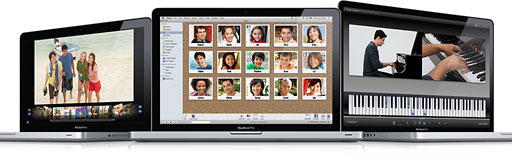
The mid-2009 MacBook Pro family.
Eclipsed by 13" MacBook Pro
However, the WhiteBook is eclipsed in value by the 13" MacBook Pro, whose base model sells for only $200 more. It gives you a slightly faster Core 2 Duo CPU (2.26 GHz); the same graphics chipset; 1066 MHz DDR3 SDRAM upgradable to 8 GB instead of the 800 MHz DDR2 and a 4 GB ceiling; a LED backlit 1280 x 800, color-corrected AU Optronics display with with 60% greater color gamut instead of the WhiteBook's old-school CCFL backlighting and lower-quality screen; a FireWire 800 port (backwards compatible with FireWire 400 via an optional adapter); a SD Card slot; a backlit keyboard; a Mini DisplayPort instead of Mini DVI; a glass multitouch buttonless trackpad; and the beauty, solidity, and durability of the unibody aluminum enclosure.
That seems like more than ample added value for the extra $200 up front.
Then there's the $1,499 2.53 GHz 13" MacBook Pro, which comes with 4 GB (rather than 2 GB) of RAM and a 250 GB hard drive. I never thought the high-end 13-incher's higher price was justified by what you got extra, but if 2 gigs more RAM, a 12% faster processor and 90 GB more hard drive space look like $300 worth of value to you . . . by all means.
Bargain 15" MacBook Pro
Perhaps more interesting value-wise is the low-end 15" MacBook Pro. Selling for $1,699 with essentially the same specs as the $1,499 13-incher, you get a larger (15.4"), higher-resolution (1440 x 900) display. Besides the larger screen, a couple of other distinctions you might want to consider in weighing these two alternatives' relative merits.
In order to cram the new FireWire 800 port and SD Card slot into the 13" MacBook Pro, it was necessary to substitute an iPod-style combination audio input jack in place of the separate digital audio jacks in the preceding, 13" Unibody MacBook. The 15-incher still has separate audio jacks and can also be ordered from Apple with a 7200 rpm drive, while the 13" MacBook Pro is restricted to 5400 rpm options (plus SSD). Other than that, they're the same, aside from the obvious physical and screen size/resolution differences.
Again, whether those differences add up to $200 (or $500 if you're comparing the 2.26 GHz 13-incher) more value is a matter of subjective preference and priorities. InfoWorld's Tom Yager has declared the 15" MacBook Pro "The Best Laptop Money Can Buy".
MacBook Air Hits Its Stride
The mid-2009 minor revision of the MacBook Air got a substantial cut in price, one configuration providing a 1.86 GHz Intel Core 2 Duo with 2 GB of RAM and a 120 GB hard drive for $1,499 (down $300), and another offering a 2.13 GHz Intel Core 2 Duo with 2 GB of RAM and a 128 GB solid-state drive (SSD) for $1,799 (down $700). Both models come with Nvidia GeForce 9400M integrated graphics - now ubiquitous throughout Apple laptops from top to bottom and a big improvement over the poky Intel GMA 3100X graphics chipset that equipped the original MacBook Airs. Reportedly, the latest Core 2 Duo/GeForce 9400M combo offers higher performance, lower heat production, and better battery life.
I've never been a big fan of the MacBook Air and remain put off by its poverty of I/O ports (one USB port, one Mini DisplayPort) and lack of RAM expandability, but it's definitely improved and a much better value with this latest price and feature revision for users who put a premium on small size and light weight.
The Mid-2009 MacBook Matrix
| 3.0 lb. | 4.5 lb. | 5.0 lb. | 5.5 lb. | 6.6 lb. |
| 13.3" MB White $999 |
||||
| 13.3" MBP $1,199-1,499 |
15.4" MBP 2.53 - $1,699 2.66 - $1,999 2.8 - $2,299 |
|||
| 13.3" MBA $1,499-1,799 |
17" MBP $2,499 |
|||
Moving Up - Discrete Graphics
As noted, Nvidia GeForce 9400M integrated graphics are used in all current Mac laptops from the price-leader MacBook to the 17" MacBook Pro, but with the 15" model from its 2.66 GHz, $1,999 variant on up through the poshest 17-incher you also get Nvidia GeForce 9600M GT discrete graphics with 256 MB of dedicated GDDR3 video memory. Leaving the 9600M graphics out of the base 15" MacBook Pro had much to do with Apple being able to sell it for $1,699, but if you need more graphics power than the GeForce 9400M chipset (which is no slouch) provides - say for high-end graphics, video editing, or serious gaming - you can get it for $300 more (and up), along with a faster CPU.
With the $1,999 2.66 GHz 15" MacBook Pro you also get 4 GB of 1066 MHz DDR3 SDRAM and a 320 GB 5400 rpm hard drive, while the high-end 2.8 GHz 15-incher at $2,299 you get a 500 GB 5400 rpm hard drive, which seems a questionable value for the extra $300. Build-to-order options for the 15-inch MacBook Pro include a 3.06 GHz Intel Core 2 Duo processor, RAM upgrades to 8 GB, hard drives up to 500 GB 7200 rpm units or 128 GB or 256 GB solid state drives.
King of the Hill
Topping the range is the big 17" MacBook Pro at $2,499 with a 2.8 GHz Core 2 Duo CPU, the LED-backlit 1920 x 1200 glossy display, 4 GB of RAM, and an ExpressCard/34 expansion slot (instead of the SD Card slots now used in the 13" and 15" models). Build-to-order options are as with the 15" model, plus the availability of a $50 anti-glare display coating.
The Value Leader
So there you have it, in my estimation the most excellent selection of Mac laptop choices Apple has ever offered. For my money, the value leader in this matrix is far and away the base 13" MacBook Pro, which gives you nearly everything you get in the $1,699 15" model save for the larger screen, 2 GB of additional RAM, a quarter-gigahertz of processor speed, and 90 GB of hard drive capacity for $500 less - and it's only $200 more than the MacBook White.
It's no surprise to hear that Apple is having trouble keeping up with demand for the 13" and entry-level 15" models.
About LEM Support Usage Privacy Contact
Follow Low End Mac on Twitter
Join Low End Mac on Facebook
Favorite Sites
MacSurfer
Cult of Mac
Shrine of Apple
MacInTouch
MyAppleMenu
InfoMac
The Mac Observer
Accelerate Your Mac
RetroMacCast
The Vintage Mac Museum
Deal Brothers
DealMac
Mac2Sell
Mac Driver Museum
JAG's House
System 6 Heaven
System 7 Today
the pickle's Low-End Mac FAQ
Affiliates
Amazon.com
The iTunes Store
PC Connection Express
Macgo Blu-ray Player
Parallels Desktop for Mac
eBay

