
'Book Value
Goldtouch Go! Travel Keyboard: Ergonomics for the Road Warrior
Charles Moore - 2009.09.14 - Tip Jar
Rating: 
Goldtouch's marketing slogan, "Productivity Through Prevention," is pretty close to home for me, capturing the dynamic I've been obliged to practice for the past decade or so battling fibromyalgia and polyneuritis, juggling the balance between productivity and disability - at least insofar as typing and mousing on computers are concerned.
Keyboards especially are a problem for me. The few I can tolerate for more than a paragraph or two of typing are few and far between, including the Kensington SlimType, some of the Apple USB keyboards, a few ancient ADB 'boards like the Macally Wave, and the built-in keyboards of the G3 Series and G4 PowerBooks and pre-"chiclet" MacBook Pros. The jury is still out on the chiclet 'board in my Unibody MacBook, which I use most of the time with an external keyboard.
Ergonomic Keyboards
There are ergonomic keyboards on the market as well with a variety of approaches and innovations, such as the radical Kinesis Contour boards and the less-radical but still somewhat unorthodox Key Ovation Goldtouch keyboard, which claimed to be the first fully adjustable ergonomic keyboard for Macintosh users.
I reviewed the standard Goldtouch Apple compatible keyboard some time ago, finding it solidly built piece of work. Goldtouch's signature approach is adjustable pronation, allowing you to configure its two split alphanumeric keypad sections both horizontally and vertically to suit your individual body requirements, thus easing stress on the carpal tunnel and nerves and tendons in the wrist.
Placing your hands flat on the keys of a keyboard can require considerable muscular effort, which in turn can cause fatigue and discomfort. The Goldtouch keyboard's two keyboard segments can be raised at the center to more closely match the natural alignment of the forearm and wrist. Forcing your hands down to the keyboard is a hand movement known as pronation. This is the rotation of the right hand in a counterclockwise direction and clockwise for the left. The theory is that assuming a more natural posture with the wrists at a relaxed angle is conducive to relieving unnatural stress on muscles and tendons, thus improving comfort and productivity while using your computer.
For example, if you orient the Goldtouch's keypads in an inverted-V "vertical tenting" configuration with the nearsides splayed, your hands and wrists can assume natural pronation body-English that does not stress joints and tendons, or the carpal tunnel. Adjustment within the 0° to 30° range in both planes is infinite, quick, and easy to change.
The major downside of the Goldtouch keyboard for road warriors is that it's pretty bulky (notwithstanding having no numeric keypad) and heavy for its size, presumably thanks to a rugged, durable construction, but not something you would want to pack along in your computer case or backpack.
Ergonomics for the Road Warrior
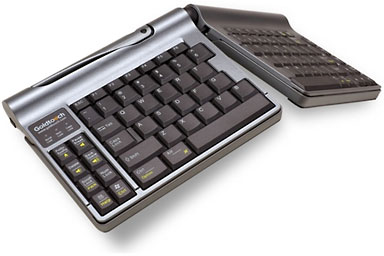 Goldtouch has now addressed that problem for road warriors with
the new Goldtouch
Go! Travel Keyboard, which retains the standard Goldtouch
keyboard's lockable center-articulation function, but incorporates it
in a much more compact and lighter package - indeed one of the smaller
and lighter freestanding keyboards of any sort that I've ever used
writing just 1 lb. 1 oz., and measuring 13.25" x 6" x 1" at its
thickest point.
Goldtouch has now addressed that problem for road warriors with
the new Goldtouch
Go! Travel Keyboard, which retains the standard Goldtouch
keyboard's lockable center-articulation function, but incorporates it
in a much more compact and lighter package - indeed one of the smaller
and lighter freestanding keyboards of any sort that I've ever used
writing just 1 lb. 1 oz., and measuring 13.25" x 6" x 1" at its
thickest point.
The compact Go! Travel Keyboard is well-suited to use in limited space environments and, with no numeric keypad, allows external mice to be placed closer to the main keyboard, reducing shoulder pain and increasing comfort.
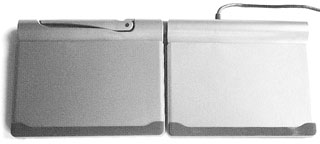 The first, somewhat disconcerting impression one has of the
Goldtouch Go! Travel Keyboard upon opening the shipping box is that it
appears to have no keys at all, because the keyboard halves are
equipped with slide-off covers to protect keyswitches from dirt and
impact damage when in transit in a backpack or computer bag. The covers
can also be used to sit the keyboard on when in use - a neat touch I've
never seen on any other laptop-oriented freestanding keyboard before,
although the screen lid serves that function on the laptop itself.
The first, somewhat disconcerting impression one has of the
Goldtouch Go! Travel Keyboard upon opening the shipping box is that it
appears to have no keys at all, because the keyboard halves are
equipped with slide-off covers to protect keyswitches from dirt and
impact damage when in transit in a backpack or computer bag. The covers
can also be used to sit the keyboard on when in use - a neat touch I've
never seen on any other laptop-oriented freestanding keyboard before,
although the screen lid serves that function on the laptop itself.
The covers slide onto the undersides of the keyboard halves for storage and also have a full-width rubber "foot" pad that, along with smaller pads at the back of the unit, supply traction so the 'board doesn't slide around on its support surface. These also allow you to use the Goldtouch Go! situated on top of the laptop's own built-in keyboard if desired without risk of scratching.
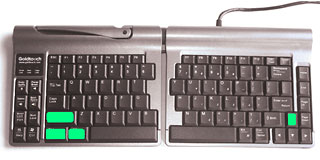 Once the keys are exposed, you're presented with a slightly
unusual, but reasonably familiar, key layout, happily with both Mac and
Windows labeling. A cool feature is that the board is instantly
convertible from Mac to PC or vice-versa by pressing a key command
combination. PC-to-Mac is left Control/Option-left Alt (white)-left
shift-Down Arrow key (on the right side)
Once the keys are exposed, you're presented with a slightly
unusual, but reasonably familiar, key layout, happily with both Mac and
Windows labeling. A cool feature is that the board is instantly
convertible from Mac to PC or vice-versa by pressing a key command
combination. PC-to-Mac is left Control/Option-left Alt (white)-left
shift-Down Arrow key (on the right side)
The convertibility feature could be especially slick for folks who run both the Mac OS and Windows in Boot Camp or Parallels on their 'Books.
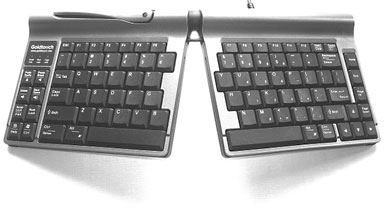
Not being a touch typist, I find the adjustment to nonstandard keyboard layouts a bit of a challenge, as my conditioned relationship with key location tends to be spatial/visual rather than by tactile feel. On this 'board I find it consistently and annoyingly easy to hit the Caps Lock key, which juts into the QWERTY area where one expects the "A" to be located, but I expect touch typists will have less difficulty.
The keys themselves have a low-effort action, with medium 3.2 mm travel and a very light touch (39 g. to 42 g. resistance). Not quite as good for me as the trusty SlimType, but one of the better 'boards I've tried, with smooth key action that has no clicking shock or over-center sensation to it, although the landing is a bit harder and more abrupt than I prefer.
If you like "clicky" keyboards, this one is not for you.
There are no wrist rests, but the 'board is so slim that the support surface it's sitting on should suffice when you're using it in flat mode.
You can of course also use the Goldtouch Go! keyboard in conventional flat orientation. You would probably not want to pay the premium price for this sort of use exclusively, but it is very convenient if more than one person uses the computer and other users are not accustomed to and comfortable with typing on a split and angled orientation 'board.
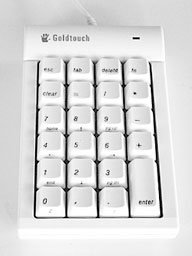 I'm less enamored of the lack of a numeric keypad, although I
appreciate the rationale in keeping the keyboard's footprint modest in
a unit designed for mobile use. There is a keypad function embedded in
the right-hand keypad and activated using the Num Lock key. Goldtouch
also offers an optional, freestanding numeric keypad module for
$49.95.
I'm less enamored of the lack of a numeric keypad, although I
appreciate the rationale in keeping the keyboard's footprint modest in
a unit designed for mobile use. There is a keypad function embedded in
the right-hand keypad and activated using the Num Lock key. Goldtouch
also offers an optional, freestanding numeric keypad module for
$49.95.
Bravo for including page navigation keys, although they have an unorthodox layout vertically on the right periphery of the keyboard, with the End key non-intuitively located just below the Home key instead of at the bottom, where you would expect to find it. There's also a Forward Delete key (hooray!), and a standard inverted tee set of arrow keys, but I do miss having a dedicated Function key.
At the opposing extreme left there is an eight-key pad with substantially different functions for Mac and Window for most of them respectively. The combinations include (Windows/Mac):
- PntSc-SysRQ/Eject
- Pause Break/Audio Volume
- Delete/louder Volume
- Back Space/loudest Volume
- Scroll Lock/Power
- Num Lock/Num Lock
- Highlight Line/Help
- Windows Key/Control
The also ambidextrously labeled Apple Option and Command modifier keys are in their usual positions when in Mac mode, and they morph into Control and Alt respectively when in Windows mode on both sides of the twin spacebars.
Above the left column keypad there are three indicator LEDs for Scroll Lock, Num Lock, and Caps Lock.
I prefer corded keyboards to wireless, and this one has a nice long cord.
Like the full-sized Goldtouch, the Go! Travel 'board is on the pricey side - indeed the mobile 'board is $10 more expensive at $139 - but this is a highly engineered, quality constructed piece of equipment, and if it eases your typing pain, you'll probably deem it an investment in productivity through prevention and hence cheap at the price.
Join us on Facebook, follow us on Twitter or Google+, or subscribe to our RSS news feed
Charles Moore has been a freelance journalist since 1987 and began writing for Mac websites in May 1998. His The Road Warrior column was a regular feature on MacOpinion, he is news editor at Applelinks.com and a columnist at MacPrices.net. If you find his articles helpful, please consider making a donation to his tip jar.
Links for the Day
- Mac of the Day: Motorola StarMax 3000, introduced 1999.09.07. This inexpensive clone used lots of off-the-shelf parts.
- Support Low End Mac
Recent Content
About LEM Support Usage Privacy Contact
Follow Low End Mac on Twitter
Join Low End Mac on Facebook
Favorite Sites
MacSurfer
Cult of Mac
Shrine of Apple
MacInTouch
MyAppleMenu
InfoMac
The Mac Observer
Accelerate Your Mac
RetroMacCast
The Vintage Mac Museum
Deal Brothers
DealMac
Mac2Sell
Mac Driver Museum
JAG's House
System 6 Heaven
System 7 Today
the pickle's Low-End Mac FAQ
Affiliates
Amazon.com
The iTunes Store
PC Connection Express
Macgo Blu-ray Player
Parallels Desktop for Mac
eBay

