
'Book Value
Looking Back at the Dual USB iBook on Its Eighth Birthday
Charles Moore - 2009.05.01 - Tip Jar
Eight years ago, Apple followed up the introduction of the Titanium PowerBook (TiBook) four months earlier with something almost as radically different to replace the original clamshell iBook.
A New Design
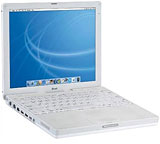
12" Dual USB iBook
The new 'Dual USB' iBook (a.k.a. "iceBook") didn't have a metal housing, but in some ways it was an even more radical departure from its immediate predecessor. The motherboard design in the first generation TiBooks owed a great deal to architecture that had been introduced in the Pismo PowerBook G3, but the new iBook was a completely clean slate new design with a much smaller form factor, built around a 12", 1024 x 768 resolution display, as opposed to the clamshell's 12" 800 x 600 screen that was marginal, at best, for Internet work.
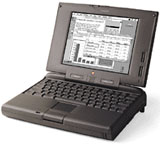
PowerBook 5300
I immediately liked the new iBook's looks. My old PowerBook 5300 was not the best computer I'd ever had, but I was very partial to its trim, squared-off styling and compact footprint, and the Dual USB iBook was quite similar on both counts, albeit much thinner and lighter at 4.8 pounds vs. the 5300's 6.2 pound weight and the 1400's road hugging 7.0 pounds. I also like white computers.
I suggested in commentaries that Apple still needed a light, compact, more conservatively styled-machine for serious road warriors, and that they could do a lot worse than to take the old PowerBook 5300 form factor, upgrade it with a G3 processor and a bigger screen, somehow shoehorn in a CD-ROM drive, and voilà! - they would have exactly what an awful lot of portable computer users want and need.
That's roughly what they had done with the Dual USB iBook.
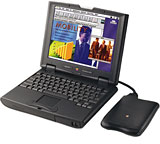
PowerBook 2400c
Here is a dimensional comparison with several PowerBooks:
- 12" Dual USB iBook - 11.2 x 9.1 x 1.35 (137.6 cu. in.)
- PowerBook 5300 - 11.5 x 8.5 x 2 (195.5 cu. in.)
- PowerBook 1400 - 11.5 x 9.0 x 2 (207 cu. in.)
- PowerBook 2400c - 10.5 x 8.5 x 1.9 (169.6 cu. in.)
- PowerBook G3 Pismo - 12.7 x 10.4 x 1.7 (224.5 cu. in.)
- Titanium PowerBook G4 - 13.4 x 9.5 x 1.0 (127.3 cu. in.)
In my initial comments on the new white machine, I suggested that the three most important things about it were "value, value, and value," noting that the base iBook sold for exactly half the price of the entry-level Titanium PowerBook. "Is it more than half the computer?" I asked rhetorically, answering: "You bet your booty! A lot more than half." (Two years later, I put my money where my mouth was and bought a newer, faster 12" iBook, but that's another movie.)
iBook vs. TiBook
With that first generation (of what would be many over a very long production run) white iBook, you got a 500 MHz G3 processor with 512 KB of onboard level 2 (L2) cache running on a 66 MHz system bus (for context, the contemporaneous base Titanium PowerBook had a 400 MHz G4, but with a 1 MB of backside cache and a 100 MHz system bus, so even with 100 MHz less clock speed, it had performance edge, but not necessarily much for non-AltiVec optimized tasks); 64 MB of RAM (same as the base TiBook); a 10 GB hard drive (same capacity as base TiBook); two USB and one FireWire ports (same); RGB/VGA and AV/S-video ports (Ti had a standard VGA port and S-video); full-size keyboard (same size as Ti, but unfortunately poorer quality); Rage 128 video card with 8 MB of VRAM (same); 56 K modem and 10/100 ethernet (same); five hour battery life (same); and stereo speakers (same).
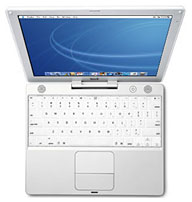
Dual USB iBook
What you didn't get, of course, was the TiBook's 15.2" 1152 x 768 widescreen display, PC Card slot, infrared port, DVD-ROM drive (optional on the iBook), or titanium case (the iBook was polycarbonate, like today's MacBook White).
In my estimation, the screen and system bus issues were the most important deficiencies of the iBook compared with the TiBook, but I deduced substantially more than half the value of the TiBook in the iBook.
The new iBook's base price was $1,299, which is also the price of today's base Unibody MacBook, which underscores how far we've come in eight years with value for money.
In May 2001, the new iBook was very nearly a full-featured PowerBook, lacking mainly a PC Card slot and an infrared port, neither of which a great many users missed a whole lot.
Of course, the new iBook and the PowerBook 5300/1400 were in different galaxies performance-wise. The PowerBook most closely corresponding to the "WhiteBook" in speed and features (as well as price, albeit used vs. new) was the Pismo, with the 500 MHz iBook slotting somewhere between the 400 MHz and 500 MHz Pismo units in power.
Spotty Reliability, Enduring Design
The first-generation 500 MHz iBooks proved to be reasonably reliable and rugged machines, although definitely not one of Apple's triumphs in that context, and the subsequent 600 MHz through 900 MHz G3 models may well have marked the low water mark in Apple laptop reliability and longevity so far - and hopefully forever.
That said, my own 700 MHz iBook lasted through six years of service, more than three as my main workhorse computer, only expiring a couple of months ago.
In summary, we certainly can't declare the Dual USB iBook to have been one of Apple's greatest laptops, but it was one of the most prolific and significant, in production for five full years in multiple G3 and G4 iterations, and it was a decent laptop for many users. I remember mine fondly, the screen being one of its nicest features. But my new, similarly priced, Unibody MacBook is a vastly better computer and better value.
For more on the G3 "iceBook", see Low End Mac's Compleat Guide to the Dual USB iBook G3.
About LEM Support Usage Privacy Contact
Follow Low End Mac on Twitter
Join Low End Mac on Facebook
Favorite Sites
MacSurfer
Cult of Mac
Shrine of Apple
MacInTouch
MyAppleMenu
InfoMac
The Mac Observer
Accelerate Your Mac
RetroMacCast
The Vintage Mac Museum
Deal Brothers
DealMac
Mac2Sell
Mac Driver Museum
JAG's House
System 6 Heaven
System 7 Today
the pickle's Low-End Mac FAQ
Affiliates
Amazon.com
The iTunes Store
PC Connection Express
Macgo Blu-ray Player
Parallels Desktop for Mac
eBay

