
'Book Value
Avoiding Dead and Stuck Pixels on Your LCD Screen
Charles Moore - 2009.06.22 - Tip Jar
MacFixIt reminds us that one of the major aggravations with CRT computer displays was "burn-in", an unwelcome phenomenon whereby after a length of time left on displaying the same image or pattern on the screen, a shadow of that image would persist even after the image had changed.
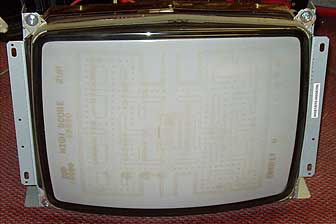
A severe case of CRT burn-in - 25 years of Pac Man.
What Is Burn-in?
Burn-in is popularly perceived to be a thing of the past with modern LCD displays, but MacFixIt says you still might experience what it calls "image persistence" - a problem that's similar in appearance to classic CRT burn-in, where a constant voltage will cause the crystal voltage-response curve to change, resulting in them letting more or less backlight through for a given voltage when compared with surrounding pixels.
Technically it's not burn-in, but the effect is similar, and it can happen after just a few hours, according to MacFixIt. In addition, you may also experience stuck and dead pixels with LCD displays where one or more of the red, green, or blue colors in a pixel loses the ability to change intensity, resulting in a persistent color regardless of the signal being given to the pixel, or the pixel just craps out altogether leaving a dark spot.
An Excellent Track Record
I've seen CRT burn-in, but I've never experienced it on any of my own machines. In 13 years of using laptops almost exclusively and owning some 10 Mac 'Books - variously purchased new, refurbished, and used - I've never had a stuck or dead pixel.
The former I attribute to being assiduous about putting my computers to sleep when I'll be away from them for more than a few minutes, and the only times I ever leave them on overnight is when I'm downloading a large item over my dialup Internet connection. (Incidentally, I've also never experienced a hard drive failure in any of my Macs, dating back to my first one in 1992, and I've had very few hardware issues of any sort. I'm convinced that the bogie about it being hard on components to frequently subject them to sleep/wake-up or power down/startup cycles is highly exaggerated.)
As for dead or stuck pixels, I expect I've had very good luck, but I suspect that sleeping the computer when practical also helps prolong LCD screen service life. I've read here and there that having up to 2 to 4 dead pixels on a high resolution TFT display is considered within the range of "normal," so I guess my various Mac laptops have been better than normal.
That's a Lot of Pixels!
When you consider that even a modest 1024 x 768 TFT display like the one in the Pismo I'm typing on requires 786,432 pixels and each pixel on an LCD monitor requires three "subpixel" transistors - one for each color (red, green, and blue) - which works out to 2,359,296 little, bitty transistors in one 1024 x 768 screen. The higher resolution Apple Cinema HD display is made up of 2.3 million pixels with 6.9 million red, green, and blue subpixels. With those many millions of subpixels, I guess its remarkable that they can come as close to pixel-perfection as they usually do in a mass-produced item, and this provides some insight as to why the display is one of the most expensive components in a laptop computer.
Apple has addressed the dead pixel issue in a Tech Info Library article entitled About LCD Display Pixel Anomalies, noting:
"...occasionally, a transistor does not work perfectly, which may result in the affected subpixel being turned on (bright) or turned off (dark). With the millions of subpixels on a display, it is quite possible to have a low number of faulty transistors on an LCD. Therefore, a certain number of subpixel anomalies is considered acceptable. Rejecting all but perfect LCD panels would significantly increase the retail price for products using LCD displays. These factors apply to all manufacturers using LCD technology - not just Apple products."
Apple advises that if you think your Apple product's display contains an excessively high number of pixel anomalies, you contact Apple tech support or your local Apple authorized reseller to arrange an evaluation.
Be aware that Apple will not replace a screen with just one or a small number of dead pixels. I've heard it suggested that five is the magic number, but I suspect that there is no arbitrary number threshold and that the location of the dead pixels, and whether they are scattered or clustered, would influence the decision to replace or not.
A Result of Trauma
Dead pixels can also be a result of trauma, like the time a young friend closed the lid of my son's WallStreet PowerBook, which had hitherto had a flawless display, after a long game-playing session on a hot summer afternoon and left it running. It got very hot after four hours of poorly ventilated running - too hot to touch, after which there was a dead pixel that tended to come and go intermittently.
Remedial nostrums include lightly tapping the screen surface in way of the dead pixels or gently massaging the surface of the LCD screen in the location of a dead pixel with a fingertip (at your own risk), which sometimes will stimulate the pixel back to life, but the best workaround may be to cultivate ignoring them if there are only one or two.
Prevention
MacFixIt suggests a number of fixes and workarounds for addressing ailing LCDs but emphasizes sensibly that prevention is better than cure, noting that the first line of defense for preventing image persistence could be to use a screen saver that exercises the pixels. Mac OS X has an attractive and entertaining selection of screen saver programs that you can access and enable using Desktops & Screen Savers in System Preferences.
Even better is to frequently turn off your display, with an important caveat being that while screen dimming helps guard against burn-in with the old CRT displays, dimming or darkening an LCD backlight won't help preserve your pixels.
However, the sleep function in OS X works really well, and wake-up waits are minimal with today's fast Intel processors. You can configure the computer to automatically put itself to sleep after idling as little as one minute in the Energy Saver system preferences panel.
It works for me.
About LEM Support Usage Privacy Contact
Follow Low End Mac on Twitter
Join Low End Mac on Facebook
Favorite Sites
MacSurfer
Cult of Mac
Shrine of Apple
MacInTouch
MyAppleMenu
InfoMac
The Mac Observer
Accelerate Your Mac
RetroMacCast
The Vintage Mac Museum
Deal Brothers
DealMac
Mac2Sell
Mac Driver Museum
JAG's House
System 6 Heaven
System 7 Today
the pickle's Low-End Mac FAQ
Affiliates
Amazon.com
The iTunes Store
PC Connection Express
Macgo Blu-ray Player
Parallels Desktop for Mac
eBay

