
'Book Value
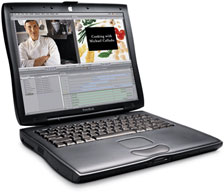
The Day the Pismo Died
Charles Moore - 2009.08.04 - Tip Jar
In The Day My Pismo Died, blogger Eph-Oh writes:
"Saturday was a sad, sad day for me. After ten years of trusty, loyal and unfailing service, my G3 Powerbook a.k.a. the 'Pismo' died . . . Nothing dramatic, nothing sudden . . . literally, it just expired and would not turn on. Even in death, the Pismo was drama-free."
I can empathize. One of my Pismos expired about a year ago due to an unfortunate incident with a faulty AC extension cord arcing and somehow frying its Power Manager board. At least that's the best consensus guess by me and a tech expert I consulted.
Eph-Oh might try a few remedial attempts before writing the Pismo off, but in the case of my dead Pismo, it was to no avail.
Death of a Pismo
Returning home from a road trip in late August 2008, I plugged in the Pismo's power adapter, and a few moments later I began to hear a sort of snapping, popping sound, which, upon investigation, turned out to be coming not from the computer itself but from the extension cord I had the power adaptor plugged into. I unplugged it, and the noise stopped, but the adapter plugs showed signs of electrical arcing. Uh-oh.
 I woke
up the computer, plugged the adaptor in another AC outlet, and and
everything seemed okay. The battery was charging, and it went through a
couple more sleep/wake cycles with all seeming well, but after I left
and returned a few hours later, the green sleep light had died, the
computer had shut down, and the battery appeared to be dead.
I woke
up the computer, plugged the adaptor in another AC outlet, and and
everything seemed okay. The battery was charging, and it went through a
couple more sleep/wake cycles with all seeming well, but after I left
and returned a few hours later, the green sleep light had died, the
computer had shut down, and the battery appeared to be dead.
I tried rebooting. No joy. Not even a start-up chime.
I tried swapping in a different battery, and the Pismo came to life, but the PRAM data had been lost, and it died immediately when I pulled the battery again. I tried two other power adapters, both known good, but the computer wouldn't recognize them. I also tried several hard Power Manager resets and the trick of of unplugging the PRAM battery, but with no success.
The logical deduction was that electrical arcing at the cord plug had somehow fried the Power Manager board through the power adapter. A less probable possibility was be that the power adapter itself had developed a fault and caused the arcing.
I wasn't about to try it with a healthy Mac in case that was what had obtained, so it remains a bit of a mystery, but my best guess is still that the extension cord socket caused the trouble. That cord has been retired, needless to say.
The PowerBook could have been repaired by replacing the Power Manager, but I consulted my hard copy of iFixIt's Pismo teardown guide (no longer in print, although the online version can be downloaded as a PDF or you can view it with a browser), and discovered that the Power Manager board resides in the most inaccessible bowels of the Pismo.
Resurrection
Wegener Media had replacement boards listed at $79, but when I consulted David Wegener, he mentioned that when the charge board went, it could have blown the logic board ($99) as well, which, he says, is a common issue with them if the DC board goes, so replacing the charge board alone seemed like a roll of the dice - and an inconvenient one at that, requiring a complete teardown of the Pismo.
I opted instead to buy another Pismo from Wegeners - just a case and chassis with the motherboard, charge board, screen, and keyboard, but no processor card, RAM, hard drive, battery, or expansion bay device. The price seemed reasonable compared with what a charge board alone would cost, and doing it this way it was sure a lot easier and less hassle.
When the replacement PowerBook "core" arrived, I just had to swap in the processor card, RAM, hard drive, and battery from the expired Pismo, which took about 20 minutes, and I was up and running again. I also, of course, have the non-functional Pismo as a parts mule, which can come in handy with an older Mac, although our two surviving Pismos are both in very active service and so far completely trouble-free.
This was an educational, cautionary, and moderately costly experience. I had previously been of the illusion, without any factual engineering assurance, that the AC power adapter would serve as a sort of buffer protecting the computer circuits from such things as cord faults. Silly me. I am now much more careful about ensuring I'm getting a clean AC feed to the power adapter before connecting the computer.
In my defense, I'm usually scrupulous about plugging in the power adapter before connecting the DC cable to the computer (which I had done in the unfortunate incident described above), as used to be emphasized by Apple, although I understand it's no longer being stressed.
Dependable Pismo
Eph-Oh says,
"I can still remember how excited I was when the box containing my computer arrived from Apple . . . it was a sleek and dependable computer. My Powerbook accompanied me all across the world, never failing me . . . even after one really unfortunate encounter with a concrete slab of floor . . . My Pismo could pretty much do everything that newer machines could do, even if a bit slower and with less glamour. Numerous times over the past years, when I would take it out with me somewhere, I would have non-Mac people ask me if my laptop was one of the 'new ones', as the aesthetics were so cool. Imagine that . . . a ten year old computer being mistaken for a new model! So long, dear Pismo, so long!!"
Of course any computer is just a collection of components, so whatever's ailing Eph-Oh's Pismo, say the charge board or logic board in a worst-case scenario, could be replaced and that machine brought back to life, but you do get into the dynamic of the hammer that lasted so long, but had it's head or handle replaced from time to time, and the question becomes "is the expense and trouble worth it," which is a subjective value judgment.
In my judgment, there's noting quite like a Pismo, and the one I'm composing this article on right now (the cobbled-together one above-mentioned) is so much more computer than a new PC netbook for about the same or less money. Some Pismo users may also have a significant investment in processor upgrades, expansion bay modules, CardBus cards, RAM upgrades, and so forth.
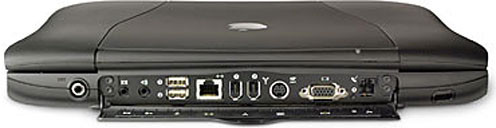
Back panel of the Pismo PowerBook. Reset is between video and modem
ports.
Before Eph-Oh entirely gives up on the apparently dead Pismo, I would at minimum suggest trying the Reset button on the back port panel a few times, ding a Power Manager reset, and disconnecting the PRAM battery inside (pretty easy to get at) in trying to boot the machine.
When Daystar installed a G4 upgrade in my original Pismo back in January 2004, I mused to Gary Dailey that it would probably buy me a year or two more service from the computer, but here we are nearly six years later with my wife still using that machine daily.
Pismos forever!
Join us on Facebook, follow us on Twitter or Google+, or subscribe to our RSS news feed
Charles Moore has been a freelance journalist since 1987 and began writing for Mac websites in May 1998. His The Road Warrior column was a regular feature on MacOpinion, he is news editor at Applelinks.com and a columnist at MacPrices.net. If you find his articles helpful, please consider making a donation to his tip jar.
Links for the Day
- Mac of the Day: PowerBook 190cs, introduced 1995.08.28. The last 680x0-based PowerBook could take a PowerPC upgrade.
- Support Low End Mac
Recent Content
About LEM Support Usage Privacy Contact
Follow Low End Mac on Twitter
Join Low End Mac on Facebook
Favorite Sites
MacSurfer
Cult of Mac
Shrine of Apple
MacInTouch
MyAppleMenu
InfoMac
The Mac Observer
Accelerate Your Mac
RetroMacCast
The Vintage Mac Museum
Deal Brothers
DealMac
Mac2Sell
Mac Driver Museum
JAG's House
System 6 Heaven
System 7 Today
the pickle's Low-End Mac FAQ
Affiliates
Amazon.com
The iTunes Store
PC Connection Express
Macgo Blu-ray Player
Parallels Desktop for Mac
eBay

